Introduction
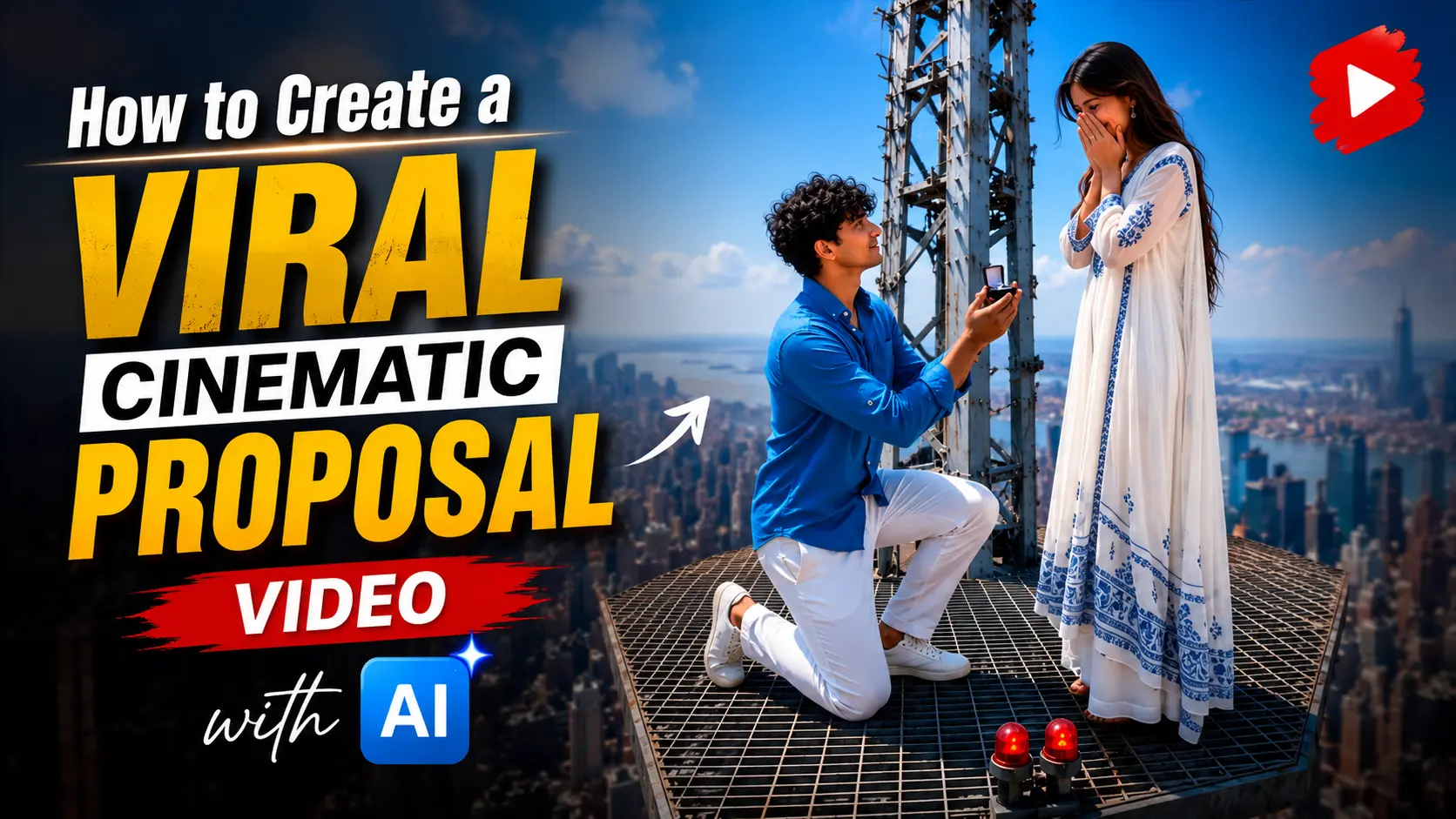
Friends, a romantic proposal video is currently going viral across Instagram, TikTok, YouTube Shorts, and other social media platforms. In the video, a Russian couple is seen expressing their love on top of a breathtaking tower, and the cinematic visuals have captured the attention of millions of people worldwide. If you’re active on social media, there’s a good chance you’ve already seen this video in your feed.
After this trend went viral, many creators started making similar AI-generated proposal videos featuring themselves and their partners. These videos look incredibly realistic, cinematic, and emotional, which is why they’re getting millions of views, likes, and shares every day.
The good news is that you can create a similar video too. You don’t need expensive cameras, professional editing skills, or a big budget. With the help of a few free AI tools, you can create a stunning cinematic proposal video in just a few simple steps.
The problem is that almost everyone is sharing these videos, but very few people actually explain how they are made. That’s exactly why I created this guide. In this article, I’ll walk you through the complete process—from generating a realistic AI image to converting it into a professional-looking cinematic video. So, if you want to create your own viral AI proposal video, make sure to read this guide until the end.
Why Is This Video Trending?
Have you noticed how romantic proposal videos are taking over Instagram, TikTok, and YouTube Shorts? These videos are getting millions of views because they are simple, emotional, and visually beautiful. People naturally enjoy watching real moments filled with love, happiness, and surprise, which is why they often stop scrolling to watch the entire video.
One of the biggest reasons behind this trend is the storytelling. In just a few seconds, the video shows a complete emotional journey—from the proposal to the ring, the happy tears, and finally a warm hug. Viewers can easily connect with these emotions, even without any dialogue.
Another reason is the cinematic look. Beautiful city skylines, rooftop views, golden-hour lighting, and smooth camera movements make these videos feel like scenes from a movie. They instantly grab attention and encourage people to share them with friends and family.
Today, AI has made creating this type of content much easier. With the help of AI image generators and AI video tools, anyone can create realistic cinematic videos without expensive cameras or professional editing experience. A good idea, clear prompts, and a little creativity are often enough to produce impressive results.
How To Creat proposal cinamatic Ai Video
To make this AI video, you will have to go through 2 processes. First of all, you have to generate your own photo with the help of AI. Then after that, convert that photo into a video and then your viral cinematic video will be ready. Below I am telling you the entire process step by step so that you do not face any problem in making this video.
Photo Editing Prompts
Scene one Photo Prompt :
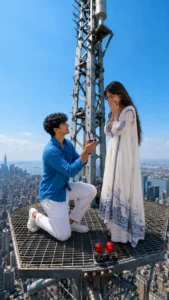
Use ONLY the uploaded reference images of the man and woman as the identity reference, and use the uploaded tower image ONLY as the composition and location reference. Do NOT copy the people from the tower image. Replace them completely with the exact two people from the uploaded reference photos. Preserve both faces with absolute identity accuracy: identical face shape, forehead, eyebrows, eyes, eyelashes, eye spacing, nose, lips, ears, jawline, beard, hairstyle, hairline, skin tone, skin texture, age, body proportions, and natural facial expression. Do not beautify, stylize, or redesign either face. No face swap, no identity drift, no look-alikes, no AI enhancement.Recreate the exact same rooftop antenna platform shown in the uploaded tower reference image. Match the platform shape, metal grid floor, central antenna mast, railing, camera angle, height, perspective, skyline, lighting, and overall composition as closely as possible. Remove the cartoon characters completely. In their exact positions, place the real couple from the uploaded reference photos. The man is kneeling on one knee in front of the woman with an open engagement ring box, proposing romantically. The woman stands in front of him with an emotional smile, gently covering her mouth in surprise. Everything else remains identical to the reference location. Hyper-realistic DSLR photography, ultra-detailed, natural skin pores, realistic lighting, HDR, 85mm lens, shallow depth of field, cinematic color grading, 8K quality, vertical 9:16, photorealistic, no text, no watermark.

Negative Prompt: face change, identity drift, face swap, different people, look-alike, AI beautification, cartoon, anime, CGI, stylized face, plastic skin, extra fingers, extra limbs, duplicate people, wrong pose, wrong location, different platform, different camera angle, low quality, blur, watermark, logo,
Scene Two Photo Prompt:
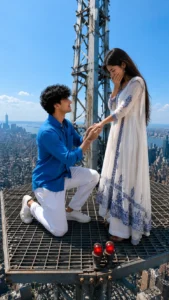
Use ONLY the uploaded reference images of the man and woman as the identity reference, and use the uploaded tower image ONLY as the composition and location reference. Do NOT copy the people from the tower image. Replace them completely with the exact two people from the uploaded reference photos. Preserve the facial identity, hairstyle, clothing, skin tone, and overall appearance of both people consistently with the uploaded reference photos.Recreate the exact same rooftop antenna platform shown in the uploaded tower reference image. Match the platform shape, metal grid floor, central antenna mast, railing, camera angle, height, perspective, skyline, lighting, and overall composition as closely as possible. Remove the cartoon characters completely.Place the real couple in the exact same position. The man is kneeling on one knee while gently holding the woman's left hand and carefully sliding a beautiful engagement ring onto her ring finger. The woman looks down at the ring with tears of happiness in her eyes, smiling emotionally while softly covering part of her mouth with one hand. The man looks at her with deep love and a heartfelt smile. Both are overwhelmed with emotion, sharing a beautiful romantic moment. A gentle breeze naturally moves their hair and clothing. Their eye contact, expressions, and body language feel authentic, intimate, and deeply emotional.Everything else remains identical to the reference location. Hyper-realistic DSLR photography, ultra-detailed, natural skin texture, realistic lighting, HDR, realistic eye reflections, 85mm lens, shallow depth of field, cinematic color grading, volumetric sunlight, 8K quality, vertical 9:16, photorealistic, luxury cinematic atmosphere, no text, no watermark.

Negative Prompt:face swap, different people, identity drift, cartoon, anime, CGI, stylized face, plastic skin, extra fingers, extra limbs, duplicate people, wrong pose, wrong location, different platform, different camera angle, blur, low quality, watermark, logo, text.
How To Create Photo
- First of all, you have to copy the prompt below the photo of scene 1 and scroll down and click on create your image.
- Login to Chatgpt, click on the plus icon, upload your and your partner’s photo, copy and paste the prompt and send it.
- Now your photo will start getting created and in a short while your photo will be ready, you have to download it.
- Similarly, you have to make a photo of scene two also.
Create Your Image
Video Editing Prompts
Scene One Prompt:
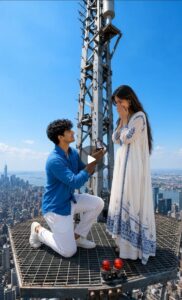
Use the uploaded image as the FIRST FRAME and lock both identities completely. Preserve the exact same faces throughout the entire video. Do not modify, beautify, regenerate, reinterpret, or replace either face. Keep the exact same face shape, forehead, eyebrows, eyes, eyelashes, eye spacing, nose, lips, ears, jawline, beard, hairstyle, hair texture, skin tone, skin texture, age, body proportions, clothing, accessories, and facial proportions exactly identical in every frame. Zero identity drift. Zero face swap. Zero morphing. Zero AI beauty enhancement.Create an ultra-photorealistic cinematic proposal video on the exact same rooftop antenna platform shown in the first frame. Keep the platform, metal grid floor, antenna tower, skyline, lighting, perspective, and composition completely unchanged.The man remains kneeling naturally while holding an open engagement ring box, looking deeply into the woman's eyes with a gentle smile. The woman becomes emotional, smiles naturally with tears in her eyes, softly covers her mouth with both hands, then slowly takes one small step toward him. She gently reaches out toward him. Hair and clothes move naturally in a light breeze. Natural blinking, breathing, tiny eye movements, realistic facial muscle movement, subtle emotional expressions only.Camera starts with a slow cinematic drone push-in, then smoothly circles around the couple while maintaining the same framing. No sudden camera movement. No scene changes. No background changes. No pose changes except natural body movement.Ultra realistic DSLR photography, Hollywood cinematic quality, HDR, physically accurate lighting, natural skin pores, realistic eye reflections, realistic cloth physics, realistic hair physics, shallow depth of field, 85mm cinema lens, volumetric lighting, premium color grading, 8K, professional filmmaking, vertical 9:16, extremely smooth motion, realistic human movement.

Negative Prompt: identity drift, face change, face swap, different people, look-alike, morphing, unstable face, changing hairstyle, changing clothes, different platform, different background, different skyline, different camera angle, extra fingers, extra limbs, duplicate people, deformed anatomy, cartoon, anime, CGI, plastic skin, blur, low quality, artifacts, watermark, logo, subtitles, text.
Scene Two Prompt :
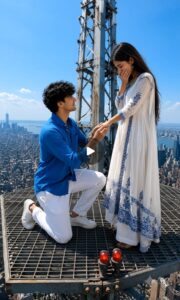
Use the uploaded image as the first frame and keep the same couple, same faces, same clothing, same rooftop platform, same antenna tower, same skyline, and the same overall composition throughout the video.Create an ultra-realistic cinematic proposal sequence.Scene 1:The man is already kneeling on one knee, gently holding the woman's left hand. He slowly slides a beautiful engagement ring onto her ring finger while looking lovingly into her eyes. The woman watches with trembling hands, her eyes filling with happy tears.Scene 2:As the ring is placed on her finger, the woman smiles emotionally, softly covers her mouth with one hand, tears roll down her cheeks, and she nods with happiness. The man smiles warmly, becoming emotional as well. Both maintain natural eye contact.Scene 3: The woman gently steps forward and lovingly pulls the man up. Without any sudden movement, they naturally embrace each other in a long, heartfelt hug. The woman closes her eyes while hugging him tightly. The man wraps both arms around her with genuine love and relief. They remain in the embrace for a few seconds while smiling emotionally.A soft breeze gently moves their hair and clothes. The golden-hour sunlight creates a warm romantic atmosphere. The camera begins with a slow cinematic push-in, then smoothly circles around the couple during the hug before ending with a close-up of their emotional expressions.Ultra-photorealistic, DSLR quality, realistic skin texture, realistic eye reflections, natural facial expressions, realistic body movement, realistic cloth and hair physics, HDR, volumetric lighting, 85mm cinematic lens, shallow depth of field, Hollywood cinematic color grading, 8K quality, professional filmmaking, vertical 9:16, smooth motion, no text, no watermark.

Negative Prompt: face swap, identity drift, different people, morphing, flickering, deformed hands, extra fingers, extra limbs, bad anatomy, unrealistic movement, cartoon, anime, CGI, blur, low quality, watermark, logo, subtitles, text, sudden camera shake.
How To Create Video
- First of all, you have to take a photo of scene one and copy the scene one prompt from the video prompt on the website.
- Below you have to click on create your video and login to Google Flow.
- After everything is done, you have to click on New Project and then click on the plus icon above and upload the scanned photo.
- Then paste the video prompt of the scene one and select the photo, go to the video section and select Omini and click on send.
- You just have to wait a little, the video will be ready in a short while, you just have to download it.
- By doing this, you have to convert the second scene into a video, then add it to any video editing tool and do whatever you want. Now your video is ready.
Create Your Video
FAQ
1. Can I create this type of AI proposal video for free?
Yes. Many AI tools offer free plans that are enough to create realistic images and short cinematic videos. You can start with free tools and upgrade later if you need more features.
2. Do I need professional editing skills?
Not at all. Most AI tools are beginner-friendly. Even if you have never edited a video before, you can follow the steps in this guide and create a professional-looking result.
3. How long should my AI video be?
For Instagram Reels, TikTok, and YouTube Shorts, a video between 8 and 15 seconds usually performs well. Short videos are more likely to keep viewers engaged until the end.
4. Can I upload AI-generated videos to social media?
Yes. You can upload your AI-generated content to platforms like Instagram, TikTok, Facebook, and YouTube. Just make sure your content follows the platform’s community guidelines and respects other people’s intellectual property.
Conclusion
Creating a cinematic proposal video with AI is no longer difficult. With the right AI tools, a clear idea, and a little creativity, anyone can create stunning images and turn them into professional-looking videos without spending a lot of money. The key is to use high-quality reference images, write detailed prompts, and keep the movements natural for the best results.
Remember, your first attempt may not be perfect, and that’s completely normal. The more you experiment with prompts, camera angles, and AI tools, the better your videos will become. Focus on telling a simple and emotional story rather than adding too many effects. In the end, it’s the emotions and realistic visuals that make people stop scrolling and watch your content.
I hope this guide helped you understand the complete process. Now it’s your turn to put these steps into action and create your own cinematic AI proposal video. Happy creating!