Introduction
Raksha Bandhan is one of those festivals where a simple photograph can hold a lot of memories. A rakhi, a box of sweets, a few decorations, and a happy moment between a brother and sister can make a photo special. But you do not always get the chance to take a good picture on the day of the festival.
This is where AI photo editing can be useful.
With an AI image editing tool, you can take two separate photos of a brother and sister and turn them into a single Raksha Bandhan-themed photograph. You can create a scene where the sister has already tied the rakhi and is feeding a sweet to her brother. With the right reference photos and a well-written prompt, the final result can look much more natural than a basic photo collage.
In this guide, I will explain how to create this type of Raksha Bandhan AI photo step by step, what kind of photos work best, how to write the prompt, and what you can do when the first result does not look right.
What Is a Raksha Bandhan AI Photo?
A Raksha Bandhan AI photo is an edited or generated image created with the help of an AI image tool. Instead of taking a new photograph, you provide your existing photos as references and describe the scene you want.
For example, you can upload one photo of the brother and another photo of the sister. The AI can then create a new scene in which both appear together during a Raksha Bandhan celebration.
The important part is not simply combining two faces. The goal is to create a complete scene with natural body positioning, suitable clothes, realistic lighting, festive decorations, and an appropriate expression.
For this particular idea, the scene can show the sister feeding a piece of mithai to her brother after tying the rakhi. A decorated background, a traditional Raksha Bandhan thali, flowers, diyas, and warm lights can make the image feel more festive.
What Is Raksha Bandhan?
Raksha Bandhan is a traditional Hindu festival that celebrates the bond between brothers and sisters. The word “Raksha Bandhan” can be understood as a “bond of protection.”
On this day, a sister traditionally ties a rakhi around her brother’s wrist. The rakhi is a decorative thread or bracelet that represents affection, care, and the bond shared between siblings.
The brother usually gives his sister a gift and promises to support and protect her. The sister also wishes for her brother’s happiness and well-being.
Although the traditional ceremony is an important part of the festival, the meaning of Raksha Bandhan has grown over time. For many families, it is simply an opportunity for siblings to meet, spend time together, share food, exchange gifts, and celebrate their relationship.
The Meaning Behind the Rakhi
The rakhi is the central symbol of Raksha Bandhan.
Traditionally, it represents the bond between siblings and the feeling of care and protection. However, it is important to understand that the festival is not only about a brother protecting his sister. The relationship works both ways.
Siblings support each other in different stages of life. They may live in different cities, have busy schedules, or meet only occasionally. Raksha Bandhan gives them a reason to reconnect and celebrate that relationship.
This is also why photographs have become an important part of modern celebrations. People often want to capture these small moments and preserve them as memories.
Prompt ⬇️
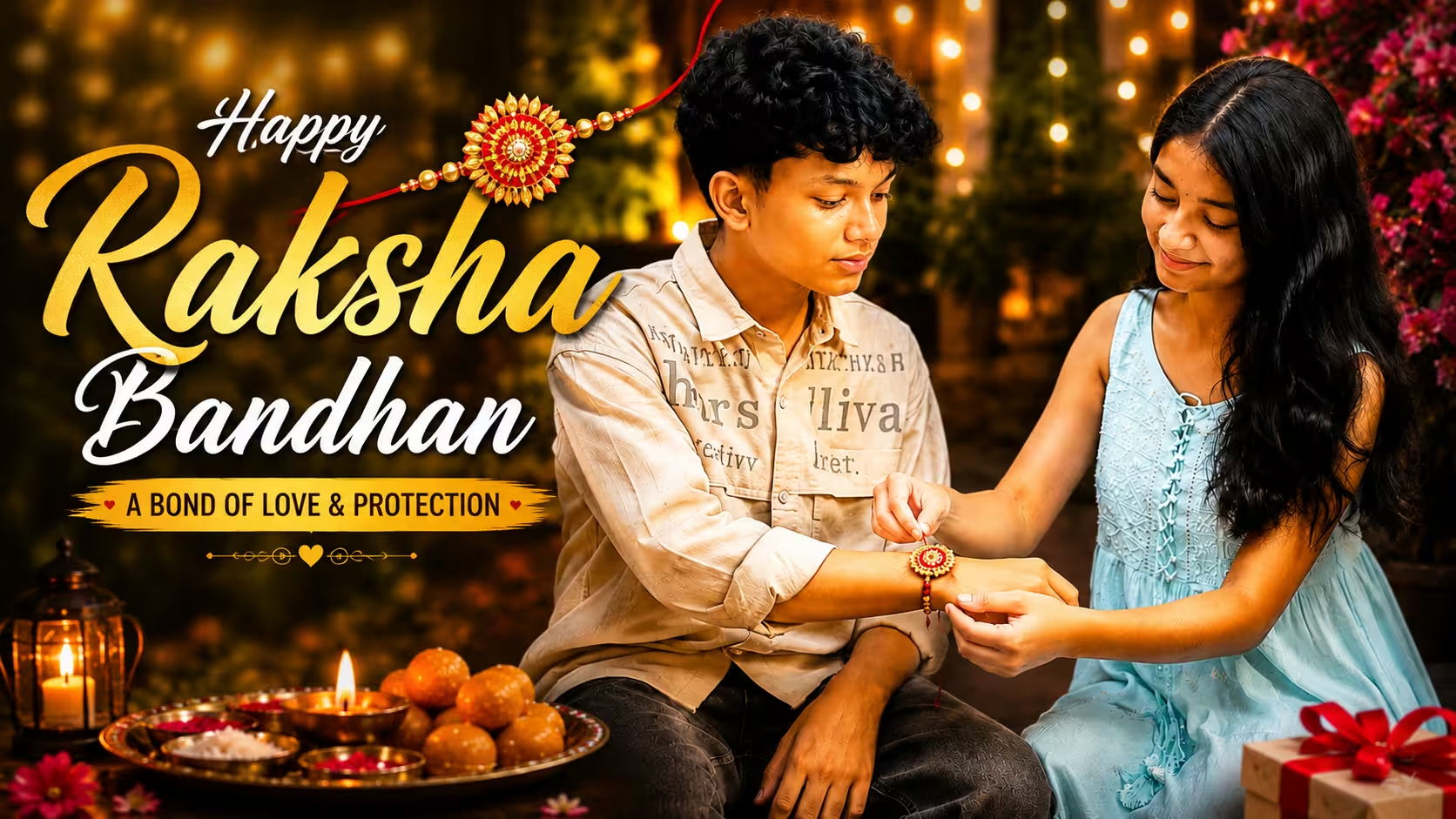
Create an ultra-realistic Raksha Bandhan celebration photograph using the two uploaded reference images. Preserve the brother and sister’s natural facial features, identity, skin texture, hairstyle and overall appearance. Show the sister sitting beside her brother and carefully tying a beautiful red-and-golden traditional rakhi around his wrist. Both should have natural, warm expressions that show their genuine sibling bond. Dress them in elegant Indian festive outfits suitable for Raksha Bandhan. Place a traditional Raksha Bandhan thali with sweets, diya and extra rakhis nearby. Add subtle marigold flowers and warm fairy lights in the background. Use soft evening lighting, realistic shadows, natural skin texture, detailed clothing and anatomically correct hands. Keep the composition balanced and candid, with a gentle background blur. The final image should look like a genuine DSLR family photograph, not an artificial or heavily edited image.
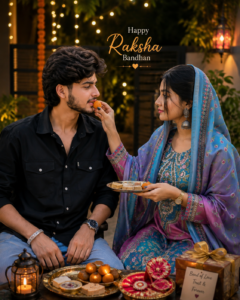
Create an ultra-realistic Raksha Bandhan family photograph using the two uploaded reference images. Preserve the brother and sister’s natural facial features, identity, skin texture, hairstyle and overall appearance. Show the sister sitting beside her brother after successfully tying a beautiful red-and-golden rakhi on his wrist. She is smiling naturally while gently feeding him a small piece of traditional Indian mithai, and the brother is happily accepting it. Keep their hand positions and body language natural and realistic. Dress them in elegant Indian festive outfits. Add a decorated Raksha Bandhan thali containing sweets, diya and rakhi nearby, with subtle marigold flowers and warm fairy lights in the background. Use cinematic evening lighting, realistic shadows, natural expressions, detailed clothing and realistic hands. Add a soft depth of field while keeping both faces sharp. Make it look like a genuine DSLR family photograph.
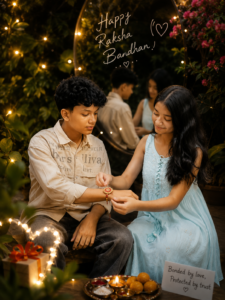
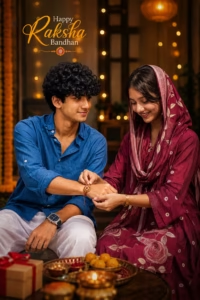
Create an ultra-realistic vertical Raksha Bandhan photograph using the two uploaded reference images. Preserve the exact facial identity, facial features, hairstyle, skin texture and natural appearance of both siblings. Show the brother and sister sitting comfortably together in a warmly decorated indoor setting. The brother is wearing the same blue shirt with white trousers, while the sister is wearing a beautiful maroon traditional outfit with a matching dupatta covering her head. She is gently tying a decorative red-and-golden rakhi around his wrist while both have natural, happy expressions. Include a festive Raksha Bandhan thali with ladoos, diya, extra rakhis and a small gift in the foreground. Add warm golden fairy lights and soft decorative lighting in the background. Keep the hands anatomically correct and the interaction natural. Use cinematic evening lighting, realistic shadows, detailed fabric, soft bokeh and high-end DSLR photography. Add elegant “Happy Raksha Bandhan” text above them.
How to Create This Rakhi Photo
Making a Rakhi photo is very easy, you can make it and get it ready in just a few minutes. Below I am describing each and every process of making it step by step, by reading and following which you can make a similar photo.
- First of all, you have to take a clear photo of yourself and your brother/sister to make such a photo.
- After that you have to download the ChatGPT app from Play Store and login to it.
- After coming to this post, you have to copy the prompt given below the photo.
- Scroll down a bit and click on the Create Your Image button.
- Now click on the plus (+) icon of the chat and select your and your sibling’s photo.
- Paste the copied prompt along with it and click on the Send button.
- ChatGPT will start the process of creating your Rakhi photo and in a short while your photo will be created and ready.
- Now you can download it and send it to your brother/sister or post it as a Raksha Bandhan story on Instagram, WhatsApp or Facebook.
Best Ai Tools For Photo Editing
If you want to create a realistic Raksha Bandhan photo using reference images, choosing the right AI photo editing tool can make a big difference. Some tools are better for generating a complete scene, while others are more useful for making final adjustments.
1. ChatGPT
ChatGPT is a convenient option for creating AI photos using reference images. You can upload photos of the brother and sister and describe the exact scene you want, such as tying a rakhi or feeding mithai.
It is especially useful when you want to create a completely new festive composition while keeping the reference subjects recognizable.
2. Google Gemini
Google Gemini is another useful option for AI image generation and editing. It can be used to combine reference images with a detailed description and create different festive concepts.
3. Adobe Firefly
Adobe Firefly is a good choice when you want more control over creative editing. It can be useful for modifying backgrounds, adding or removing elements, and making other controlled changes.
4. Canva
Canva is particularly useful after the AI image has been created. You can use it to add “Happy Raksha Bandhan” text, adjust the layout, create a social media post, or prepare the image for your website.
5. Midjourney
Midjourney is popular for creating highly detailed and cinematic images. It can be useful when your priority is a creative or artistic visual style, although exact identity preservation may vary depending on the image and prompt.Common Mistakes to Avoid
Common Mistake To Avoid
1. Using blurry reference photos
Poor-quality references can make facial details less consistent.
2. Giving a very short prompt
A generic prompt leaves too many decisions to the AI.
3. Adding too many decorations
Too many objects can make the background look crowded and artificial.
4. Ignoring the action
If the goal is to show the sister feeding mithai, describe that action clearly.
5. Overusing filters
Strong effects can make the photograph look less natural.
6. Expecting the first result to be perfect
AI image generation often needs a few attempts. Minor changes to the prompt can improve the final result considerably.
FAQ
1. Can I create a Raksha Bandhan AI photo using two separate photos?
Yes. You can upload separate reference photos of the brother and sister and describe the Raksha Bandhan scene you want to create.
2. Do the two reference photos need to have the same background?
No. The photos can have completely different backgrounds. The AI can create a new background based on your prompt.
3. Can I make the sister feed mithai to her brother?
Yes. Simply mention the exact action in the prompt, such as the sister feeding a piece of mithai to her brother after tying the rakhi.
4. How can I make the AI photo look realistic?
Use clear reference photos and describe natural expressions, realistic skin texture, correct hand positioning, natural lighting, and realistic clothing details. Avoid adding too many unnecessary effects.
5. Can I change the clothes in the AI-generated photo?
Yes. You can specify traditional outfits such as a saree, salwar suit, lehenga, kurta, or kurta-pajama in the prompt.
6. Can I change the background?
Yes. You can create the scene in a decorated home, garden, balcony, living room, or any other suitable location.
Conclusion
Creating a realistic Raksha Bandhan AI photo is a simple way to turn ordinary sibling photographs into a memorable festive scene. With two clear reference photos, a detailed prompt, and the right composition, you can create moments such as tying the rakhi, feeding mithai, exchanging gifts, or posing together.
For the best results, focus on natural expressions, realistic hand positions, suitable lighting, and a background that complements the celebration. If the first result is not perfect, make small changes to the prompt instead of changing the entire idea.
The main purpose of this type of AI editing is not to replace real memories, but to give you a creative way to present your sibling bond in a new and beautiful form.