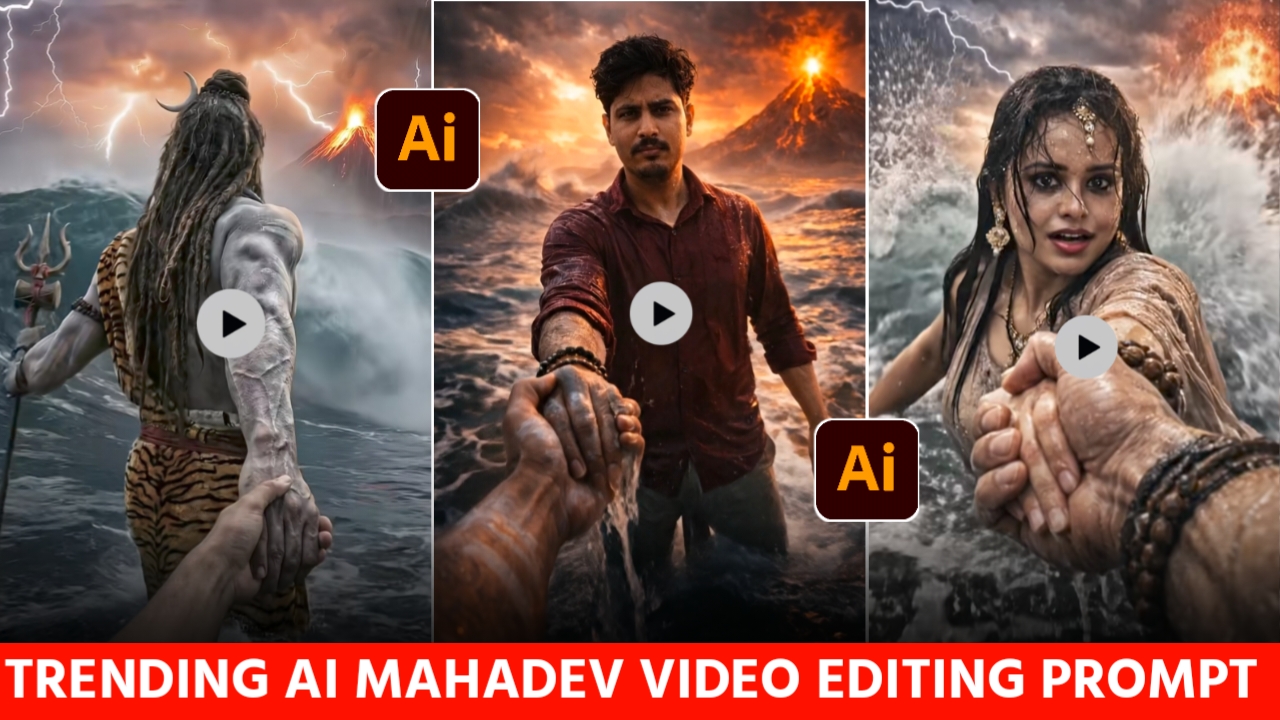
Hello friends, at this time you must be watching the video which is going viral rapidly on social In which Lord Shankar himself is taking you out of the water holding your hand. This reel is quite trending on social media, whoever is uploading it is getting lakhs of views and likes.And this type of video is also very nice to watch and in a few days there is Savitri due to which this video is becoming even more viral. Now you can also make a reel of this type and upload it on your social media. This type of video can be made very easily and will be ready without any hard work. After watching this video, you might have felt at some point that it takes a lot of hard work to make such a video, but something like this Nothing, you can also easily make this video.I will tell you that you can make and ready this type of video in 2-4 minutes. You can easily make your own video by following my steps, just follow the article carefully.
Details Lord Shiv Ai Video Editing Prompt :-
So friends, today we will tell you how you can make this viral video.You just need one photo to make this video, after that you can easily make such a reel yourself and upload it on your social account. Videos like this are trending quite a bit and are getting millions of views As Mahashivratri is on February 15th, people are liking videos like this a lot. And everyone wants to have one more photo with Lord Shiva this Shivratri so that I can make a story and post it.But don’t worry, today with the help of this article of mine you will be able to easily make your own video, it does not require much hard work to make it. I will tell you the step by step process of making this video below I am giving you a prompt as well, please read the article carefully and follow it.

A cinematic mythological scene from a first-person POV, Lord Shiva standing in a raging ocean during a cosmic storm, Shiva holding the viewer's hand and pulling them forward, viewer's hand like modern human hand eith no wearings and slim hand, lord shiva's powerful muscular arm in focus, wet skin texture with detailed veins, ash-smeared body, long matted hair flowing in the wind, trident (Trishul) holding in his another hand, crescent moon in his hair, tiger-skin cloth around waist, and he is only visible from back side.
Massive waves crashing around, dark storm clouds, lightning striking the sky, glowing volcanic mountain erupting in the background, dramatic orange and purple sky, epic scale, divine aura, godly presence.
Ultra-realistic, cinematic lighting, shallow depth of field, motion blur on water, high contrast, volumetric fog, hyper-detailed skin and environment, image in 9:16 ratio, 8K, photorealistic, movie still, epic fantasy realism.

Create a hyper-realistic cinematic scene.
Keep my face 100% same, same facial features, same skin texture, same expression, no identity change at all.
Keep my outfit 100% same as the uploaded image, wet clothes, same color, same fabric, no change in clothing.
Place me standing in shallow ocean water with realistic waves splashing around my body.
The camera should be in first-person POV perspective, as if the viewer is holding my hand.
My right hand is tightly holding another hand in the foreground, creating a strong emotional connection.
The hand I am holding should look like the divine hand of Lord Mahadev (Shiva) — powerful, slightly larger than human, ash-marked (vibhuti), subtle glowing divine aura, spiritual energy around the hand, but still realistic and cinematic (not cartoon).
Do not show full body of Mahadev, only the divine hand in the foreground.
Background should show a massive erupting volcano with flowing lava and fiery glow in the sky, dramatic clouds, stormy cinematic atmosphere.
Lighting should be dramatic sunset + volcanic glow, high contrast, volumetric light rays, mist and ocean spray in the air.
Ultra-realistic skin details, wet hair, water droplets on face and clothes, cinematic depth of field, shallow focus on face, epic movie scene look, dark dramatic color grading.
8K ultra HD, hyper-detailed, professional cinematic photography, vertical 9:16 ratio.
No face change, no outfit change, no distortion, no blur on face, no extra fingers, no deformities.
How To Create Lord Shankar Viral Ai video –
- First of all you have to download Chatgpt from Google Play Store and login from your Gmail.
- After that you have to visit our website and copy the first prompt.
- Then click on create your image and paste the prompt you copied and click on send. Wait for a while, your image will be downloaded in 1-2 minutes, save it.
Go to the website once again, copy the second prompt, click on Create Your Image, enter the prompt, and upload a photo click on Send. Download the image as soon as it is generated.
Now you have to go to Google and search for Google Flow. After that, open it and sign in. - Then select the frame by frame video and upload both the images one by one.
- After that, you just have to copy the third prompt posted on the website and send it.Your video will be made and ready.
Creat Your image

Create a single continuous cinematic shot using the two uploaded images as the start and end reference. The video begins in a first-person POV. The camera shows only the front person's shoulder, arm, and hand holding the viewer's hand. The camera moves forward naturally, as if the viewer is walking through ocean waves.
Water splashes, rain falls, lightning flashes, and a volcano erupts in the background. Without any cuts or scene changes, the camera smoothly moves around the subject in one fluid motion, maintaining the hand-holding connection. The movement feels like a natural body-mounted camera (steady but realistic). As the camera completes the movement, it ends facing me, fully revealing my face and body while I continue walking forward through the water, still holding the viewer's hand. Technical Style: Single take, one-shot camera, no cuts, no jumps, smooth cinematic motion, realistic physics, slow motion water splashes, dramatic lighting, ultra-realistic textures, epic storm atmosphere, 4K cinematic quality, natural human movement, stable focus, no flicker.
How To Create your Video
 l
l
So friends, how can you make such viral videos? I will tell you in some easy steps below. You just have to follow these steps carefully, only then you will be able to make such videos.
- First, you will see the homepage where you need to sign in using any Google account, as there are currently no options to sign in or sign up with Facebook, Apple ID, or Gmail. So, you can only log in through your Google account.
- After signing in with your Google account, click on the plus (+) icon. You will then see options like Text to Video and Frames to Video. Click on the “Frames to Video” option, select the aspect ratio that suits your needs, And you have to upload your image by clicking on the plus icon. and enter your prompt
How To Select Best Photo:-
So friends, if you want the image you create to look absolutely real, I know that many people don’t create such images because their faces don’t match. But don’t worry, I’m telling you what you should do to make your face match exactly. If you want your face to match 100%, you can use your selfie photo to create such an image because AI detects selfie photos very well and the face doesn’t change at all if you don’t want your face to change. If you use your selfie photo, only then your face will match 100% and you can also use your full photo if you want to match only your face because as long as the face matches only then it won’t look real.
How to sign in on the Flow AI website?
So friends, to make drone videos, you will have to sign up on this flow ai website. To sign up, I will tell you below how to do it.Photo editing presets
- First, you will see the homepage where you need to sign in using any Google account, as there are currently no options to sign in or sign up with Facebook, Apple ID, or Gmail. So, you can only log in through your Google account.
- After signing in with your Google account, click on the plus (+) icon. You will then see options like Text to Image and Frames to Video. Click on the “Frames to Video” option, select the aspect ratio that suits your needs, and enter your prompt
Conclusion –
So friends, in today’s article, we told you how you can make your own viral video with Lord Shiva by following our steps. Believe me, this type of image is going viral very fast on social media. You too should follow this trend as soon And upload it to your account as soon as possible to get views and likes. So in this article we have told you those 100 steps by following which you will be able to easily make your own video. I hope that you will find this article of our You must have been very helpful and liked it a lot. In future, we will be posting many more such articles for you which are trending a lot on social media, you just stay connected with us. For now, we request you to join us till 8 pm with the next article.Till then, say bye.