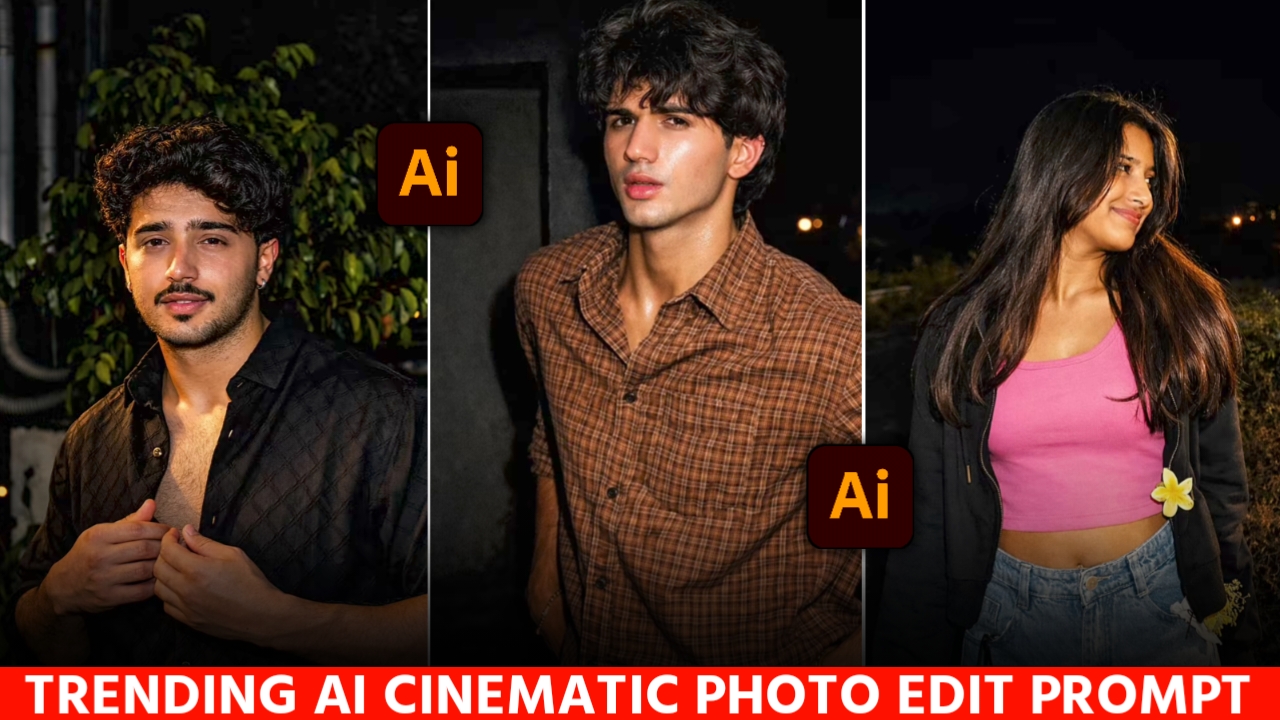
in this modern age, every small and big influencer is making his own cinematic photos and uploading them on his social media. Which looks very nice, people are liking it a lot and why not because it looks much better than the normal photo. Photos like this are getting millions of likes on social media. Have you ever wondered how people are making such photos? If you think you need a high-quality camera and good editing skills to create this image, you’re absolutely wrong. If I tell you that you can get this cinematic image ready in just one click and that too in just 2 minutes. You can create this photo with just a small prompt.
What is cinematic photo
A cinematic photo is one that looks like it was taken for a film and was taken with a very high-quality camera. In this image, a lot of attention is given to light, sunset and pose. This photo is mostly taken by actors and influencers and uploaded to their accounts. These photos look quite different from normal photos, it seems as if a lot of hard work has been put in to make this photo. This photo looks very professional and its background looks very clear and bright.
Detailes of Cinematic Viral Ai Photo
So today I will tell you how you can create your own cinematic photo which is trending a lot on Instagram these days. Many big creators are creating such photos with the help of AI. Today I will tell you step by step the process of making this photo and how you will be able to make it. I will also give you a prompt to create a Cinematic image and will also tell you the tools using which you will be able to convert your normal looking image into a Cinematic photo.After seeing the viral cinematic photo, you must have felt like I wish I could create such an image or I wish I had a photo like this. So today I will help you in this and you will also make this photo of yours today. There are different trends on social media all the time, this one is trending right now, you too should follow this trend and get your desired photo.
Cinematic Viral Photo prompt
So friends, I am writing a complete detailed prompt for you to make a cinematic photo below, which you have to copy and paste it using the tools mentioned below and make your own photo in one click.

PORTRAIT of a stylish young man [ keep it real face from uploaded image ] Indoor aesthetic fashion photo of a young man with voluminous black hair with wolfhaircut standing in front of a tall glass door with dark large curtains on one side, wearing sunglasses a slightly open dark black formal shirt and loose white pants, looking down with his hands near his half body short, Holding Rose bouquet in right hand.

Edit image :Cinematic street photography, night photography, this Subject: [messy hair over forehead, head up, gaze toward the viewer, black tank top and black leather jacket, black baggy cargo pants, rimless rectangle black tinted glass glasses], Action: [seated on car hood, leaning against car, hand on pocket gesture, stoik pose], Vehicle: [BMW M4, obsidian and gold paint, gold neon underglow], Location: [Macau metropolis street, wet asphalt,

Discover more Cinematic lighting kits lights Photography Tutorials Lightroom Presets Digital art tablets Apply an ethereal lighting filter to the uploaded photo while fully preserving every original detail of the photo unchanged except for lighting, glow, and color mood. Add diffused sunbeams striking the subject’s skin, creating a glowing highlight on cheekbones, nose bridge, lips, and hair strands. Maintain clear separation between bright sunlit areas and soft, deep shadows to create a cinematic high-contrast mood. Inject subtle lens bloom, light haze, and a thin layer of atmospheric glow around the face and shoulders. Render skin with luminous translucency and gentle peachy tones. Enhance stray hair strands backlit by sunlight. Color-grade with slightly lowered saturation, and gentle film-like grain. Keep the overall background intact but allow sunlight flares and soft bokeh to wrap naturally around the subject. The result should look like a soft, ethereal daydream-sunlit, delicate, and cinematic. Hard rule: Do not change the face and hairs

Apply a bold night-flash aesthetic to the uploaded photo while fully preserving every original detail of the photo unchanged except for lighting, glow, and color mood. Keep the nighttime environment dark, deep, and unlit, maintaining all existing shadows and silhouettes. Do not brighten or alter the background except for slightly enhancing existing point lights to keep the night atmosphere realistic. Illuminate the subject with a strong, warm, and direct front-facing flash. The flash should be drawn precisely to the face and upper body, making the subject the brightest element in the entire frame. Add diffused sunbeams striking the subject’s skin, creating a glowing highlight on cheekbones, nose bridge, lips, and hair strands. Maintain clear separation between bright sunlit areas and soft, deep shadows to create a cinematic high-contrast mood. Inject subtle lens bloom, light haze, and a thin layer of atmospheric glow around the face and shoulders. Render skin with luminous translucency

Create a moody mysterious portrait of my picture. Keep the same background and camera angle as per the reference warm golden hour sunlight casting dramatic shadow on a plain wall ensure the strong shadow of the face on the wall is visible ratio 9:16 overall cinematic tone.Do not change the pose or any kind of detail, just add sunlight
How To Create Cinematic photo
So friends, today I will tell you the process of making Cinematic photo . And I will also tell you which AI tools have been used to create this photo.
- First of all you have to download the ChatGPT
app from your Google Play Store. - After that, open it and sign in or login with your Google account.
- Then you have to go to my website and copy the prompt below the image .
- Then scroll down the website a bit and click on create your image.
- As soon as you click, you will reach ChatGPT, from there you have to upload a photo of yourself by clicking on the plus icon.
- And paste the copied prompt there and click on the send button.
- It takes some time for the image to be created, you have to wait for 2 minutes.
- As soon as your Cinematic photo is ready, save it by clicking on save button and now your perfect Cinematic photo is ready.
Create Your image
How To Choose Best Photo
Sometimes it happens that when you take a photo with AI, it completely changes your face.Most of the times when you create your photo with Google Gemini and ChatGPT, it does not create your face properly and changes your face. For this, I am telling you a permanent solution, whenever you are getting your photo made through AI, then you can take a perfect selfie image of yourself in which your face is straight. Your photo should be clear, especially keep in mind that your photo should not be blurred. Now when you make your photo from your selfie photo, your perfect image will be ready.
FAQ
1. Is it possible to make Cinematic photo in one click?
Yes, you can make this Cinematic photo in one click by following the prompt given by me and the steps mentioned. You can easily make this photo within 2-4 minutes.
2. Is it free to make Cinematic viral photo ?
Yes, You can absolutely make your Cinematic photo in free , you don’t have to pay even a single rupee to make this photo.
3.Does this photo require a lot of editing knowledge ?
No, you don’t need any editing knowledge to make cinamtic photo. You can make it this photo just one click through the help of Ai.
4. Can I go viral by uploading Cinamtic photo ?
Yes absolutely, you can use viral hashtags and trending songs to the post and upload it. If this type of photo is trending a lot then there are high chances of it going viral.
Conclusion
So friends, in today’s article, I showed you how you can create a cinematic photo in one click. All you need to do is use one of your photos and the prompts I provided and your Cinematic photo will be ready. In this article, I have explained to you in great detail how you can make your photo. I have written every single thing in detail and explained it step by step. Now after reading this article of mine, make your own cinematic photo and you too should post this photo on your story, because this trend does not come again and again. You must have liked my article today and it must have been very helpful for you. VS Editor will keep bringing such trending things for you from time to time. That’s all for today, now we will meet you with the next article.