
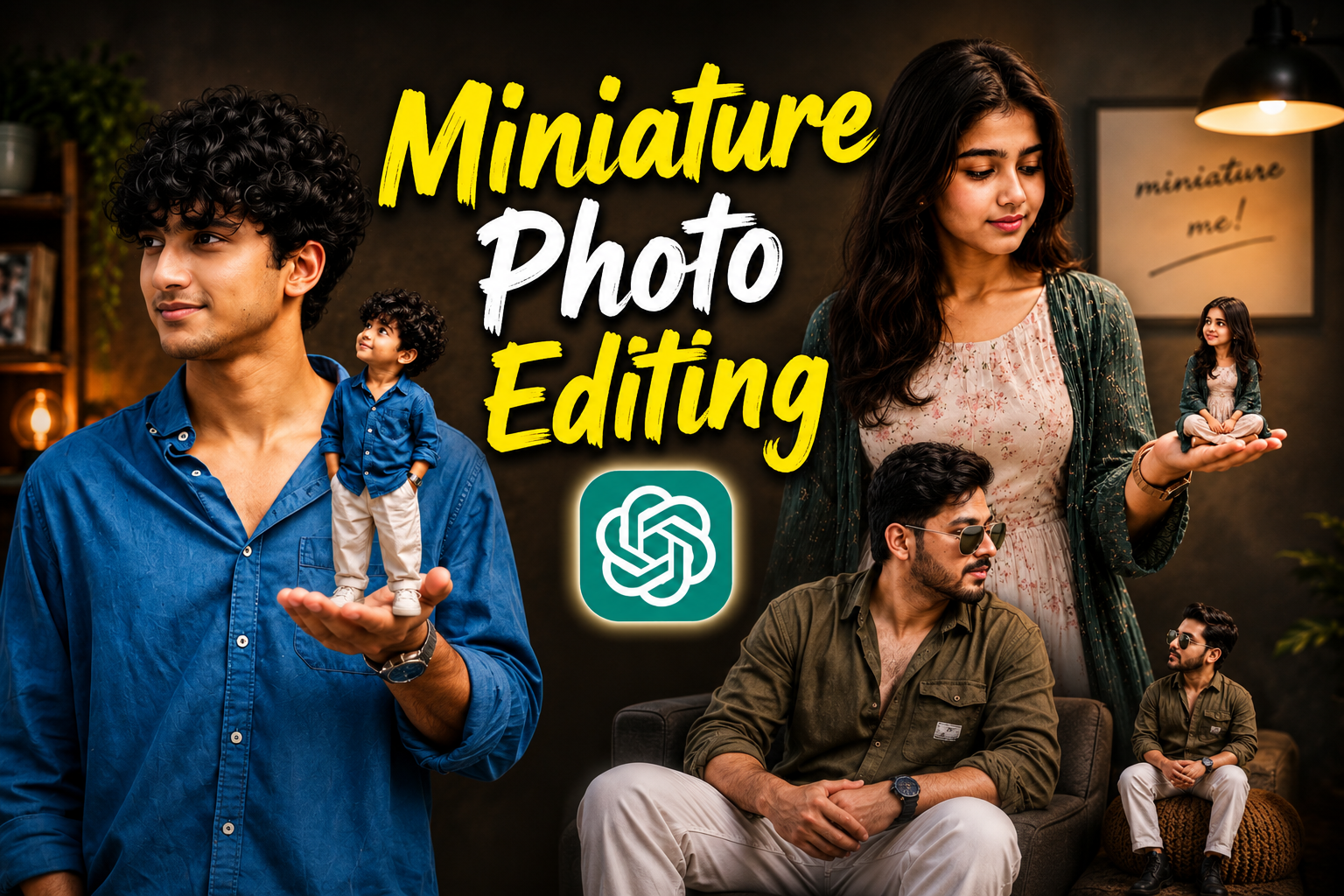
Hello friends, another new trend has come in which people are making miniature photos which are going viral all over Instagram.This miniature photo looks very unique and professional, which is being liked by many people and everyone has become crazy about this photo. Everyone wants to make their own miniature photo but due to lack of knowledge people are unable to make it but there is no need to worry at all, today VS Editor will tell you everything.How can you make your photo absolutely free and that too without any hard work and that too in just 2 minutes Today’s entire article is going to be very special for you, so do not miss it at all because this photo is currently going very viral and is trending all over social media. Follow this trend as soon as possible and make your miniature photo because the trend that goes away does not come again and again.
Detailes of Miniature Photo Editing :
So let’s talk about the miniature photos that are going viral on social media. This photo contains a small clone of your photo, which looks very beautiful.The best part is that to create this photo, you neither have to spend hours editing nor do you need to put in any kind of hard work. This photo is completely created with the help of AI, for which you will need a special prompt and with the help of that prompt you will be able to create your photo. People are making their photos and videos viral by creating this miniature photo and adding trending songs to it. So if you also want to make your photos and videos viral, then this is the best time for you to make your video viral. So in today’s article, I will teach you how to make this nature photo and will tell you all the steps in detail as to which AI tool you should use to make your photo and which photo you should take.Along with this, I am giving you some special prompts below in this article which will help you in making your photo and with its help you will be able to make your photo.

Create a realistic "Miniature Me" concept portrait from the uploaded photo. Generate two versions of one normal-the same person standing together sized and one tiny cute miniature version. The miniature version should have slightly oversized expressive eyes, soft facial features, silky hair, and a charming doll-like appearance while still clearly matching the real person. Both characters should wear matching outfits and pose naturally beside each other against a dark textured studio wall. Add warm cinematic lighting, soft shadows, realistic skin tones, detailed fabric texture, and a premium DSLR photography look. Include handwritten text on the wall saying "miniature me!" in aesthetic cursive style. Style should feel trendy, Instagram-worthy, ultra realistic, adorable, high-detail, soft depth of field, warm moody tones, cinematic portrait photography, 4K quality, symmetrical composition, natural pose, fashionable styling, luxury studio vibe.

Create an ultra realistic “Miniature Me” concept portrait using the uploaded photo as the face reference. Show one normal-sized young man and one tiny miniature version of the same person together in a cozy luxury indoor studio setup. Both should have identical facial features, curly black hair, same skin tone, and matching blue shirt with white pants and white sneakers.
The normal version should sit casually on a modern armchair while the miniature version sits beside him on a small knitted pouf, both looking naturally at each other with a cute emotional connection. The tiny version should have slightly oversized expressive eyes, soft facial features, silky curly hair, and an adorable doll-like appearance while still clearly matching the real person.
Background should feature a warm cinematic living room aesthetic with wooden shelves, indoor plants, soft glowing lamps, textured walls, and a framed handwritten text saying “miniature me!” in elegant cursive style. Add warm moody lighting, soft shadows, shallow depth of field, realistic skin texture, detailed fabric folds, DSLR photography quality, luxury studio vibe, Instagram aesthetic, symmetrical composition, cozy atmosphere, high detail, ultra sharp focus, cinematic color grading, 4K realistic portrait photography.

Create an ultra realistic “Miniature Me” concept portrait using the uploaded photo as the face reference. Show a stylish young man standing inside a cozy luxury indoor studio while holding a tiny miniature version of himself on the palm of his hand. The miniature version should perfectly match the real person’s face, hairstyle, beard, skin tone, outfit, sunglasses, and fashion style, but with slightly oversized expressive eyes, softer facial features, silky hair, and an adorable doll-like appearance.
The normal-sized version should pose naturally while looking at the tiny version in his hand with a cute emotional connection. The miniature should sit comfortably on the hand with realistic body proportions and detailed clothing folds. Both characters should wear matching olive green shirts, white pants, stylish watches, and black boots.

Background should feature a warm cinematic living room aesthetic with wooden shelves, indoor plants, soft glowing lamps, textured dark walls, modern furniture, and a framed handwritten text saying “miniature me!” in elegant cursive style. Add warm moody lighting, soft shadows, shallow depth of field, realistic skin texture, DSLR photography quality, luxury studio vibe, cinematic color grading, Instagram aesthetic, symmetrical composition, ultra detailed fabric texture, cozy atmosphere, soft bokeh, high realism, 4K ultra realistic portrait photography.
How To Create Miniature Photo :-
- First of all you have to download chatGPT app from Google Play Store.
- After that you have to login to it with your Google account.
- Then you have to visit the website and copy the prompt below whichever photo you like.
- Then scroll down a bit and click on the create your image button.
- You have to add a nice photo of yours by clicking on the plus sign of Chatgpt and send it by pasting the copied prompt.
- As soon as you send it, your photo will start getting created and in a short while your miniature photo will be ready.
- Now your viral miniature photo is ready, you can add it to your story with a nice song or send it to your friend, girlfriend or anyone else.
Create Your Image
How To Fix Face Change Problem:-
When we take a photo with the help of AI, the AI does not capture our face correctly and changes the face.I have brought a way to fix that problem 100%.
- First of all, you have to take such a photo of yourself which does not have too many unnecessary things in the background.
- Your photo should be clear and HD. The photo should not be clicked from too far away.
- If your photo is straight then your photo will become even more perfect.
- The most important thing to keep in mind is that your face should be open in your photo, only then will the AI be able to read your photo properly.
Conclusion:-
In today’s article, I have summarized everything for you and told you which tool you can use to create your own miniature photos. And along with this, I have also given you a prompt to create a photo and have explained every process of creating a photo step by step so that you do not face any problem. If you have read this article carefully today, I hope you will not have any problem in making it.
Dhiudv
8 sidd flushed man jab nbcc hd Aaj u abhi kch jab Hnn
Ultra realistic IPL live broadcast crowd cam video featuring the SAME PERSON from the reference image. Do NOT change the face, bone structure, eyes, lips, eyebrows, hairstyle, skin tone, or proportions. Maintain exact facial identity and realism. No AI beauty filter, no influencer vibe, no glossy skin, no cinematic fashion-shoot feeling.
Looks exactly like a real JioHotstar / Star Sports IPL live TV crowd cam accidentally capturing a normal spectator during an intense RCB vs MI cricket match at night. The person is sitting casually in the stadium seats naturally watching the cricket game while surrounded by energetic IPL fans. Other spectators are cheering, chatting, drinking beer, waving RCB and MI flags, holding cheering sticks, towels, mini portable fans, and wearing jerseys. Plastic beer cups, snacks, giant digital scoreboard, LED advertising boards, stadium floodlights, and realistic crowd movement are visible everywhere.
The person should behave naturally and never pose for the camera: casually watching the match, looking toward the field, glancing left and right, checking the scoreboard, blinking naturally, making small eye movements, adjusting sitting posture, crossing and uncrossing legs comfortably, slight awkward reaction after realizing camera is on them, subtle half smile then looking away, fixing hair naturally with one hand, realistic breathing and natural micro expressions.
NO exaggerated expressions, NO TikTok behavior, NO influencer posing, NO model-like appearance, NO perfect symmetry, NO doll-like smooth skin. Keep realistic pores, baby hairs, natural skin texture, slight sweat shine from stadium atmosphere, realistic imperfections, slightly compressed TV broadcast quality, realistic digital noise, subtle motion blur, imperfect realism like an actual live sports broadcast.
Camera should feel like a real telephoto sports broadcast zoom lens from a distance with slight handheld shake, autofocus hunting, focus breathing, imperfect framing, natural zoom adjustments, realistic depth compression, and authentic live TV sports-camera behavior.
Lighting should come only from real IPL stadium floodlights with uneven shadows and natural stadium exposure. No cinematic lighting or studio lighting.
Ultra realistic, authentic IPL crowd-cam atmosphere, minimum 10 seconds long, realistic crowd ambience, indistinguishable from actual live RCB vs MI broadcast footage.
Create a realistic “Miniature Me” concept portrait from the uploaded photo. Generate two versions of one normal-the same person standing together sized and one tiny cute miniature version. The miniature version should have slightly oversized expressive eyes, soft facial features, silky hair, and a charming doll-like appearance while still clearly matching the real person. Both characters should wear matching outfits and pose naturally beside each other against a dark textured studio wall. Add warm cinematic lighting, soft shadows, realistic skin tones, detailed fabric texture, and a premium DSLR photography look. Include handwritten text on the wall saying “miniature me!” in aesthetic cursive style. Style should feel trendy, Instagram-worthy, ultra realistic, adorable, high-detail, soft depth of field, warm moody tones, cinematic portrait photography, 4K quality, symmetrical composition, natural pose, fashionable styling, luxury studio vibe.
Very good 👍. it works
Ashok dharua