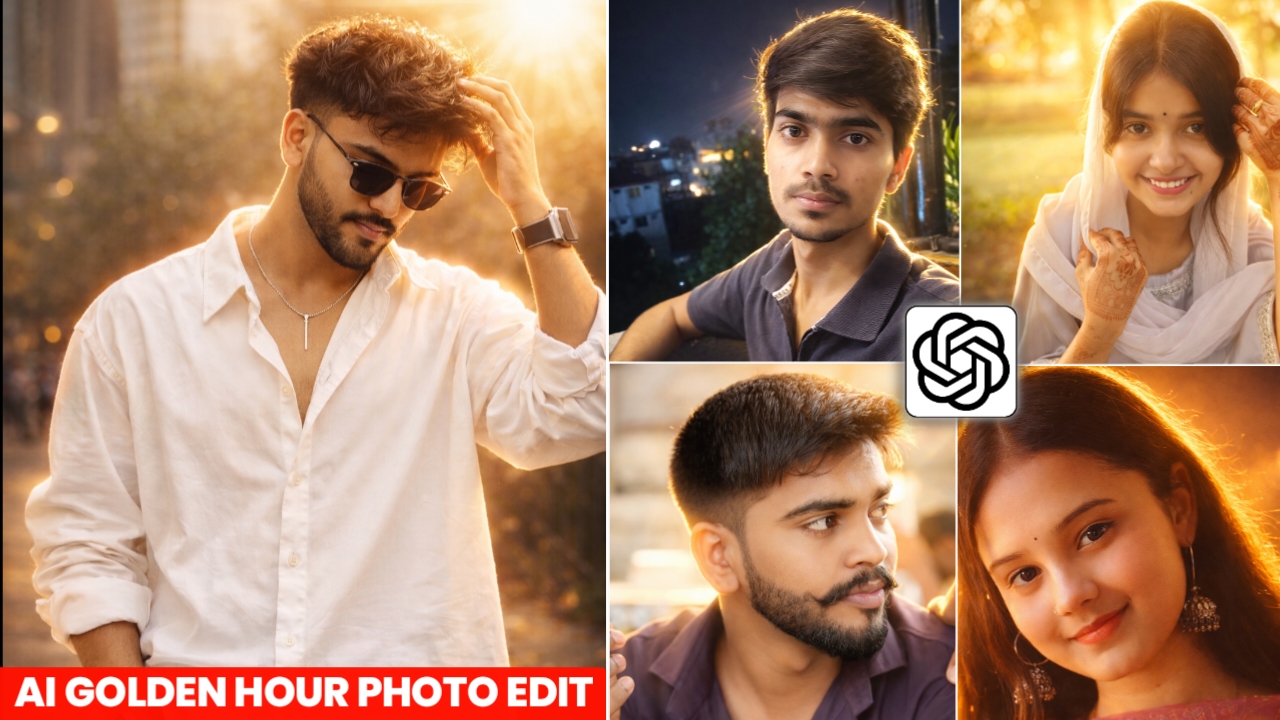
Hello friends, another new trend has come on social media in which people are converting their normal looking photos into golden light photos which are looking very good.You can also make this kind of photo of yourself, that too absolutely free, without any hard work, it is very easy to make this golden light photo.At this time, everyone is uploading such photos on Instagram and those photos are getting lots of likes and views.This photo is trending a lot on social media and people are liking it a lot. Everyone wants to make their own photo with golden light.And I will tell you the complete process of making it. You can create this photo in just 2 minutes and that too without any editing knowledge.
Detailes of Golden Light Photo
Today I will tell you how you can convert your normal looking photo into Golden Light photo and upload it on your social media and get likes and views.This photo which is going viral has been created with the help of a prompt and your photo. For this, neither any money has to be paid nor any hard work is required. In Golden Light photo, your photo looks much better than normal photo because your photo has extra light, clean and HD which gives your photo a better look And makes your photo unique from normal photos. So today, with my help and this article, you will be able to create your own photo. I will explain the entire process to you in very simple words.If you also want to take your photo with golden light, then do not delay, take this photo as soon as possible because it is currently trending on social media. And if you want to grow on social media, then follow trending things, then your chances of growth are much higher.
What is Golden Light Photo
Golden Light Photo is the photo which is taken either in the morning at the time of rising of Lord Surya or at the time when the Sun sets.There is extra light in this photo which is absolutely golden and falls directly on your face which looks very beautiful. Golden light gives your face a unique natural glow in photos and sun light has a different effect on your face.When you take photos during the golden hour, they look very professional and aesthetic. Many actors and creators like to get their photos taken during the golden hour and upload them to their social media.
Golden Light Photo Editing Prompt
Below I am giving you a prompt to make a golden light photo, by using which you can make your own golden light photo from your phone without any editing.

Remove the heavv shadowed cast from the uploaded photo and apply an ethereal lighting, while restoring natural true to-life skin tones and fabric colors and deblur the subiect without altering the subiect, pose, or backqround Neutralize color spill while preservina realistic lighting depth Reconstruct balanced light on the subject's skin as if lit bv a direct on-camera flash maintaining strong contrast between illuminated areas and deep shadows Elevate the image using soft, dreamy sunliaht Add sunbeams creatinq a glowing highlight on cheekbones nose bridge, lips, and hair strandsInject subtle lens bloom and a thin laver of qlow around the face and shoulders Render skin with Iuminous translucency and gentle peachy tones Enhance stray hair strands backlit by sunlight Retain dark surroundingsif the image is soft or motionblurred, upscale with high-detai enhancement. Hard rule no face change

 Enhance the uploaded night portrait photo to ultra-high resolution while keeping the face, pose, framing, background, clothing, and composition exactly the same. Do not change the facial identity.
Remove harsh shadows and dark noise from the night photo and apply warm golden cinematic lighting similar to soft sunset light mixed with night ambience. Add a strong soft backlight from behind the subject creating a warm glowing halo around the hair and shoulders.
Illuminate the face with soft diffused front light as if from a professional camera flash so facial details stay natural and sharp. Restore natural skin tones and fabric colors while improving brightness, contrast, and dynamic range.
Add subtle warm golden light rays and atmospheric glow from the background lights, creating glowing highlights on the hair strands, cheekbones, nose bridge, and lips.

Inject soft cinematic lens bloom and a thin warm glow around the subject while keeping the background darker for depth and night mood.

Reduce blur, noise, and compression artifacts while regenerating ultra-fine details such as skin texture, hair strands, and clothing fabric.

Final result should look like a professional cinematic night portrait with warm golden lighting, soft backlight, DSLR quality, sharp focus, high dynamic range, and dramatic contrast.

Hard rule: do not change the face, pose, or composition.

 Enhance the uploaded photo to ultra-high resolution while keeping the pose, framing, background, face, clothing, and composition exactly the same. Do not change the facial identity.
Remove heavy shadows and apply warm golden cinematic lighting similar to golden hour sunlight. Add a strong soft backlight from the top or behind the subject, creating a warm glowing halo around the hair and shoulders.
Illuminate the face with soft diffused front light so facial details remain clear and natural. Restore natural skin tones and fabric colors while improving brightness, contrast, and dynamic range.
Add warm sunlight rays and subtle sunbeams from the background, creating glowing highlights on the hair, cheekbones, nose bridge, and lips.

Inject a soft cinematic lens bloom and warm glow around the subject while keeping the background slightly darker for depth and contrast.

Reduce blur, noise, and compression artifacts while regenerating fine details such as skin texture, hair strands, and clothing texture.

Final result should look like a professional cinematic portrait with warm golden sunlight, soft backlight, DSLR quality, sharp focus, and high dynamic range.

Hard rule: do not change the face, pose, or composition.
How To Create Photo
I am telling you the process of making Golden Light Photo in very detail and every process step by step. Which tool can you use to create your photo and what things should you keep in mind?Please read my steps very carefully.
- First of all you have to download chatGPT from Google Play Store.
- Now you have to login to ChatGPT with your Google account.
- Then you have to come to my website and copy the prompt given by me by clicking on the copy button.
- Scroll down the website a bit and click on “Create Your Image”.
- Then you have to upload a good photo of yourself by clicking on the plus icon and paste the copied prompt.
- Now you have to click on the send button, now your photo will start being sent.
- You just have to wait a little, your balloon will be ready in a short while.
- Now you have to save it by clicking on the save button and upload it on your social media with some background music.
Create Your Image
How To Select Best Photo
I will tell you how to choose a good photo to create your Golden Light photo. To make this photo, you have to choose a photo which is not taken from a long distance and its background should be clear and the photo should not be blurred.You can also take a selfie photo for this, it is best because it is taken from close up and your face also looks quite good in it.Sometimes when you get your photo made by AI, it does not understand your face properly and changes your face. If you want that AI should not change your face then you choose your selfie photo it is best for you.
FAQ
Can I make Golden Light Photo for free without spending any money?
Yes, you can make this photo absolutely free. You don’t have to pay a single rupee to anyone for this. This photo has been made with ChatGPT and you can make it absolutely free.
Do I need to know any kind of editing skills to create this photo?
No, you will not need any kind of editing for this, because this photo is completely made by AI, in which AI does all your work itself, just send the prompt and image to you.
Can I make this photo in one click?
Yes, absolutely you can make this photo in one click, you just have to go to my website and copy the prompt, then paste your photo in Chatgpt and your photo will be made in one click.
Can I go viral by uploading this Golden Light photo?
Yes, you can go viral by uploading Golden Light photos right now because this photo is becoming very viral right now, everyone is making photos of this type and uploading them.If you upload it with the right background, there is a higher chance of it going viral.
Conclusion
So friends, in this article I told you how you can create your Golden Light photo with the help of just one special prompt. You have to upload your photo in ChatGPT and paste the prompt given by me and send it, now your photo with Golden Light will be ready. Making this photo is not a big deal, anyone can easily make it in minutes and upload it on their social media where it can get lots of likes and views.So in today’s article, I have told you everything in great detail and have also explained everything well. I hope that you did not face any problem in this and you would have liked this article of ours and it would have been helpful for you.We will always bring you such things which are trending, so for now, we will meet you with a new and good article.