
AI image-generation tools have made creative photo editing much easier. Instead of manually changing the background, lighting, clothes, and overall atmosphere, you can now describe your idea with a detailed prompt and let an AI tool create a new visual concept.
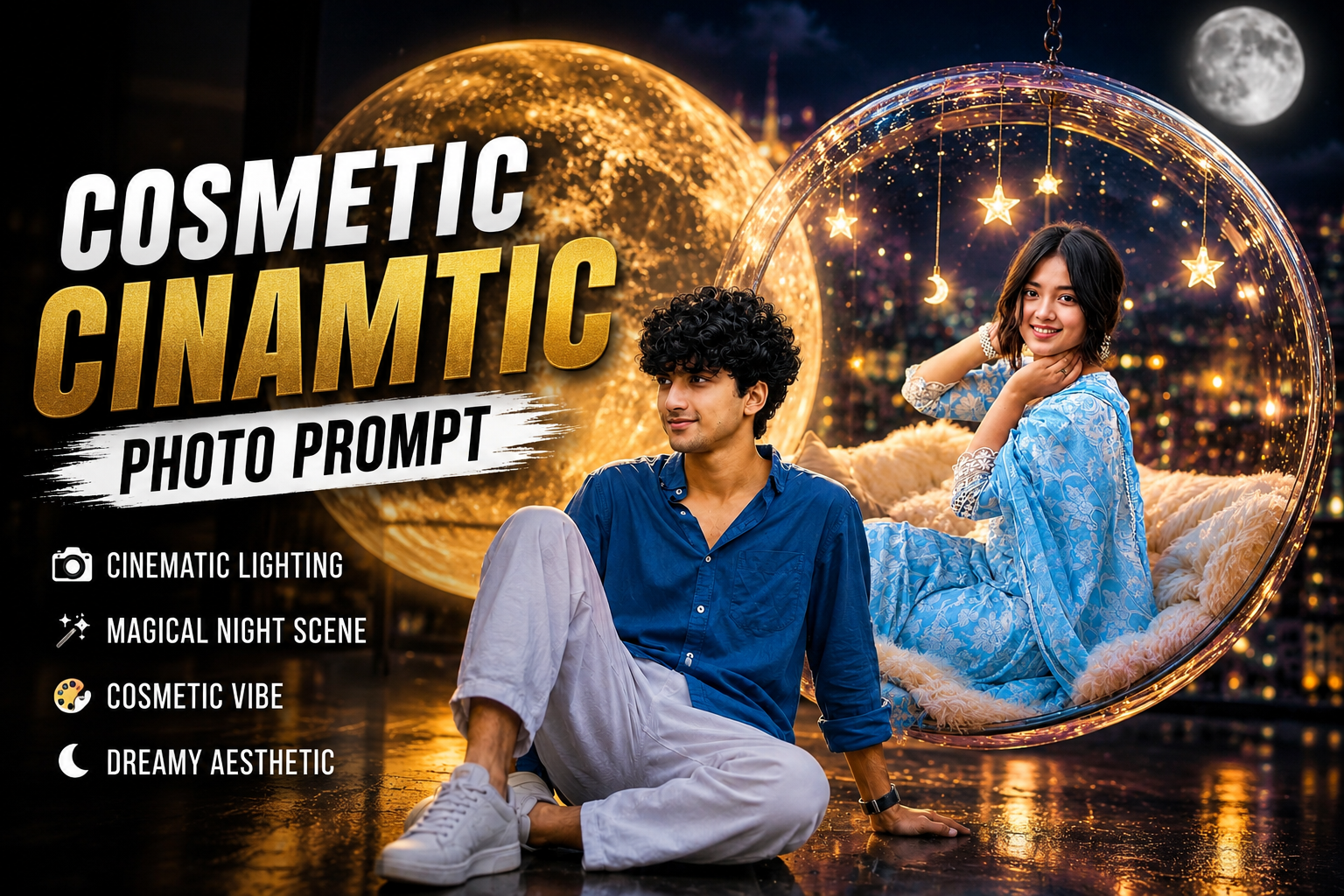
One interesting style is the Cosmic Cinematic Photo Edit. This style combines elements such as a giant glowing moon, cinematic lighting, reflective surfaces, modern architecture, dreamy colors, and a professional photography look.
You don’t need advanced Photoshop skills to experiment with this effect. All you need is a clear photograph and a suitable AI image-generation tool that supports reference images.
In this guide, you’ll find three different prompts that you can try. I’ve also explained the complete process, reference-photo tips, common problems, and ways to improve the final result.
What Is a Cosmic Cinematic Photo?
A cosmic cinematic photo is a creative image that combines realistic portrait photography with a dramatic or dreamy environment. A large moon, night sky, glowing lights, reflections, clouds, and cinematic shadows are some of the elements commonly used in this type of composition.
The important thing to remember is that the final image is an AI-generated creative edit. It doesn’t necessarily represent a real photograph or a real location.
The same basic concept can also be adapted to different styles. For example, you can create a dark moonlit portrait, a dreamy feminine portrait, or even a clean daytime fashion photograph.
Why Use a Detailed AI Prompt?
An AI image generator needs instructions about what you want to see. A short prompt such as “make my photo cinematic” may produce a result, but it doesn’t provide enough information about the composition.
A detailed prompt can describe:
- Subject and clothing
- Pose and facial expression
- Background
- Lighting
- Camera perspective
- Colors
- Reflections
- Depth of field
- Image orientation
- Overall photography style
However, adding more words doesn’t automatically guarantee a better result. The instructions should be clear and should not contradict one another.
Cosmic Cinematic AI Photo Editing Prompts

Use the uploaded real face photo as the exact face reference. Keep the facial identity highly realistic and recognizable. Create a cinematic fantasy portrait of a stylish young Indian man sitting casually on a glossy reflective floor in front of a gigantic glowing full moon. He is wearing a royal blue loose shirt, white relaxed pants, white sneakers, and a modern smartwatch.

Pose should feel natural and confident, with one knee raised and soft calm expression looking sideways. The environment should have a luxury urban-night aesthetic with dark glass architecture, wet reflective floor, golden ambient lighting, dreamy glow, soft shadows, depth of field, and cinematic atmosphere.

Behind him place an enormous ultra-detailed illuminated moon creating strong backlight and halo effect around the body. Add subtle warm neon text on the side saying “Dream Plan Do”. Make the lighting dramatic, aesthetic, Instagram-trending style, hyper realistic, ultra detailed, 8K quality, moody cinematic color grading, soft skin texture, realistic curly hair, premium fashion editorial vibe.

Vertical composition 9:16, DSLR look, shallow depth of field, realistic reflections, luxury cinematic photography.

Use the uploaded real face photo as the exact face reference and keep the facial identity highly realistic, soft, and naturally beautiful. Create a dreamy cinematic night scene where the girl is sitting inside a giant transparent hanging glass bubble chair suspended high above a glowing city skyline at night.

Inside the bubble, add fluffy cream-colored cushions, cozy textures, warm fairy lights, glowing hanging stars and moon charms, and soft magical reflections on the glass surface. The girl should wear the same elegant light blue floral saree with realistic fabric folds and delicate embroidery details.

Background should feature a massive glowing full moon, deep blue night sky, soft clouds, bokeh city lights, and luxurious rooftop atmosphere. Add warm golden lighting mixed with cool moonlight for a surreal dreamy aesthetic.

Pose should feel relaxed, cute, and eye-catching with a soft smile toward camera. Create ultra realistic skin texture, detailed hair strands, cinematic depth of field, glossy reflections, fantasy atmosphere, Instagram viral aesthetic, luxury dreamy vibe, hyper detailed, 8K quality.

Vertical composition 9:16, DSLR photography style, soft glow, magical ambience, trending AI photo edit style.

Use the uploaded photo as the face reference and keep the exact facial identity, hairstyle, skin tone, and expression natural and realistic.
Create an ultra realistic daytime cinematic portrait of a stylish young Indian man sitting casually on the ground beside a modern minimalist concrete building with large glass walls. The pose should look relaxed and confident, one leg folded and one hand resting on the floor.

Outfit: deep royal blue loose shirt, white relaxed-fit pants, clean white sneakers, modern wrist watch.

Scene should feel completely different from fantasy/moon edits — clean modern architecture aesthetic, luxury urban vibe, soft daylight, realistic shadows, premium lifestyle photography look. Add greenery and blurred trees in the background for a fresh atmosphere.

Camera angle: low angle portrait shot, DSLR photography, shallow depth of field, highly detailed skin texture, natural lighting, crisp focus, soft background blur, realistic reflections on the floor.

Style: luxury editorial photoshoot, Instagram aesthetic, modern fashion campaign, realistic color grading, minimal and classy composition.

Aspect ratio: 9:16 vertical.Ultra HD, 8K, cinematic, hyper realistic.
How to Create a Cosmic Cinematic AI Photo
You can use these prompts with an AI image-generation feature that supports uploading a reference image.
- Open the ChatGPT app or the supported AI image-generation tool.
- Start a new conversation or image-generation request.
- Upload a clear photo that you have permission to use.
- Copy one of the prompts from this article.
- Paste the prompt along with your uploaded photo.
- Submit the request and wait for the image to be generated.
- If the result doesn’t match your expectations, adjust details such as the pose, lighting, clothing, or background and try again.
- Save the final image when you are satisfied with the result.
Tip: A clear, front-facing photograph usually gives the AI more useful visual information. However, the final result can still vary depending on the reference image and the image-generation system.
Create Your Image
Tips for Better Facial Results
AI-generated portraits don’t always preserve facial details perfectly. If the face looks different from the reference, try these adjustments:
- Use a clear, well-lit reference photograph.
- Avoid extremely low-resolution or heavily filtered images.
- Keep the face reasonably visible in the reference photo.
- Try a simple pose before experimenting with complex angles.
- Avoid adding too many instructions that conflict with each other.
- If the first result isn’t satisfactory, modify the prompt instead of repeatedly using exactly the same request.
There is no guaranteed method to achieve an exact facial match, because AI image generation can interpret reference images differently from one generation to another.
Important Note About AI-Generated Images
These images are creative AI-generated edits and should not be presented as genuine photographs of real events or places when they are fictional. If you use another person’s photograph as a reference, make sure you have their permission and avoid using the generated image in a misleading or deceptive way.
Conclusion
Creating a cosmic cinematic portrait with AI can be a simple way to experiment with different photography concepts without manually editing every part of the image.
The three prompts above give you different directions: a dramatic moonlit portrait, a dreamy night scene, and a modern daytime fashion composition. You can also customize the prompts by changing the outfit, location, lighting, colors, or camera perspective.
For the best results, start with a clear reference photo and make small changes to the prompt until the composition matches your idea.
Sorry