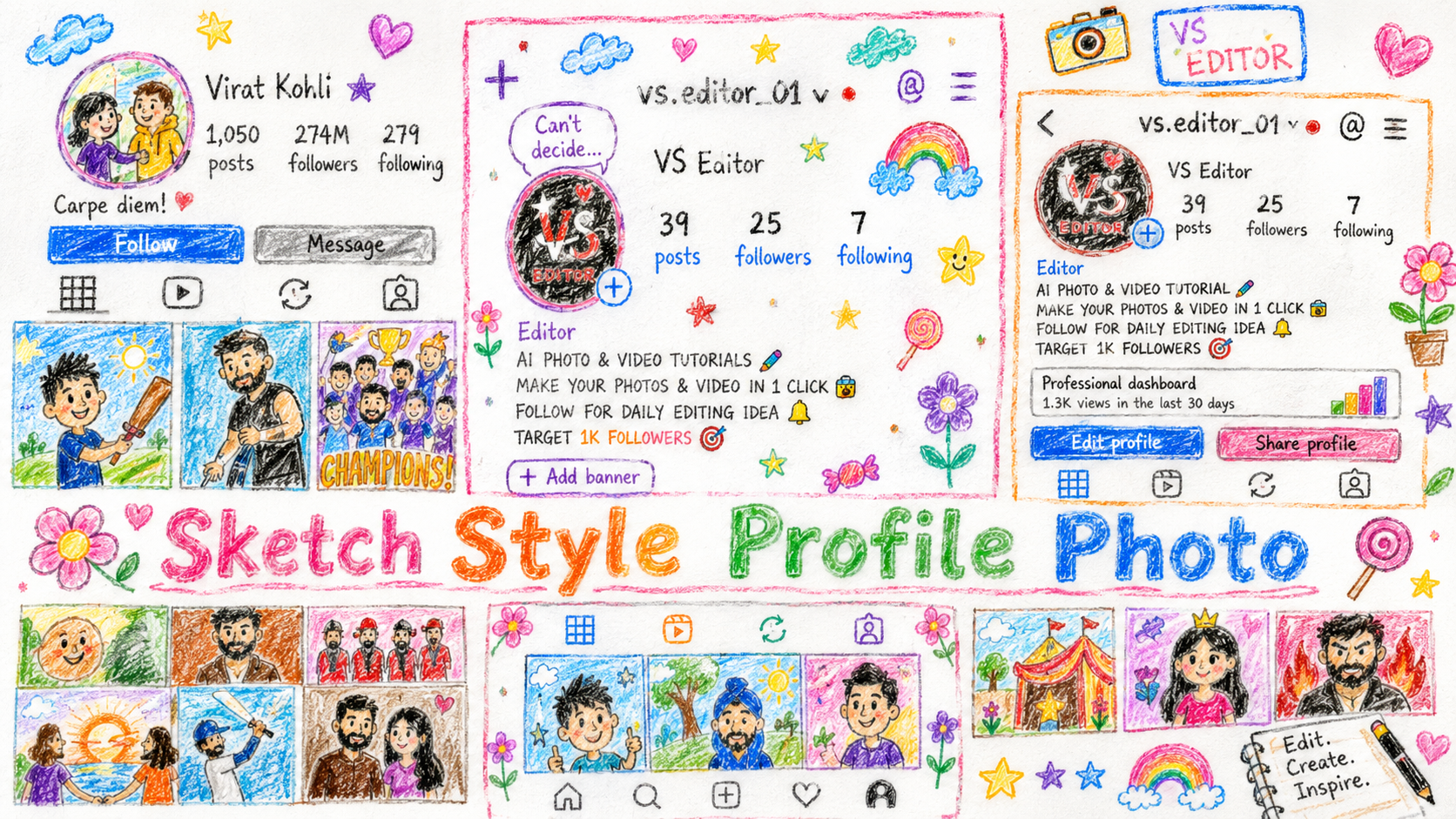
Friends, at this time on social media, people are making their Instagram profile like a handmade sketch and are putting a story on it and are also uploading it on their social media. And this photo is very beautiful to look at and attracts everyone’s attention because this photo is so eye catching.Perhaps this is one of the reasons for this photo going viral, whoever is creating and uploading such photos, his photos and videos are going viral. At this time, this photo has completely created a trend on social media, every other person wants to make a photo like this. So today in this article I will tell you about converting your profile into a handmade sketch, how you can change your profile into a handmade sketch by just giving a little of your time. And the best part is that you can now create this sketch-like profile photo without any effort and without any difficulty, you can easily create it and post it on your story or your account.
What Is Handmade Sketch Profile Photo :-
If you also want to know what is handmade sketch then let me tell you that it makes your profile look as if someone has made it by hand with the help of pencil and colours.Sketchy profile photos look great and are quite realistic too. But now you don’t need a pencil or color to create it, nor do you need to sit for hours creating art. You can create this photo in just a few minutes with the help of AI. This photo is completely made with the help of a special prompt. I will give you that prompt and also tell you the process of making this sketch profile photo. Just read my article carefully, you will not face any problem in making it and you will be able to make it in no time.

Edit the provided image and reimagine the entire scene as a crayon-style drawing. Simplify the details and make it look like it was drawn by a 10-year-old child Do not use the original image's colors. Give it the feeling of being drawn on a sheet of white paper, with a very cute, playful, and innocent look. Add charming childlike elements such as flowers, candy, stars, clouds, and other sweet decorative details to enhance the whimsical feel Keep the overall result adorable, colorful, and full of childlike innocence

Create a highly detailed 3D cartoon-style Instagram profile scene placed on a cozy creative desk setup. The profile page should look like a real floating 3D social media interface with smooth rounded edges, glossy buttons, soft shadows, and vibrant lighting.
The username should be “vs.editor_01” with a stylish 3D logo profile picture. Show profile stats like posts, followers, and following in bold modern typography. Add a creative editing-themed bio related to AI photo & video editing tutorials.
Design the entire scene like a miniature creator studio with cute decorative elements around the profile such as:
- neon signs
- camera props
- desk lamp
- tiny plants
- colorful stars
- floating social media icons
- notebook with creative quotes
- coffee mug
- pencils and editing accessories

The post grid should contain different cinematic 3D thumbnails including:
- selfie vlog
- hoodie portrait
- royal chair portrait
- daily vlog girl
- intense red cinematic character Use warm cinematic lighting, depth of field, glossy textures, toy-like 3D characters, realistic reflections, and ultra-detailed rendering. Make everything look adorable, premium, modern, and visually satisfying like a Pixar-inspired 3D artwork.
Style: Pixar-style 3D render, cute aesthetic, ultra detailed, soft shadows, vibrant colors, cozy creator workspace, realistic lighting, high quality, 4K render.

Create a stunning ultra-detailed artistic recreation of a dark-mode Instagram profile page on a smartphone screen, blending multiple art styles together including realistic oil painting, watercolor texture, anime aesthetics, Studio Ghibli-inspired atmosphere, cinematic lighting, and semi-realistic 3D digital painting. The interface should remain recognizable like Instagram but transformed into a premium masterpiece with thick expressive brush strokes, textured canvas feel, smooth watercolor blending, anime-style facial detailing, soft Ghibli mood, and realistic depth. Include profile picture, follower count, bio section, buttons, navigation icons, and a 3×2 post grid featuring cinematic portraits, vlog thumbnails, and dramatic character artwork. Use glowing highlights, rich shadows, vibrant contrast, warm ambient lighting, realistic reflections, painterly textures, detailed skin shading, and immersive composition. Make it aesthetic, modern, visually powerful, creative, and social-media-worthy. Ultra HD, 4K, masterpiece quality, highly detailed, trending digital art, premium illustration, realistic texture, sharp focus.
How To Create Sketch Profile Photo :
I will tell you every process of making a sketch photo in great detail and in very simple words so that it becomes easy for you to make the photo and you can create a sketch on your Instagram profile without any difficulty.
- First of all you have to take a screenshot of your Instagram profile and after that you have to download the Chatgpt app from Play Store.
- After downloading, you have to login to it with your Google account or Gmail.
- Now you have to go to my website and copy the prompt below which type of profile photo you want to make.
- Now you need to click on Create Your Image below. As soon as you click, you’ll be taken to Chatgpt.
- Now you have to click on the plus icon and add your screenshot and paste the copied prompt and click on send.
- Now your photo will start getting created, it may take some time, you have to wait a little and as soon as your photo is created and ready, you have to download it.
- Now your sketch profile photo is ready, you can add it to your story or post it with some nice background music.
Create Your Image
Conclusion:
So friends, in today’s article I told you how you can take a screenshot of your Instagram profile picture, paste it in Chat and use the prompt given by me. You can change your profile photo to a sketch style which looks very cute and professional. I have also given prompts to create many other types of profile photos, you can try them also and create them.If you also want to make your photos viral on social media then this is the best time because these photos are trending right now, so without any delay make and upload them as soon as possible. Because this trend will not come again and again and neither will you get such an opportunity again, so make it without any delay. Vs editor will keep you updated with trending content from time to time and will keep bringing new things for you. I hope that in today’s article I have explained everything to you very well and you must have got help from it.That’s it for today, I’ll meet you soon with a new article.