
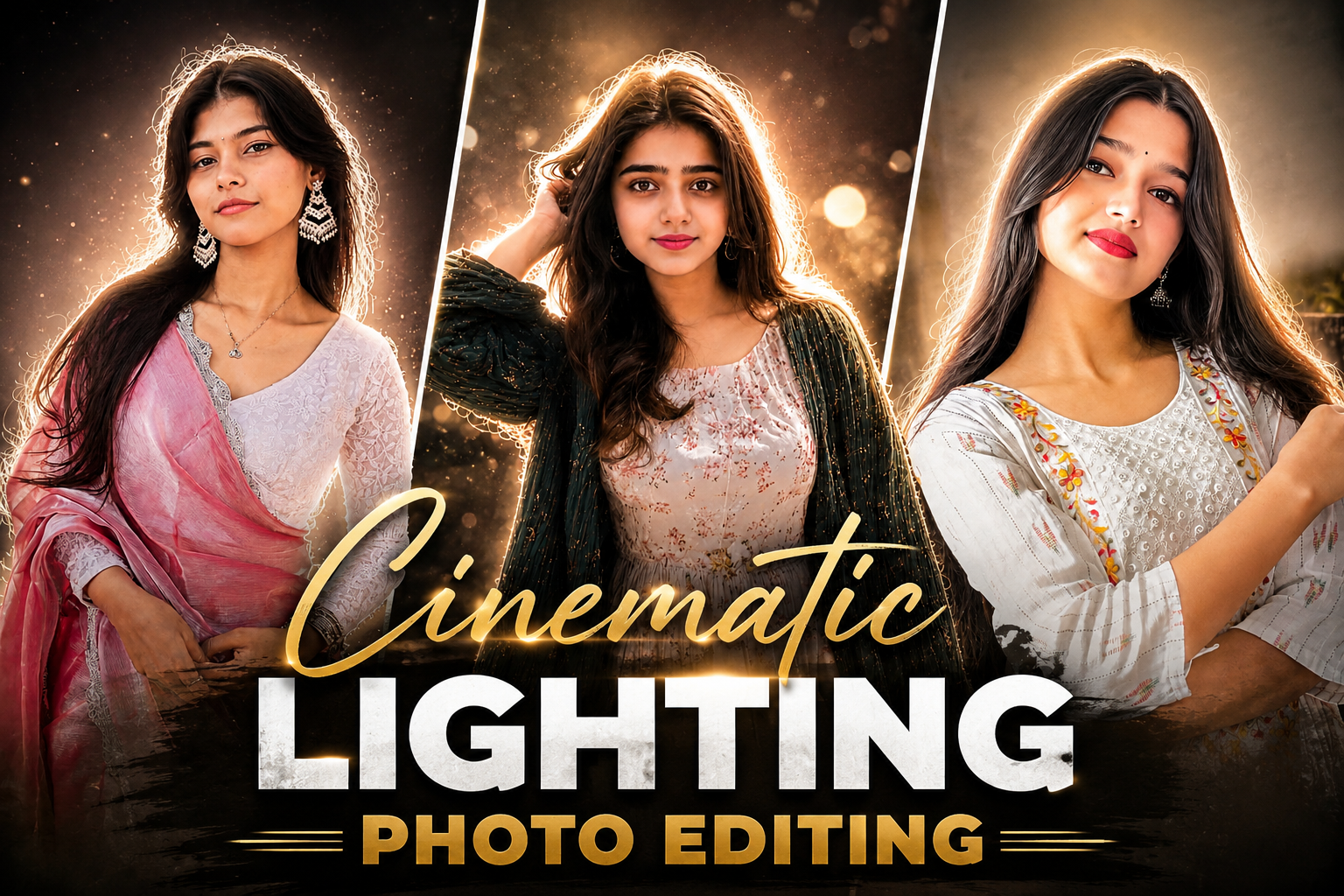
So friends, at this time another new trend has come on Instagram which is very viral on the entire Instagram. I am talking about kinetic photo quality which is trending a lot these days and literally whoever is making such photos, his photos and videos are going viral.Every big creator is making some such cinematic photos of his own, and posting them on his social media as stories because this photo looks quite unique. And I know that when you saw this photo, you must have felt like making this photo and if you are also thinking of making a photo of yourself in such a cinematic style, then you can definitely do it.Before the trend ends, take some cinematic photos like this because this trend will not come again and again.So in today’s article, I will tell you how you can create your own cinematic photo in just a few minutes, that too without any hard work or editing.
Detailes of Cinamatic Photo :-
In today’s article, we are talking about a viral cinematic photo, so first of all let me tell you that this photo has been created in one click with the help of AI, with the help of some special prompts. The AI tool with the help of which this photo has been created is absolutely free and everyone must know how to use it. Nowadays, many people are taking different types of photos of themselves with the help of AI and uploading them on their social media, which goes viral.Some people followed these trends and grew rapidly on social media, gaining millions of views and millions of followers.If you also want to make your photos and videos viral, then you can grow rapidly by following the trending threads on social media. It is very easy to make a photo with AI. Where earlier it used to take you hours to edit a photo, now AI is making it in just one minute and that too absolutely free. In this you are saving both time and money. Cinematic photos have extra light and shine which makes your photo even more beautiful and this photo is much better than your normal photo, whoever sees it will appreciate this quality of himself.So in today’s article I am telling you the process of making this photo and along with that I am giving you a prompt and also telling you which AI tool to use.So read this article carefully today so that you do not face any problem in making this photo and you can easily make it in one click and get it ready.

Create a cinematic dreamy night portrait with a strong soft white backlight glow behind the subject, creating a bright natural halo around the hair and body edges. Keep the face 100% original and realistic with no changes to facial features, skin tone, hairstyle, pose, outfit, expression, or body structure. Add clean white rim lighting with a very slight warm tone, soft bloom glow, glowing edges, subtle lens flare, smooth skin highlights, and DSLR flash photography aesthetics. Background should remain dark and minimal to make the white backlight stand out beautifully. Add soft atmospheric haze, floating dust particles, shallow depth of field, cinematic contrast, and ultra realistic skin texture. Enhance the image with premium cinematic color grading, dreamy mood, and high-detail glowing outline around the subject. Viral Instagram aesthetic, ultra realistic, soft white glow, elegant cinematic lighting.

Use the uploaded photo as the exact face and pose reference. Keep the face 100% original and realistic with no changes to facial features, hairstyle, skin tone, expression, outfit, body shape, hand position, or camera angle. Transform the image into a cinematic dreamy night portrait with a dark moody background and strong soft white backlight behind the subject, creating a bright glowing halo around the hair and body edges. Add clean warm rim lighting, subtle golden glow, atmospheric haze, floating dust particles, realistic bokeh lights, shallow depth of field, and DSLR flash photography aesthetics. Keep the subject ultra sharp while the background remains blurred and cinematic with soft streetlight glow and faint tree silhouettes. Add realistic glowing outlines around the hair and shoulders, smooth skin highlights, premium cinematic contrast, soft bloom effect, subtle lens flare, and ultra detailed skin texture. Apply luxury cinematic teal-and-warm color grading for a viral Instagram aesthetic. The final image should look like a high-end professional editorial night photoshoot with dreamy lighting, realistic shadows, elegant glow, and ultra realistic details.

Create a professional cinematic studio-style edit of the uploaded photo while keeping the person’s face, hairstyle, beard, skin tone, body proportions, pose, outfit, motorcycle, and overall identity 100% unchanged and realistic. Keep the original outdoor background intact without replacing it. Add a strong glowing backlight behind the person to create a soft white halo and rim light around the hair, shoulders, arms, and body edges. Use clean white glow with a slightly warm tone, soft bloom, subtle lens flare, and smooth cinematic lighting. Enhance the image with deep blacks, high contrast, sharp Sony A1 portrait quality, realistic skin texture, detailed shadows, and premium DSLR photography aesthetics. Add soft depth of field, dramatic cinematic color grading, and a polished high-end editorial look while preserving the natural environment and original composition.

Golden Hour Backlight: Transform this image into a cinematic, dreamy editorial portrait with soft golden-hour lighting. Apply strong backlighting from the sun positioned behind the subject, creating a natural rim light around the hair and shoulders.Prismatic Lens Flare: Add a realistic prismatic rainbow lens flare diagonally crossing the frame, with subtle chromatic dispersion and light streak bloom.Depth & Focus: Enhance depth using shallow depth of field (f/1.8 style), keeping the subject sharp while softly blurring the background into a creamy bokeh. Introduce slight motion blur in the environment to create a dynamic, ethereal movement effect while keeping the subject stable.Color Grading: Apply warm, soft color grading with pastel tones, slightly lifted highlights, and gently faded shadows for a filmic look. Add subtle glow diffusion to highlights (especially around light sources and skin, creating a soft, dreamy haze without losing detail.Skin & Detail: Skin tones should
How To Create Cinamtic Portrait Photo :-
Below I am telling you the process of making cinematic photos, that too step by step.If you follow the steps given by me then you can easily create and prepare your own kinetic photo and that too absolutely free.
- First of all download the Chatgpt app from Playstoe and login to it with your Google account.
- After that you have to come to the website and select your photo as per your choice and then copy the prompt given below the photo.
- Now scroll down a bit and click on “Create Your Image”
- Then click on the plus icon in Chatgpt, upload a nice photo of yourself and send it by copying and pasting the prompt.
- Your cinematic portrait photo will now begin to be created. This may take a little time, about 1-2 minutes.
- And as soon as your photo is ready, download it by clicking on the download button.
How To Fix Face Change Problem :-
So nowadays people get their photos made with the help of eye, in which most of the people have to face the same problem, in which their face changes. Today I am giving you some tips to solve this problem, by which your face change problem will be solved and a perfect photo of yours will be ready.
- First of all, when you create photos with the help of AI, I would recommend you to use Chatgpt.
- And to get your photo made, you should take a photo of yourself alone which should be clear and HD.
- You have to take such a photo in which your face is clearly visible and the photo should be taken nearby.
- I would recommend you to use your selfie photo because it is the best.
- You should use your own straight photo in it, there should not be too many things in the background.
Why People Love Ai Photo :-
People like photos made with AI because earlier we had to work hard for hours to make any photo and even after so much hard work we did not get the results we wanted.But AI is doing your hours of hard work in just minutes and you are getting amazing results and the best thing is that it is absolutely free. It transforms your normal photos into something very professional and unique, making your photos even more eye-catching. This is also one reason why these days the photos made with AI are becoming very popular all over the social media and people are liking it a lot.And the second reason is that AI saves your time and also your money which is something everyone wants.
Conclusion :-
In today’s article, I have told you in great detail how you can create your own cinematic photo, that too in one click. Every single process is explained in detail and clearly so that you do not have to face any problem. I hope that you have understood today’s article completely and it must have been very helpful for you. That’s all for today, we will meet you in a new article.
Create a cinematic dreamy night portrait with a strong soft white backlight glow behind the subject, creating a bright natural halo around the hair and body edges. Keep the face 100% original and realistic with no changes to facial features, skin tone, hairstyle, pose, outfit, expression, or body structure. Add clean white rim lighting with a very slight warm tone, soft bloom glow, glowing edges, subtle lens flare, smooth skin highlights, and DSLR flash photography aesthetics. Background should remain dark and minimal to make the white backlight stand out beautifully. Add soft atmospheric haze, floating dust particles, shallow depth of field, cinematic contrast, and ultra realistic skin texture. Enhance the image with premium cinematic color grading, dreamy mood, and high-detail glowing outline around the subject. Viral Instagram aesthetic, ultra realistic, soft white glow, elegant cinematic lighting.