
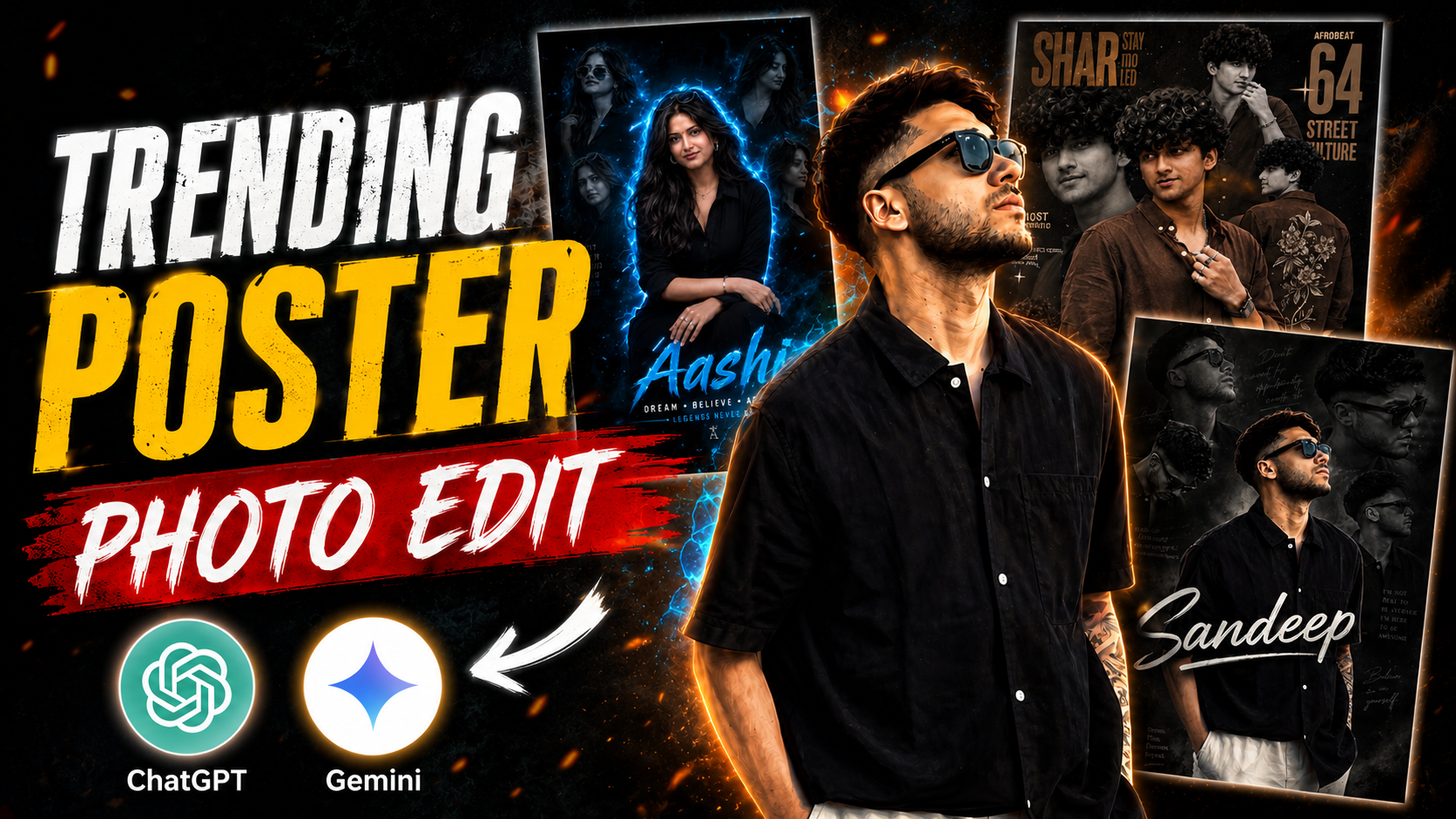
At this time, another new trend has emerged in which people are creating their poster images and posting them on their stories and DPs.This photo is going viral all over Instagram and is being liked by many people. People are making their photos and videos viral by making such photos, because these photos are so eye-catching that everyone wants to make such photos of themselves. And in today’s article, I will tell you how you can create such a poster photo of yourself and your friends, that too in just a few minutes. The best thing is that to make this photo you do not need any kind of editing nor will you have to work hard for hours to make it, you can make it in just a little time.So if you also want to make your own poster photo, then you have got today’s article, you should read it very carefully.
Detailes of Photo Edit :-
So friends, in today’s article I will tell you how you can create your own poster photo and that too absolutely free. First of all, if we talk about this poster photo, then this photo has not been made through editing, it has been made with the help of AI. For which there is some special prompt which if you send along with your photo to AI then it will convert your normal photo into some such poster style And your photo will look attractive and unique. Now you will be able to clearly see the difference between your normal photo and this AI photo, which one is the best.Currently, this photo is in demand all over social media and everyone wants to make this photo, so today you are at the right place, I will tell you how to make it.
Poster Photo Editing Prompt :-
Below I am giving you some different prompts to make this poster photo, with the help of which you will be able to make your photo. First of all, I am showing you which photo can be made from which prompt. Below every photo there is a prompt to make such a photo.So you have to copy the prompt below of the type of photo you want to make and send it along with your photo in AI.I will also tell you the process of making the rest of the photo step by step below.

Create a high-end cinematic photo manipulation poster of a stylish young Indian man with voluminous messy curly hair, a sharp beard, and an intense expression, wearing a fitted black shirt with rolled sleeves, silver chain necklace, bracelet, stud earrings, and sunglasses placed on top of his hair. The main portrait should be centered, ultra detailed, realistic skin texture, dramatic face lighting, and glowing blue rim light around the body.
Add multiple monochrome side portraits of the same person around the background in different poses and angles, creating a collage composition. Use a dark black and electric blue color grading with neon blue light streaks, smoke effects, glowing particles, and futuristic cinematic atmosphere.

The background should be moody, deep black with blue energy glow and soft depth effects. Add stylish typography at the bottom with the name “Karan” in large glowing electric blue brush font. Under it write: “DREAM • BELIEVE • ACHIEVE” and “LEGENDS NEVER DIE” in clean cinematic text style. Include a motivational quote on the side: “I DON’T FOLLOW THE CROWD. I MAKE MY OWN PATH.”

Poster style should look like a premium Instagram DP editing artwork, ultra realistic, hyper detailed, sharp focus, dramatic shadows, teal-blue neon glow, luxury fashion aesthetic, cinematic editing, DSLR quality, 8K resolution, high contrast, professional Photoshop manipulation, trending Indian editor style.

Create a high-end cinematic photo manipulation poster of a stylish young Indian woman with voluminous messy wavy hair, sharp jawline, glowing skin, and an intense confident expression. She is wearing a fitted black outfit with rolled sleeves, silver chain necklace, bracelet, rings, stud earrings, and stylish sunglasses placed on top of her hair. The main portrait should be centered, ultra detailed, realistic skin texture, dramatic beauty lighting, and glowing electric blue rim light around the body.
Add multiple monochrome side portraits of the same woman around the background in different poses and angles, creating a premium collage composition exactly like a luxury cinematic Instagram DP artwork. Use a dark black and electric blue color grading with neon blue light streaks, smoke effects, glowing particles, futuristic glow effects, and dramatic cinematic atmosphere.

The background should be moody deep black with blue energy glow, soft depth blur, cinematic haze, and high contrast lighting. Add stylish typography at the bottom with the name “Payal” replaced by a female name in a large glowing electric blue brush font. Under it write:

“DREAM • BELIEVE • ACHIEVE”

and

“LEGENDS NEVER DIE”

in elegant cinematic text style.

Include a motivational quote on the side:

“I DON’T FOLLOW THE CROWD. I MAKE MY OWN PATH.”

Poster style should look like a premium Instagram DP editing artwork, ultra realistic, hyper detailed, sharp focus, dramatic shadows, teal-blue neon glow, luxury fashion aesthetic, cinematic editing, DSLR quality, 8K resolution, high contrast, professional Photoshop manipulation, cyber blue lighting, magazine-quality retouching, glowing edge light, trending Indian editor style, feminine luxury aura, futuristic cinematic mood, highly detailed facial features, glossy black tones, cinematic smoke particles, and electric blue visual effects..

A retro-urban styled poster ARD featuring a young refference with image artist in multiple poses. He wears a brown casual shirt and background embroidered on the back., multiple silver rings and bracelets emphasize his flashy.NAME ISNJUST cinematic black and white SHAR STAY mo LED The design is layered with close-up portraits, warm brown tones, bold typography reading "TYPE YOUR NAME" a modern magazine-style collage aesthetic, representing Afrobeat 64 and street culture

"Create a high-quality cinematic collage poster of a teenage boy with stylish curly hair and black outfit, inspired by modern Instagram creator edits. The design should have multiple black-and-white side portraits in the background and one detailed main portrait in the center with a digital painting effect.tex by."Sandeep "
How To Create Poster Photo :-
So that you do not face any problem in making the poster photo, I am telling you every process step by step to make this photo.And I am explaining each and every thing in great detail and in an easy way so that you do not have to face any problem.
- First of all you have to download Chatgpt app from Play Store and login to it with your Gmail.
- After that you have to visit our website and copy whatever prompt you like from the prompt given there.
- Scroll down a bit and click on Create Your Image.
- Then you have to add a nice photo of yours by clicking on the plus icon of the chat.
- Then paste the copied prompt and click on send. Now your photo will start getting created.
- Your photo will be ready in a short while, and as soon as it is ready, download it.
- Now your poster photo is ready. If you want to make more similar photos, you can make them by following the same process.
How To Fix Face Change Problem :-
When we take a photo with the help of AI, the AI does not capture our face correctly and changes the face.I have brought a way to fix that problem 100%.
- First of all, you have to take such a photo of yourself which does not have too many unnecessary things in the background.
- Your photo should be clear and HD. The photo should not be clicked from too far away.
- If your photo is straight then your photo will become even more perfect.
- The most important thing to keep in mind is that your face should be open in your photo, only then will the AI be able to read your photo properly.
Conclusion :-
So friends, in today’s article I told you how you can convert your normal photo into poster style with the help of Chatgpt.That too with the help of a prompt you can make your photo unique and professional So in today’s article, I told you how you can make this without any hard work.So if you also want to make your photo viral, then make this photo as soon as possible before the trend ends.So I hope that today’s article would have been very helpful for you. See you with another new article.
“Create a high-quality cinematic collage poster of a teenage boy with stylish curly hair and black outfit, inspired by modern Instagram creator edits. The design should have multiple black-and-white side portraits in the background and one detailed main portrait in the center with a digital painting effect.tex by.”Sandeep “
It is Very Helpfull