Introduction
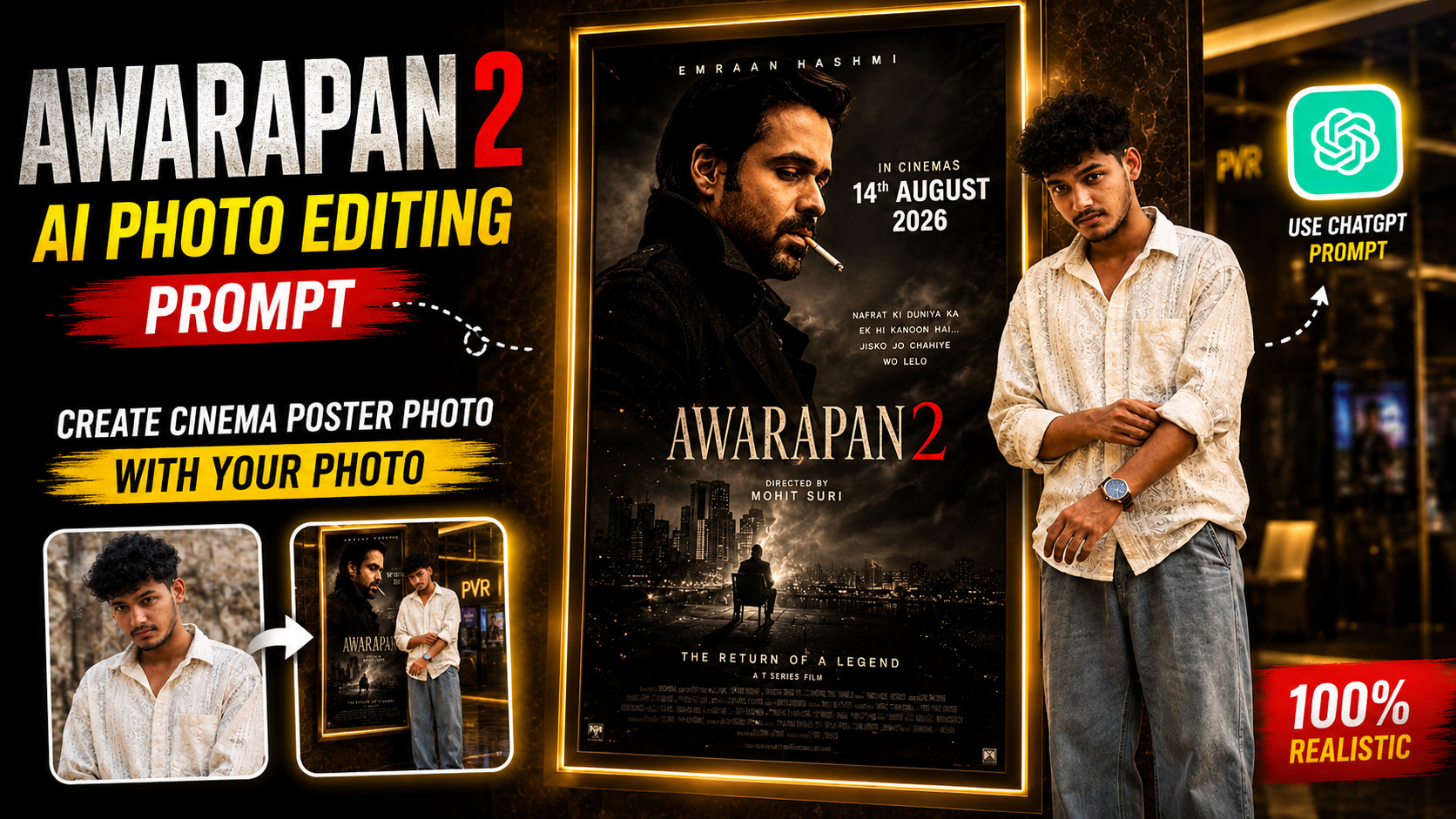
AI photo editing has become a fun way to create movie-style pictures without actually visiting a film set. One of the latest ideas is to place your own photo beside a large Awarapan 2 movie poster inside a luxury cinema lobby.
In this guide, I’ll show you how to create this type of realistic Awarapan 2 AI photo using a simple prompt. You can use your own picture as the reference image and ask an AI image editor to place you naturally beside the movie poster.
The main goal is to make the final image look like a real photograph taken inside a premium cinema rather than an obviously AI-generated picture.
What Is the Awarapan 2 AI Photo Editing Trend?
The idea is quite simple. You upload your own photo to an AI image editing tool and give it instructions about the new environment. Instead of changing your face or completely redesigning your appearance, the prompt asks the AI to preserve your identity, hairstyle, clothes and body proportions. The background is then changed to a cinematic movie-lobby environment.
For example, you can create a scene where you are standing next to a giant illuminated Awarapan 2 poster on a marble wall, just like you are visiting a premium cinema for the movie. Awarapan 2 is the sequel to the 2007 film Awarapan. The film stars Emraan Hashmi and is directed by Nitin Kakkar. It was released in theatres on 14 August 2026.
Why Is This Awarapan 2 AI Photo Popular?
Awarapan 2 AI photos are becoming popular because they give people a simple way to create movie-style pictures using their own photos. Instead of visiting a cinema or arranging a professional photoshoot, users can place themselves next to a realistic Awarapan 2 poster with the help of AI.
Another reason for its popularity is the cinematic look. The luxury cinema lobby, marble walls, warm lighting and realistic reflections make the final image look like a professional movie-premiere photograph. People can also keep their original face and outfit while changing the background, which makes the edit feel more personal.
These AI-generated movie photos are especially suitable for Instagram, Facebook and WhatsApp, where unique and realistic-looking edits often attract attention, likes and shares.
Prompt ⬇️
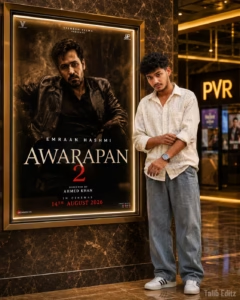
Use the uploaded photo as a STRICT IDENTITY REFERENCE. Preserve the person's face, hairstyle, expression, skin tone, outfit, body proportions and overall appearance exactly. No face editing, beautification, age change or face replacement. Create an ultra-realistic 4:5 DSLR photograph of the same person naturally standing beside a giant illuminated Awarapan 2 movie poster in a luxury PVR/IMAX-style cinema lobby. Keep the person's exact clothing and identity unchanged. Use a natural pose, looking toward the camera, with realistic anatomy, shadows and reflections. POSTER LOCK: Keep the original Awarapan 2 poster, Emraan Hashmi, title, typography, colors, artwork, frame and composition unchanged. Release date: 14 AUGUST 2026. Do not alter the poster. Use a premium dark marble wall, polished reflective floor, warm golden cinema lighting, realistic glass surfaces and cinematic depth of field. Match the subject's lighting with the environment for a natural photograph. Add “Talib Editz” watermark at the bottom-right. Ultra-realistic, photorealistic, HDR, 8K, professional movie-premiere photography, natural perspective, highly detailed.
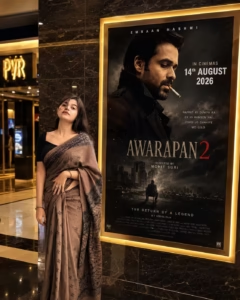
Use uploaded photo as STRICT IDENTITY REFERENCE. Keep face, hairstyle, expression, skin tone, outfit, hijab/hair, body proportions and overall appearance 100% identical. No beautification, no face editing, no AI face replacement, no age modification. EXACT SCENE RECREATION: Ultra-realistic luxury cinema lobby photograph. Subject standing naturally beside a giant illuminated Awarapan 2 movie poster display mounted on a premium marble wall. Original Awarapan 2 poster featuring Emraan Hashmi remains completely unchanged. Luxury PVR/IMAX cinema environment, warm golden ambient lighting, polished marble floor reflections, realistic glass surfaces, premium theater atmosphere. SUBJECT POSITION: The uploaded person standing beside the movie poster, naturally posing for a photo. If male: confident casual pose. If female: elegant natural pose. Same clothing as uploaded photo. Same face and identity preserved exactly. Looking toward camera. Realistic shadows and reflections. POSTER LOCK (DO NOT CHANGE): Keep the original Awarapan 2 poster exactly unchanged: Emraan Hashmi remains inside poster. Same title: AWARAPAN 2. Same typography. Same colors. Same background. Same release text. Same poster design. Same frame size and placement. CINEMA ENVIRONMENT: Luxury multiplex lobby, marble wall, realistic reflections, premium movie-promotion display, DSLR photography look, cinematic depth of field, natural perspective, authentic theater lighting. IMPORTANT: Only replace the audience standing beside the poster. Do not modify: Awarapan 2 poster, Emraan Hashmi, Movie title, Release date, Cinema frame, Wall texture, Camera angle, Overall composition. WATERMARK: Talib Editz bottom-right corner. QUALITY: Ultra-realistic DSLR photograph, 8K Ultra HD, HDR, cinematic lighting, professional movie-premiere photography, hyper-detailed, viral Instagram-quality image. ASPECT RATIO: 4:5 Vertical.
How To Create Ai Photo
Below I am telling you the entire process of making Awaarapan 2 AI photo poster step by step.You can easily insure your photo by following the steps given by me.
- First of all you have to download Chatgpt app from Play Store and login to it.
- After that you have to come to this post and copy the prompt given below the photo.
- Scroll down a bit and click on the Create your image button.
- Now click on the plus icon of the chat and add your photo.
- Paste the copied prompt along with the photo and click on the send button.
- Now Chatgpt will start taking your photo and your photo will be ready in a short while.
- You have to download it by clicking on the yarrow.
Create Your Image
How to Get the Best Results
To get the most realistic Awarapan 2 AI photo, the quality of your original photo is very important. Use a clear, high-resolution image where your face and clothes are clearly visible. Avoid blurry, dark or heavily filtered photos. For better results, make sure the AI tool understands that your uploaded image is a strict identity reference. This helps preserve your original face, hairstyle, skin tone and outfit.
Keep the requested pose simple and natural. Avoid complicated hand positions or unusual body movements, as these can sometimes create unrealistic results. The lighting should also match the environment. Warm cinema lighting, realistic shadows and natural floor reflections can make the final image look much more like a real DSLR photograph. Finally, use a 4:5 vertical aspect ratio for a professional Instagram-friendly result.
Common Mistakes to Avoid
When creating an Awarapan 2 AI photo, a few common mistakes can make the final image look unrealistic. Here are some things you should avoid:
- Using a blurry photo: Always use a clear, high-quality image as your reference.
- Changing too many things at once: If you want your identity and outfit preserved, avoid asking the AI to redesign your appearance.
- Ignoring the lighting: The subject and background should have similar lighting for a natural result.
- Using complicated poses: Simple, natural poses usually produce better anatomy and hand details.
- Covering the poster: Keep enough space between yourself and the poster so the important artwork and text remain visible.
- Not checking the final image: AI can sometimes create incorrect hands, facial details or poster text, so review the image before posting it.
- Using excessive filters: Heavy filters can make the image look artificial instead of like a real photograph.
Why Always Use ChatGPT?
ChatGPT is a popular choice for creating AI photo edits because it can understand detailed prompts and follow specific instructions about the person’s appearance, background, lighting and overall composition. For this type of Awarapan 2 photo, you can upload your own picture and describe exactly how you want the final scene to look.
Another advantage is that you don’t need advanced photo-editing skills. A well-written prompt can tell the AI to preserve your face and outfit while changing the environment around you. This makes the process easier for beginners.
However, ChatGPT is not the only option. Other AI image-editing tools can also produce good results, so you can choose a tool based on the features and image quality you prefer.
FAQ
1. Can I create this Awarapan 2 photo with my own picture?
Yes. You can upload your own clear photo to an AI image-editing tool and use the prompt provided in this article.
2. Do I need Photoshop to create this photo?
No. You don’t need advanced Photoshop skills. An AI image-editing tool that supports reference images can be enough.
3. How can I keep my face looking natural?
Use a clear, high-quality reference photo and clearly instruct the AI to preserve your original face, hairstyle, skin tone and overall appearance.
4. What aspect ratio should I use?
A 4:5 vertical ratio is recommended, especially if you plan to share the image on Instagram.
5. Why does the AI sometimes change the face or hands?
AI image generators can occasionally make mistakes with facial details, hands, clothing or other small elements. Generating another version with a better reference image can often improve the result.
Conclusion
Creating an Awarapan 2 AI photo is a simple way to turn an ordinary picture into a cinematic movie-style portrait. With a clear reference photo and a detailed prompt, you can create a realistic-looking cinema lobby scene without needing professional photography equipment or complicated editing software.
For the best results, focus on preserving your original appearance, using natural lighting and choosing a simple pose. Always check the final image carefully because AI can sometimes make small mistakes in faces, hands or poster text.