
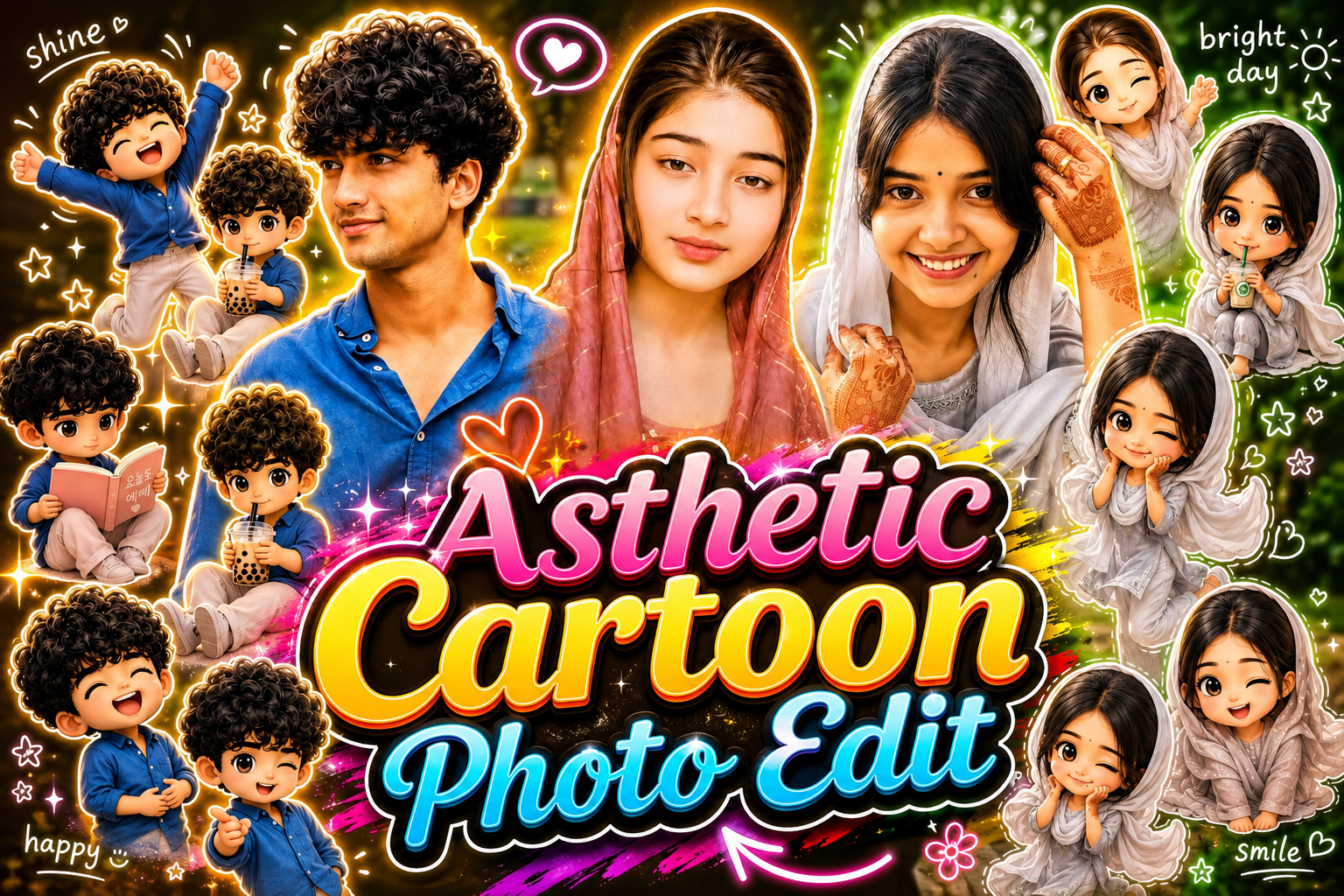
Currently, a photo is trending a lot on social media, which people are uploading on their account pages and is going viral very fast, and this photo has created a different trend on the entire Instagram. I am talking about Aesthetic cartoon photo which is becoming very viral these days, every small and big creator is making such photos and making their photos and videos viral very fast.This photo is very easy to make, the easier it is to make, the more cinematic and professional it looks. In this, there are many different clones of your same photo, one is your original photo and the rest are 3D characters of you in different poses.To make this cartoon photo, you will neither need hours of editing nor any hard work. You can prepare this photo in just 2 minutes and share this photo with your friends or your partner.
Detailes of Asthetic Cartoon Photo :-
First of all, if we talk about aesthetic cartoon photo, then this photo has been completely created with the help of AI. To make this, you just need a photo of yourself and here you will get a special prompt with its help you will be able to make it. Whoever is uploading this photo on his Instagram, his photo and video are going viral very fast. And if you are also thinking of making your photos and videos viral, then this is the best time to make them viral because right now it is trending a lot and this trend does not come again and again.If we talk about this photo, then this photo looks so aesthetic and unique that everyone thinks of making such a photo of themselves but due to not knowing the process, they back out. So this article is going to be especially for you people, in which we will teach you how to make this photo. You will also be provided with everything you need to create your photo. If I take you on a sample tour, I will show you which AI tool to use.Below I am giving you some different prompts to make this aesthetic cartoon photo, by using which you can make your photo ready in just a few minutes.

Use the uploaded real face photo as the main reference, keeping the original facial identity accurate, natural, and realistic. Maintain the same indoor background from the original image with a softly blurred depth-of-field effect. Create a dreamy Korean-inspired aesthetic portrait with warm golden-pink lighting, soft cinematic shadows, glowing smooth skin, and a clean pastel atmosphere. Around the main portrait, add multiple adorable 3D chibi mini versions of the same girl while preserving her exact facial features and outfit colors. Each chibi should have different dynamic poses and expressions such as jumping happily, waving excitedly, sitting shyly, holding bubble tea, reading a cute book, making finger hearts, sleepy expression, laughing with closed eyes, playful wink, cozy relaxed pose, and cheerful smiling expressions. Style the chibis in ultra-detailed glossy 3D Korean kawaii style with expressive eyes, soft reflections, fluffy fabric details, smooth skin texture, and cute accessories. Add white hand-drawn doodle decorations around the entire composition including glowing stars, hearts, sparkles, swirls, tiny flowers, motion lines, smiley icons, bunny doodles, mini clouds, ribbons, and cute aesthetic symbols. Include handwritten doodle text in a casual Korean-style font such as “shine”, “bright day”, “happy”, “smile”, “lovely mood”, “soft glow”, “dreamy”, and “good vibes”. Add a clean white sticker-outline around the main character and all chibi characters for a trendy social-media sticker collage look. Use a soft pastel color palette with pink, peach, cream, beige, blush tones, and subtle golden glow. Overall style should feel Pinterest aesthetic, Instagram-worthy Korean photo edit, visually magical, cozy, elegant, high-detail, luxury soft edit, premium digital art finish, ultra-realistic face with glossy 3D chibi elements, cinematic lighting, and high-resolution polished composition.
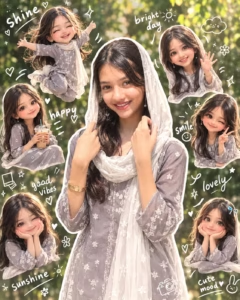
Create a premium 4:5 Instagram-style portrait collage using the uploaded photo as the main identity reference. Keep the woman’s real facial features, natural smile, skin tone, hairstyle, and overall appearance unchanged. Place her in the center wearing a soft pastel-grey traditional outfit with delicate floral details and a flowing white scarf, surrounded by a dreamy outdoor garden background with green foliage, warm sunlight, and soft bokeh. Add several cute 3D mini versions of the same woman around the main portrait, each with a different cheerful pose such as waving, jumping, holding an iced drink, winking, smiling, or resting her face on her hands. Give the mini figures a glossy cute toy-like 3D appearance while keeping their hairstyle and overall resemblance consistent. Add a clean white sticker outline around the subjects, plus hand-drawn white doodles including hearts, stars, flowers, clouds, sparkles, bows, smileys, and playful lines. Include handwritten white text such as “shine”, “happy”, “smile”, “good vibes”, “lovely”, “sunshine”, and “cute mood”. Use soft pastel tones, warm cinematic sunlight, subtle glow, polished details, and a trendy scrapbook aesthetic.

“Create an ultra-detailed 4:5 fully 3D Korean aesthetic portrait using the uploaded real face as reference, keeping the exact facial features, natural smile, hairstyle, skin tone, and identity perfectly recognizable while transforming the entire image into a premium glossy 3D Pixar-style Korean Instagram artwork. Make the main character fully 3D with smooth glossy skin, detailed silky hair strands, expressive sparkling eyes, soft blush cheeks, pastel grey traditional outfit with realistic fabric texture, and a flowing translucent white scarf. Keep the same dreamy outdoor park background but convert it into a fully 3D environment with soft green trees, glowing sunlight rays, blurred bokeh leaves, cinematic depth-of-field, pastel color grading, and warm soft lighting with subtle shadows for a magical dreamy atmosphere. Surround the main portrait with multiple mini 3D chibi versions of the same girl while preserving her real facial resemblance in different cute poses such as jumping happily, waving cheerfully, sitting relaxed holding an iced drink, shy blushing pose, playful wink, and smiling with hearts. Make all chibis ultra-cute glossy Korean 3D toy style with oversized sparkling eyes, adorable proportions, smooth rounded features, pastel shading, glowing skin, and highly detailed rendering. Add aesthetic hand-drawn white doodle elements in layered sticker style including stars, hearts, sparkles, flowers, clouds, bows, smileys, swirls, motion lines, and tiny cute icons. Include handwritten white doodle text in casual marker style saying ‘shine’, ‘bright day’, ‘happy’, ‘smile’, ‘good vibes’, ‘lovely’, ‘sunshine’, and ‘cute mood’. Overall vibe should feel dreamy, luxurious, soft, trendy, cute, and highly polished like a premium Korean Instagram scrapbook collage with Y2K photobooth aesthetics, white sticker outlines, airy clean composition, glossy textures, pastel grey and creamy white tones, cinematic glow, ultra realistic 3D rendering, masterpiece quality, and insanely high detail.”
How To Create Photo :-
Below I am telling you the step by step process of making this photo, by following which you can make your photo very easily.
- First of all you have to download the Chatgpt app from Play Store.
- After that you have to visit the website and copy the prompt given there.
- Then click on the button “Create Your Image” given below.
- After that, you have to add your photo by clicking on the plus icon and send it by pasting the copied prompt.
- Now your photo will start getting created, you have to wait a little and as soon as your photo is created and ready, download it.
- Now your photo is ready, you can upload it with your favorite music.
How To Fix Face Change Problem:-
Today I am telling you the process to 100% fix the problem of your face changing while taking a photo, due to which your face will not change at all. First of all, you have to take such a photo of yourself which is not taken from too far and there should not be many things in its background.The quality of your photo should be clear and HD so that your perfect photo will be ready.And to create this photo you have to take a single photo of yourself so that the AI will record your face correctly and will not change your face. I would suggest you to take a selfie photo of yourself, this would be the best option.
Conclusion :-
So friends, in today’s article, I taught you how you can turn your normal photo into an aesthetic cartoon style with the help of ChatGPT and the prompts given by me. Which looks amazing and if you look at that photo then you cannot take your eyes off it. So in today’s article, I have explained each step to you in very simple words. If you have read this article carefully, then I hope that you would not have faced any problem in making this photo.So today’s article ends here and we will meet you with a new article.

Sk Alim
Nice prompt