
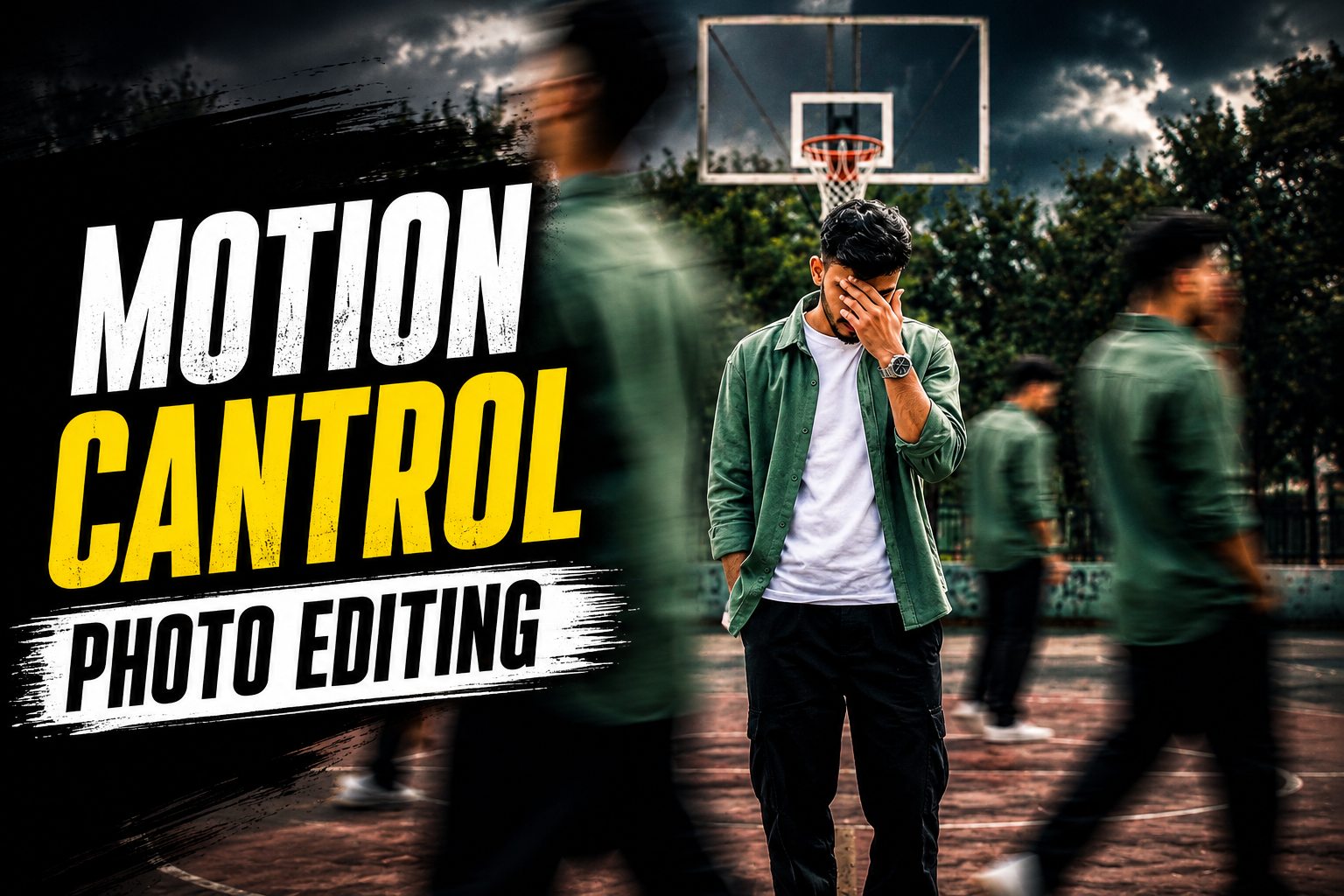
Friends, at this time many photos and videos are going viral on social media and people are growing rapidly on social media by making such photos and videos.I am talking about a photo which is currently trending a lot on Instagram, which is known as Motion Control and this photo looks quite aesthetic and eye-catching. If you have seen this photo yourself, then your eyes too would not have moved away from this photo and you too would have wondered how I could make such a photo.So friends, today I will tell you that today I will guide you how you can make this photo and that too without any hard work and that too absolutely free. First of all, I would like to tell you that this photo has not been created through any editing, it has been created with the help of a special tool and prompt. So if you read this article carefully, you will be able to take motion-controlled photos of yourself and your friends.
Detailes Of Motion Control Photo :-
If we talk about what is motion control photo and how it is made, then today I will tell you that this photo has been made with the help of AI.To make this, you need a photo of yourself, and in this article, I’ll give you some special prompts so you can make your own photo in just a few minutes. Motion control photos contain numerous clones of the same photo, and that too in the same photo, which make it appear as if the photo has been created in a very professional manner. Moreover, the look of this photo is really very nice. When I saw this photo, I also felt like making this photo and I did make it. Big creators and celebrities are also creating similar photos and uploading them on their social media, on which they are getting lots of likes and views.Now you can also make some such photos and upload them on your social media and grow rapidly. People are becoming viral very quickly by following the current trends on social media. You can also become viral by following them.
Motion Cantrol Photo Editing Prompt :-
Below I am giving you some different prompts for creating motion control photos. You can create your own prompt by using whichever photo you feel is right.Below every photo there is a prompt to create a similar photo. If you copy it and give it to the AI, it will create a photo for you just like that.

Transform my photo into a high-end cinematic streetwear editorial poster. Keep my face, body, pose, outfit, and original background recognizable, but enhance everything into a luxury fashion campaign aesthetic. Add 4 realistic duplicate versions of me across the frame placed naturally like motion-captured walk sequences. Keep the main/front version largest, sharpest, and most detailed, while side clones are slightly faded or motion blurred. Use dramatic overhead lighting with a subtle glow, deep shadows, long floor shadows, cool-toned cinematic color grading, strong contrast, glossy highlights, and soft film grain. Make the outfit textures crisp and premium. Add bold oversized magazine-style typography in the top corner with on20.4K powerful word related to movement or style
(example:

MOTION, STATIC, RUSH, ECHO). Include10 smaller minimal text such as collection year, slogan, barcode, or campaign

A cinematic streetwear photoshot of a teenage boy standing on an outdoor basketball court, don’t change out fit ,face 100%match,head slightly down covering face with hand netural pose,multiple motion clones off the same person walking around him creating a motion blur effect , dramatic lighting,dark moody sky , high contrast,sharp Focus on main subject depth of field , fashion editorial style,urban environment ,trees in background, realistic shadows,4k ultra realistic , Nike style campaign , poster design

editorial poster. Keep my face, body, pose, outfit, and original background recognizable, but enhance everything into a luxury fashion campaign aesthetic. Add 4 realistic duplicate versions of me across the frame placed naturally like motion-captured walk sequences. Keep the main/front version largest, sharpest, and most detailed, while side clones are slightly faded or motion blurred. Use dramatic overhead lighting with a subtle glow, deep shadows, long floor shadows, cool-toned cinematic color grading, strong contrast, glossy highlights, and soft film grain. Make the outfit textures crisp and premium. Add bold oversized magazine-style typography in the top corner with one powerful word related to movement or style (example: MOTION, STATIC, RUSH,)
How To Create Motion Control Photo
Below I am telling you the step by step process of making this motion controlled photo, how you have to make the photo and which AI tool you have to use. I will explain each and every thing in very detailed and in very simple words so that you do not face any difficulty in making the photo. Just read the steps given by me carefully and follow them.
- First of all you have to download chatGPT app from play store.
- Once downloaded, open it and sign in with your Google account.
- After this, you have to visit the website and copy the prompt below whichever photo you find appropriate.
- After that you have to scroll down a bit and click on create your image.
- Chatgpt will open, you have to add a nice photo of yours by clicking on its plus icon.
- Then paste the copied prompt and click on the send button.
- Now your photo will start getting created, you have to wait a little, it may take a few minutes for the photo to be created.
- As soon as your photo is ready, you have to download it by clicking on the download button.
- Now your motion controlled photo is ready and you can upload it on your social media with some cool background music.
Create Your Image
Conclusion :-
So friends, in today’s article I told you how you can create motion controlled photos using Chatgpt.As unique as this photo looks, the process of making it is equally easy. So in today’s article I have told you everything about how you can create and prepare your photo in minutes and by uploading the same photo you can make your photo viral.So we will meet you with another new article and bring something unique for you.
Viral photo editor
Viralpost