Creating realistic AI photos is no longer only about changing a background or adding cinematic effects. People are now using AI image editing tools to create complete scenes that look like they were captured naturally with a real camera. One style that has become especially popular is the realistic candid street photo.
These photos usually have a simple and natural feeling. The subject may be standing beside a car, walking on a city street, holding flowers, looking toward the sunlight, or simply enjoying a moment without looking directly at the camera. With the right reference photo and a detailed prompt, you can create a similar look without spending hours learning professional photo-editing software.
The most important thing is to avoid making the final image look overly polished. A realistic candid photograph should have natural lighting, believable surroundings, realistic skin texture and small camera imperfections. These details can make a big difference.
In this article, we will look at how this type of AI street photo works, how to use the prompt provided below, and what you can do to get a more natural-looking result.
What Makes a Candid AI Photo Look Realistic?
The first thing to understand is that a realistic photo is not necessarily a perfect photo.
When you take a normal photograph with a phone or camera, everything is not always perfectly sharp. There can be slight motion in the subject, uneven sunlight, soft areas in the background, lens flare, film grain or a little overexposure. These small details are part of real photography.
AI-generated images can sometimes look too clean. The skin may appear unusually smooth, the background can look artificial, and every object may appear equally sharp. This is one of the easiest ways to tell that an image does not look like a normal camera photograph.
A good candid-style prompt tries to avoid this problem by describing the photograph as an ordinary moment captured naturally.
For example, instead of simply asking for a beautiful portrait, the prompt can describe a person standing beside a parked car on a busy street, surrounded by trees, buildings and other vehicles. The person can have a relaxed expression and a natural body position instead of looking directly at the camera.
This gives the AI a much clearer idea of the type of photograph you want.
The Reference Photo Is Very Important
The quality of the reference image can have a noticeable effect on the final result.
If you are creating the image using your own photograph, choose a picture where the face is clearly visible. A reasonably sharp image with natural lighting usually works better than a heavily filtered selfie.
The reference image gives the AI visual information about the person’s appearance. When the prompt asks the tool to preserve the natural facial features and overall appearance, the result can stay closer to the original photograph.
However, AI image tools may still make small changes. This can happen with facial details, hair, hands, clothing or body position. That is normal with AI editing, so it is worth checking the final image carefully instead of assuming that the first generation will always be perfect.
For the best results, use a reference image with enough visible detail and avoid using a photograph that is extremely dark, blurry or heavily edited.
Use the Prompt Below With Your Reference Photo
Below this section, you can add the realistic candid street photo prompt for your readers.
The prompt is designed around a natural street photography concept. It describes the subject, clothing, pose, surroundings, lighting and camera characteristics so that the AI has enough information to understand the intended scene.
Readers can simply copy the prompt, upload their reference photo to a compatible AI image tool and use the prompt with it.
The prompt can also be modified later. For example, the same concept can be used with different clothes, locations, accessories or objects while keeping the overall candid photography style.
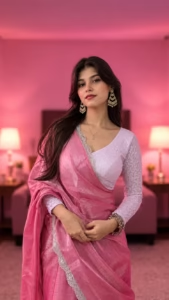
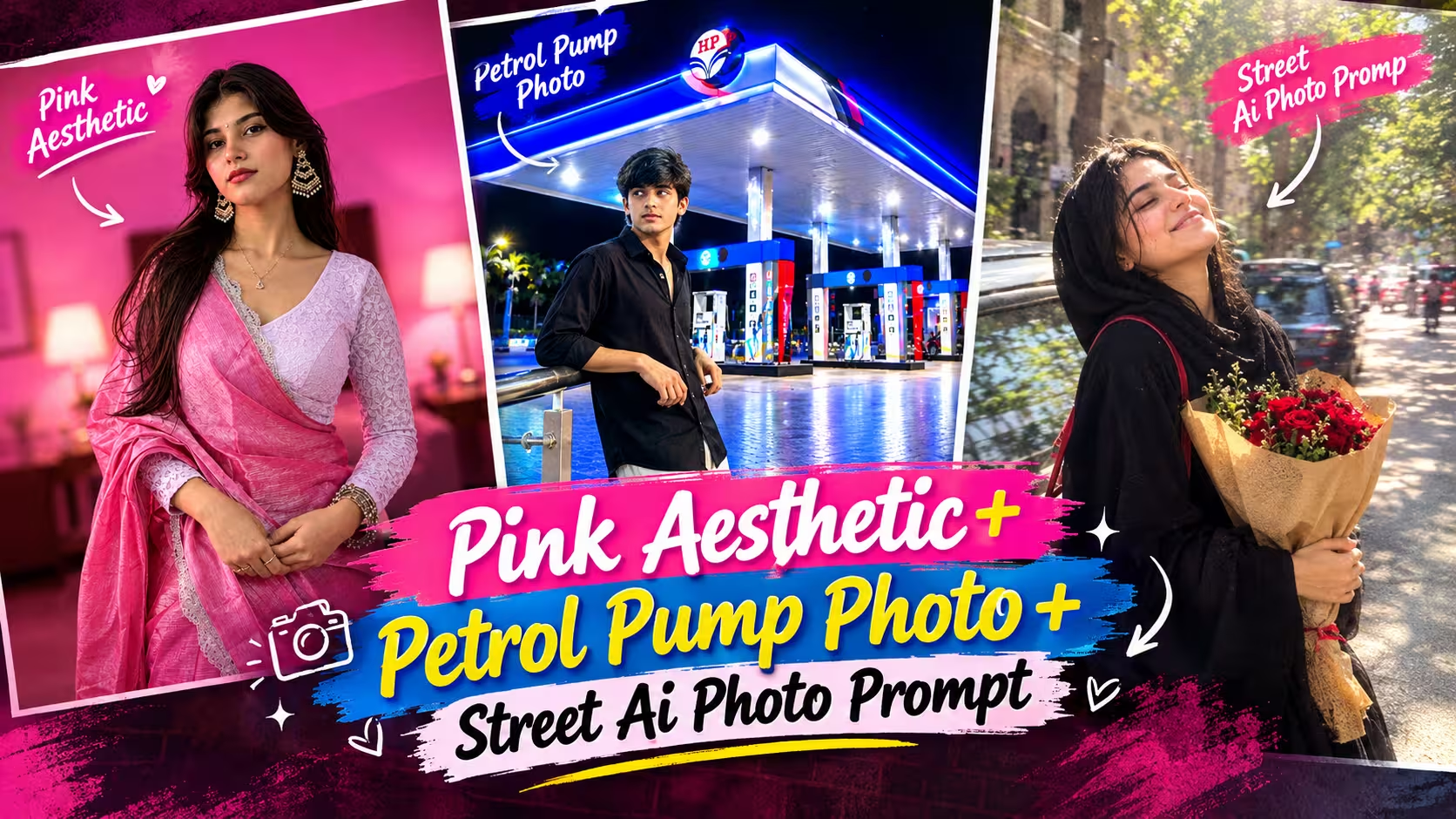
Enhance this image with asthetic pink blur background Soft lighting +indoor asthetic room with dim lighting + no changes in facial features + clear and good
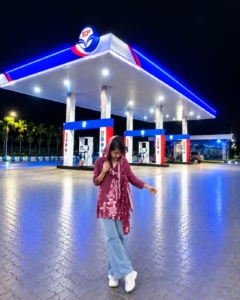
Use my uploaded photo as the main identity reference. Create a highly realistic full-body portrait of me standing naturally in front of a modern, brightly illuminated petrol station at night. Preserve my exact facial identity, face shape, eyes, nose, lips, skin tone, hairstyle, body proportions, and natural appearance. Place me slightly in the foreground with a relaxed, candid pose and natural expression. The petrol station should have a large contemporary canopy, bright white ceiling lights, blue and red accent lighting, visible fuel dispensers, clean tiled pavement, and subtle reflections on the ground. Add realistic night atmosphere with deep dark sky and soft environmental lighting. Maintain accurate perspective, natural shadows, realistic skin texture, detailed clothing, DSLR-quality photography, cinematic depth, sharp focus, and photorealistic details. No text, watermark, distortion, or artificial beauty effects.
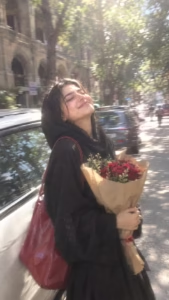
Ultra-realistic candid street photograph, vertical 9:16. Use the uploaded photo as the identity reference and preserve her natural face, skin tone, age and recognizable features. Show a young South Asian woman wearing a flowing black abaya and matching hijab, standing beside a parked white car on a busy tree-lined city street. She carries a large red leather shoulder bag and holds a bouquet of deep red roses wrapped in brown kraft paper with both hands. Her body leans slightly backward, head tilted upward toward the sunlight, eyes tightly closed and wearing a genuine broad joyful smile, as if caught laughing naturally. Include parked cars, leafy trees and old buildings with beautiful arches in the background. Bright midday sunlight, dappled shadows, glowing highlights, gentle haze and slight overexposure. Add subtle motion blur, soft lens focus, smeared edges, faded colors, realistic film grain and imperfect camera texture. Keep natural skin texture, realistic hands and proportions. No beauty filter, plastic skin, CGI, cartoon look or artificial appearance.
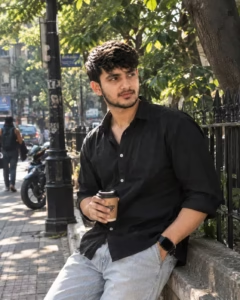
Create an ultra-realistic 4:5 street portrait using the uploaded photo as the identity reference. Preserve the person’s natural facial features, skin tone, hairstyle, age and overall appearance. Show him casually sitting against a low stone wall beside a black iron fence on a leafy urban street. He wears a relaxed black button-up shirt with rolled sleeves, light blue jeans, a black smartwatch and a subtle chain, holding a takeaway coffee cup in one hand while looking thoughtfully to the side. Add mature trees, a street lamp, parked scooters, cars, distant pedestrians and softly blurred city buildings in the background. Use warm afternoon sunlight, natural shadows, gentle bokeh, realistic depth, subtle lens softness and authentic skin texture. Keep the image candid, natural and photographic, without beauty filters, plastic skin, CGI or artificial effects.
How to Create Ai Street Photo
Creating this realistic candid street photo is very easy. You can create a similar image in just a few minutes using ChatGPT. Below, I have explained the complete process in simple steps, so you can follow it easily even if you have never used an AI photo editing tool before.
- First, choose one clear photo of the person you want to edit. A photo with a clearly visible face, natural lighting, and good quality usually gives better results.
- After that, open the ChatGPT app and log in to your account.
- Now come back to this article and copy the Realistic Candid Street Photo Prompt given below the example image.
- Next, open a new chat in ChatGPT and tap the + icon near the message box. Select the photo you want to use from your phone and upload it.
- After uploading the photo, paste the copied prompt into the chat along with the image and tap the Send button.
- ChatGPT will process your reference photo and create a new street-style image based on the prompt. Wait for the image generation to finish.
- Once the image is ready, carefully check the face, abaya, hijab, roses, red shoulder bag, pose, white car, background and lighting. Make sure everything looks natural and matches the style shown in the example.
- If you want to change something, simply tell ChatGPT what you want to adjust and ask it to create another version. You can also try the prompt again if the first result does not look right.
- Finally, once you are happy with the result, save your generated photo and share it on Instagram, Facebook, WhatsApp, or any other platform you prefer.
Create Your Image
How to Get Better Results From the Same Prompt
You do not necessarily need a completely different prompt every time the first result is not perfect.
Look at what went wrong and make a small adjustment.
- If the face does not look close enough to the reference, strengthen the instruction about preserving the person’s natural facial features.
- If the background looks artificial, provide more information about the street and surrounding environment.
- If the pose looks uncomfortable, simplify the pose.
- If the image is too blurry, reduce the amount of motion blur.
- If the colors look too strong, ask for muted and natural colors.
This approach is usually more useful than continuously adding more and more instructions to the prompt.
Why Small Imperfections Can Improve the Image
Real photographs have imperfections.
A person may move slightly while the shutter is pressed. Sunlight can cause a bright patch on the face. Hair can move in the wind. A background vehicle may be slightly blurred. A camera lens can create a soft glow around bright areas.
These details are not necessarily flaws. They can actually make an image feel more authentic.
For this reason, the candid prompt focuses on things such as subtle motion blur, film grain, soft focus and natural lighting rather than trying to create an impossibly perfect photograph.
The key word is subtle. These effects should support the photograph rather than become the main attraction.
You Can Create Different Versions From the Same Idea
Once you understand the basic concept, you can use the same style for many different AI photo edits.
You could create a rainy street version with wet roads and reflections. A golden-hour version could use warm evening sunlight. A winter version could include a coat and a cloudy background.
You can also change the location.
A quiet residential street can give the photograph a peaceful feeling, while a busy market can make it feel more energetic. An old building with arches can create a different visual character compared with a modern city background.
The important thing is to keep the scene believable.
A Few Things to Check Before Saving the Final Image
Before downloading or sharing the final image, take a moment to look closely at the details.
Check the face first. Does it still look natural and consistent with the reference image?
Then look at the hands and fingers. AI tools can sometimes create small mistakes in these areas.
After that, check the clothing, bag, flowers and other objects. Make sure they are properly connected to the person’s hands and body.
Finally, look at the background. Cars, buildings, trees and other objects should have believable shapes and perspective.
If something looks strange, generate another version or make a small change to the prompt.
Frequently Asked Questions
1. Can I use my own photo for this AI street photo edit?
Yes. A clear personal photo can be used as the reference image with an AI tool that supports image-based editing or generation. Make sure you have the necessary rights or permission when using photographs of other people.
2. Do I need professional editing skills?
No. The main idea is to provide a suitable reference photo and use a well-written prompt. Basic familiarity with the AI tool is usually enough.
3. Why does my result look too much like an AI image?
This can happen because of overly smooth skin, unrealistic lighting, excessive sharpness or unnatural backgrounds. Asking for natural skin texture, realistic lighting and subtle camera imperfections can help.
4. Can I change the outfit?
Yes. You can replace the outfit description with the clothing style you want. The rest of the scene can remain similar.
5. Can I change the flowers or bag?
Yes. Props can easily be changed. You can use flowers, a handbag, coffee cup, book or another suitable object.
6. Can I make the image vertical for Instagram or social media?
Yes. A 9:16 vertical format is suitable for many social-media platforms and works particularly well for full-screen mobile viewing.
7. Will every generated image look exactly the same?
No. AI generation can produce different results even when the same prompt and reference photo are used. Small variations in facial details, lighting, background and pose are normal.
Conclusion
Creating a realistic AI street photo is mainly about getting the scene, pose, lighting, and natural details right. A good reference photo combined with a detailed prompt can turn a simple portrait into a candid-looking street photograph without requiring advanced editing skills.
For the most natural result, avoid excessive effects and focus on realistic skin texture, believable backgrounds, natural lighting, and subtle camera imperfections. If the first result is not perfect, make small changes and try again.
You can use the prompt provided in this article as a starting point and customize the outfit, location, props, and lighting to create your own unique candid street photos.