Nowadays, AI-generated portraits are becoming a popular way to create beautiful and creative photos for Instagram, Facebook, WhatsApp and other social media platforms. Among different AI photo trends, emotional close-up portraits have a special look because they focus mainly on the face, eyes and expressions.
A simple portrait can look completely different when it has a cinematic atmosphere, soft lighting, natural skin details and an emotional expression. Instead of looking like a regular selfie, the final image can have the feel of a professional photography session.
The AI Portrait Prompts: Create Emotional, Cinematic Close-Up Photos with AI trend is especially interesting for people who enjoy aesthetic and realistic portraits. These images can be used for profile pictures, social media posts, wallpapers, creative projects and personal collections.
In this article, we will look at what makes emotional cinematic portraits different, what kind of visual details make them attractive, and some important things to keep in mind when creating this type of AI photo.
What Are Emotional AI Portraits?
An emotional AI portrait is a digitally created or enhanced portrait that focuses strongly on the person’s expression and mood.
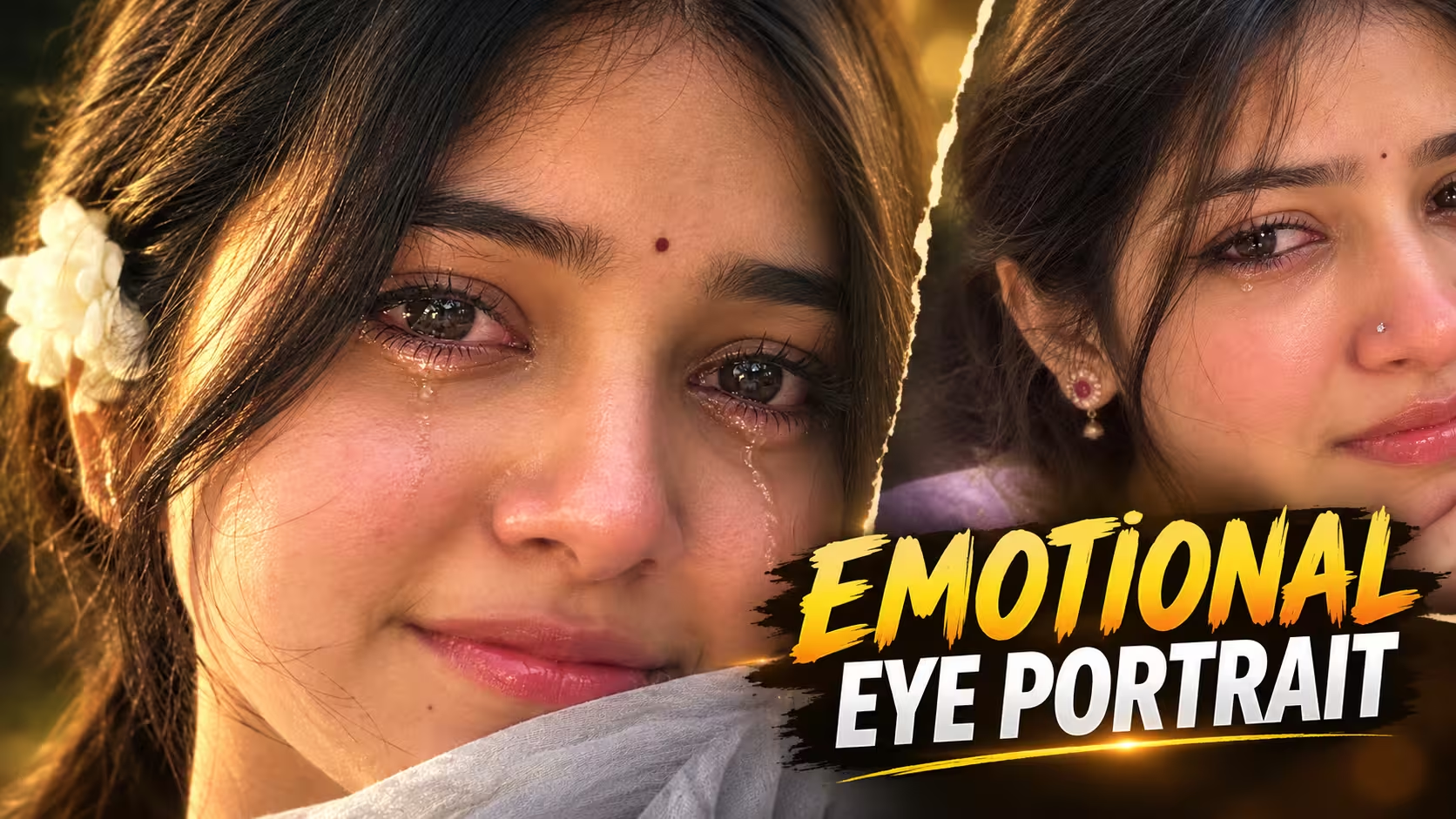
Unlike normal portraits where the complete outfit and background may be equally important, an emotional close-up portrait usually gives more attention to the face. The eyes, lips, hair, skin texture and small facial expressions become the main part of the composition.
A slightly watery eye, a gentle smile or a quiet expression can communicate a feeling without requiring any text. This is one reason emotional portraits work well on social media.
The cinematic style adds another layer to the image. Soft light, background blur, natural colors and controlled shadows can make the portrait feel more like a professional photograph.
Why Are Cinematic Close-Up Photos So Popular?
One major reason is that close-up photography naturally creates a stronger connection with the viewer.
When the face occupies most of the frame, small details become noticeable. The viewer can see the eyes, expression, hairstyle and natural facial features more clearly.
Cinematic lighting also helps create a particular mood. Warm evening light can make a portrait feel soft and peaceful, while slightly darker lighting can give it a more serious and emotional appearance.
Another reason is simplicity. A good close-up portrait does not need a complicated background or lots of objects. The face itself becomes the main subject.
This makes the style suitable for social media profile pictures, Instagram posts, WhatsApp DPs and other personal content.
Prompt ⬇️
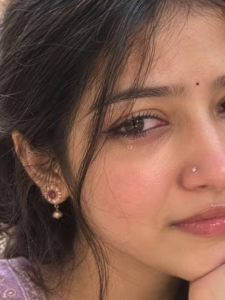
Extreme close-up smartphone portrait, same face and features. Focus on dark eyes, slightly red and watery as if she just cried, glossy pink lips, silver nose pin, tiny black bindi, soft smile, warm golden-hour light, natural skin. Hide the face so that the eye can be seen. Put Kajal in the eyes.
How To Create Emotional AI Portrait Photo
If you also want to create this beautiful emotional cinematic portrait with AI, then don’t worry. The complete process is very simple. Just follow the steps given below carefully and you can easily create your own photo.
- First of all, download the ChatGPT app from the Play Store and log in with your account.
- After that, come back to this article and copy the AI photo editing prompt given below the image.
- Now open ChatGPT and click on the Plus (+) icon to upload your photo.
- Select a clear and high-quality photo in which your face is properly visible.
- After uploading your photo, paste the copied prompt into the chat.
- Now click on the Send button and wait for a few moments.
- ChatGPT will start processing your photo according to the given instructions.
- Once the image is generated, check the face, eyes, hair, skin details, and overall composition.
- If the result is not exactly what you want, you can generate another version with the same prompt.
- Finally, download your AI-generated emotional portrait and use it for your Instagram DP, WhatsApp Status, Facebook post, or personal collection.
Create Your Image
Tips for a More Realistic AI Portrait
- If you want the final image to look natural, there are a few things worth keeping in mind.
- First, the reference photograph should be clear and reasonably well-lit. A blurry or heavily filtered image can make facial details harder to preserve.
- Second, avoid changing too many facial characteristics at the same time. Keeping the person’s basic appearance consistent usually creates a more believable result.
- Third, avoid excessive beauty effects. Very large eyes, unrealistically smooth skin or exaggerated facial proportions can quickly make an image look artificial.
- It is also useful to keep the lighting, hairstyle and overall styling consistent when creating multiple versions of the same portrait.
- Most importantly, remember that realistic images are often created through subtle details rather than excessive effects.
Things to Avoid in AI Portraits
There are a few common issues that can reduce the quality of an AI portrait.
Avoid excessive blur because it can remove important facial details. Extremely smooth skin can also make the face look plastic.
Unnatural eyes are another common problem. If the eyes are too bright, oversized or incorrectly shaped, the portrait may immediately look artificial.
Hands and accessories can sometimes contain small visual errors as well, so it is worth checking the complete image carefully before sharing it.
Text, logos and unwanted objects in the background should also be checked, especially if the image is going to be used publicly.
A final review can help you catch small problems that may not be noticeable at first glance.
Why This Style Works Well for Social Media
Emotional portraits naturally attract attention because they communicate a feeling without requiring a long caption.
A close-up face with expressive eyes can work particularly well as an Instagram post or profile image. The cinematic appearance also gives ordinary portraits a more polished visual identity.
However, there is no guarantee that an AI-generated image will become viral simply because it follows a popular style. Social media performance depends on many factors, including the image itself, audience, timing and the overall content.
The best approach is to focus on creating an image that feels authentic and visually interesting rather than relying only on trends.
FAQ
1. What is an emotional cinematic AI portrait?
It is a digitally created or enhanced portrait that focuses on facial expressions, lighting, mood and close-up composition to create a cinematic photographic appearance.
2. Can I create this type of portrait from my own photo?
Yes. Many AI image tools support reference images, allowing users to create a new portrait while using an existing photograph as visual reference.
3. What type of photo works best as a reference?
A clear photo with good lighting and a visible face generally provides a better starting point. Blurry or heavily filtered photographs may produce less consistent results.
4. Can I create a sad or emotional expression?
Yes. Emotional details such as watery eyes, subtle tears, a quiet expression and soft lighting can create a melancholic mood without making the portrait look exaggerated.
5. Can I add kajal, a bindi or traditional accessories?
Yes. Details such as kajal, a small bindi, earrings and traditional clothing can be included when creating an Indian-style portrait.
6. Why does my AI portrait sometimes look artificial?
This can happen because of excessive retouching, unrealistic facial proportions, poor reference quality or overly complicated visual directions. Keeping the appearance natural generally helps.
7. Can these portraits be used on Instagram and WhatsApp?
Yes. You can use your AI-generated portraits for personal social media posts, profile pictures and other creative purposes, provided the content follows the relevant platform rules.
Conclusion
AI portrait editing has made it much easier to explore different photography styles without needing a professional camera or studio setup. Emotional cinematic close-up portraits are a beautiful example of how small visual details can completely change the feeling of an image.
Expressive eyes, natural skin texture, soft lighting, subtle makeup, loose hair and a simple background can come together to create a portrait that feels personal and realistic.
If you are creating this type of image, focus on keeping the overall appearance natural instead of adding too many effects. A clean composition and a genuine expression can often make a stronger impression than heavy editing.
Whether you want an emotional profile picture, an aesthetic social media post or simply a creative portrait for your personal collection, this cinematic style gives you plenty of room to experiment with different moods and visual ideas.