Introduction
Every year, 15th August is celebrated with great pride across India. It is a day that reminds us of our freedom, our history, and the sacrifices made by countless freedom fighters. People celebrate Independence Day in many different ways. Some attend flag-hoisting ceremonies, some wear tricolor outfits, and many express their patriotism by sharing special photos and videos on social media.
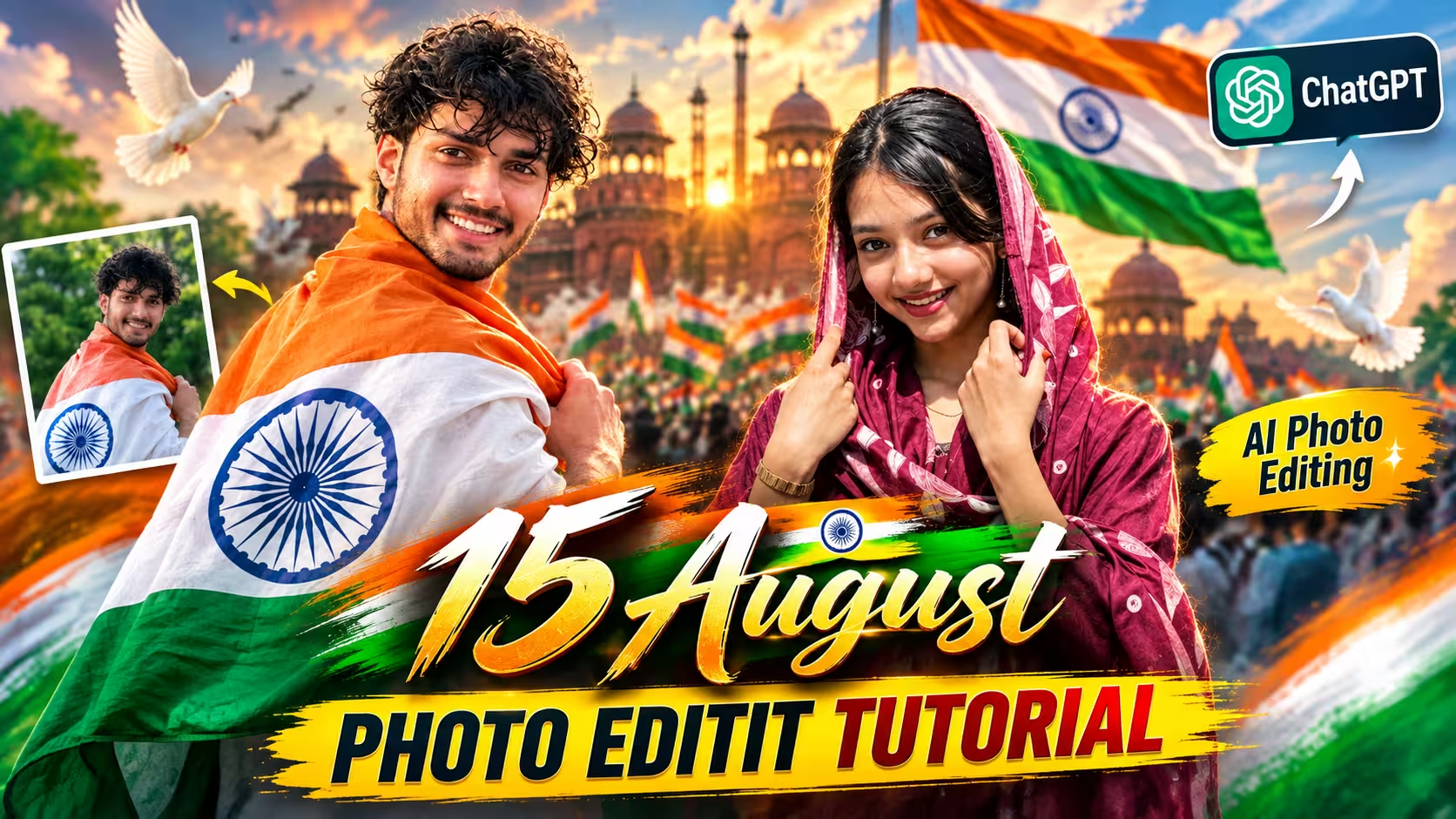
In recent years, one trend has become incredibly popular. Instead of using ordinary pictures, people are creating cinematic AI-generated Independence Day portraits. These photos feature the Indian National Flag, the Red Fort, golden sunrise lighting, flying birds, patriotic backgrounds, and professional DSLR-style effects. They look so realistic that many people cannot even tell they were created with AI.
The best part is that you don’t need to be a professional photo editor to create these stunning images. With the help of ChatGPT and a well-written prompt, anyone can create a beautiful Independence Day portrait within a few minutes.
In this guide, I’ll explain everything step by step, so even if you’re using AI for the first time, you can easily create your own patriotic photo.
Why Are AI Independence Day Photos So Popular?
Every festival and national celebration brings new social media trends, and Independence Day is no exception. Every year, millions of people update their Instagram profile pictures, WhatsApp DP, Facebook cover photos, and status with patriotic images.
This year, AI photo editing has completely changed the way people create these pictures.
Instead of downloading random Independence Day wallpapers from the internet, users are now creating personalized portraits using their own photos. AI can place your picture in front of famous monuments like the Red Fort or India Gate, add a large Indian National Flag, beautiful golden lighting, cinematic depth, and realistic visual effects that make the final image look like it was captured by a professional photographer.
This is one of the biggest reasons why AI-generated Independence Day photos are becoming viral on Instagram Reels, Facebook, YouTube Shorts, and WhatsApp Status.
What Makes These AI Photos Look So Real?
The secret behind these realistic AI photos is a well-written prompt. AI creates images based on the instructions you provide. A detailed prompt tells the AI exactly what you want, including the background, lighting, facial details, camera angle, skin texture, colors, and overall style. The clearer your instructions are, the more realistic and professional the final image looks.
For Independence Day photos, prompts often include elements like the Indian National Flag, Red Fort, golden sunrise, cinematic lighting, flying birds, white doves, and DSLR camera settings. These details help AI generate a natural-looking portrait with realistic skin, sharp facial features, and beautiful patriotic effects. That’s why a high-quality prompt can make an AI-generated image look almost like a real photograph.
Prompt ⬇️
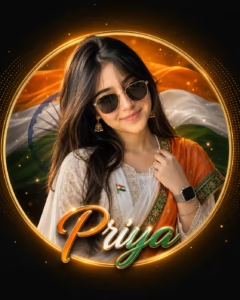
Use the uploaded image as the ONLY identity reference. Preserve her face exactly: face shape, forehead, eyebrows, eyes, nose, lips, jawline, skin tone, hairstyle, hairline, expression and unique features unchanged. Create a premium Independence Day Instagram DP, 4:5 portrait, strict chest-up, perfectly centered inside a glowing circle with equal margins, looking at camera with a soft elegant smile.
Matte black luxury background, flowing saffron-white-green silk waves, subtle Ashoka Chakra, thin metallic-gold ring, orange glow, golden particles and minimal dotted graphics. Cinematic HDR, soft beauty lighting, golden hair/shoulder rim light, DSLR quality. Dress her in a premium white embroidered Anarkali with white chiffon dupatta and saffron silk dupatta with green embroidered border. One hand gently holds the dupatta. Add gold-frame butterfly sunglasses, silver smartwatch, Indian flag pin, gold jhumkas and thin bracelet. Inside the circle only, add handwritten “Priya” in metallic Indian tricolor gradient, gold outline and soft glow. Ultra-realistic, hyper-detailed skin, 8K luxury editorial photography. No face modification, distortion, extra limbs, cropping or text outside the circle.
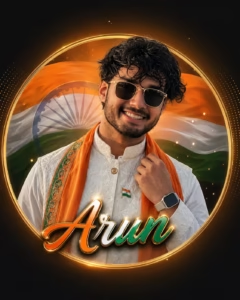
Use the uploaded reference image as the ONLY identity reference. Preserve facial identity exactly. Do not alter the face shape, hairstyle, skin tone, eyes, nose, lips, beard, or expression. Create a premium Independence Day luxury Instagram DP. Aspect Ratio: 4:5 Portrait

Composition:Strict chest-up portrait Entire character completely inside a centered glowing circle Equal margins on all sides Looking directly towards the camera One hand gently adjusting the saffron stole (or lightly touching the jacket collar) Soft confident smile

Background: Premium matte black Centered glowing circular frame Luxury flowing Indian tricolor silk wave inside the circle Soft semi-transparent Ashoka Chakra Thin metallic gold ring Minimal luxury dotted graphic Warm orange radial glow Tiny floating gold particle Clean, premium composition

Lighting: Ultra-realistic HDR Golden rim light around the subject Soft cinematic face lighting High-end luxury color grading

Outfit:

Premium white embroidered kurta Luxury Nehru jacket (white or deep navy) Flowing saffron silk stole with green embroidered border Elegant patriotic detailing

Accessories:

Premium butterfly-style sunglasses with gold frame Luxury silver smartwatch Minimal patriotic lapel pin (Indian flag) Typography (Inside Circle Only): Large handwritten name [Arun] Indian tricolor metallic gradient Gold outline Soft golden glow

Style: Ultra-realistic Hyper-detailed skin texture Premium luxury Instagram creator aesthetic Perfect symmetry Sharp focus 8K quality Professional DSLR look High-end Independence Day celebration theme Everything perfectly aligned inside the circular composition.
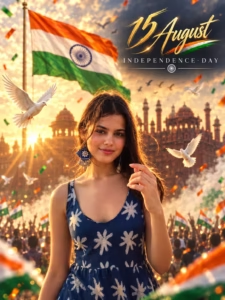
 Create an award-winning ultra-realistic 8K Independence Day cinematic poster using the uploaded photo as the exact facial reference. Maintain 100% identity accuracy including hairstyle, facial structure, beard, expression, clothing, and skin tone.
Compose the subject in the foreground with a powerful, confident pose. Behind him, display an enormous Indian National Flag illuminated by golden sunrise light. Use a dreamy blurred background inspired by the Red Fort and Independence Day celebrations.
Enhance the scene with cinematic fog, floating tricolor dust particles, soft golden bokeh, flying white doves, birds soaring across the sky, patriotic crowd silhouettes, realistic sunlight beams, subtle smoke, and luxury lens flare.
Apply premium magazine-style HDR color grading, hyper-realistic skin texture, crisp facial details, natural lighting, soft rim light, cinematic depth of field, dramatic contrast, and ultra-sharp DSLR quality.
Add elegant typography:
"15 August" in luxurious handwritten gold script.
"INDEPENDENCE DAY" in minimal uppercase below.
Luxury editorial composition, Instagram 4:5 poster, photorealistic, masterpiece, trending viral Pinterest aesthetic, Canon EOS R5, RF 85mm f/1.2 lens, ultra-detailed, 8K UHD, breathtaking cinematic quality.
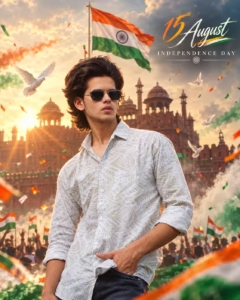
 Create an ultra-realistic 8K cinematic Independence Day portrait using the uploaded photo as the exact facial reference. Preserve the person's facial identity 100%, including face shape, hairstyle, beard, skin tone, expression, clothing, body proportions, and natural texture without alteration.
Position the subject confidently in the foreground, looking proudly toward the camera. In the background, feature the iconic Red Fort with a gigantic Indian National Flag waving dramatically from a tall flagpole. Fill the atmosphere with warm golden sunrise rays piercing through soft morning mist, creating a premium patriotic ambience.
Add saffron, white, and green cinematic light streaks, floating tricolor confetti, subtle smoke effects, white doves flying across the sky, and a cheering patriotic crowd silhouette with tiny Indian flags in the distance. Include realistic lens flare, volumetric lighting, HDR reflections, shallow depth of field, and luxury color grading.
Use DSLR photography quality, 85mm lens, f/1.8 aperture, ultra-sharp facial details, natural skin pores, realistic shadows, soft cinematic glow, premium contrast, and vibrant tricolor tones.
Typography:
"15 August" in elegant handwritten calligraphy.
"INDEPENDENCE DAY" in clean uppercase beneath it.
Vertical 4:5 Instagram poster, masterpiece, ultra-realistic, cinematic, luxury editorial style, 8K UHD, trending Pinterest aesthetic, highly detailed.
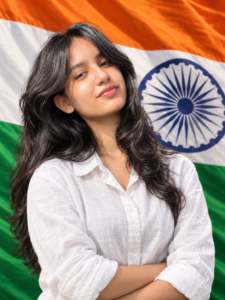
 Prompt: A hyper-realistic studio portrait of a
20-year-old Indian [boy/girl] standing directly in front of a massive, gently waving Indian national flag that completely fills the entire background. The person is wearing a premium white linen casual shirt, looking confidently into the camera with a proud smile.
Professional studio lighting, sharp focus on the person, realistic fabric textures of both the clothes and the flag, shot on 85mm lens, 8k resolution, indistinguishable from a real photograph. 3:4 ratio
How To Create 15 August Photo
Here you are given some instructions to make the photo of 15th August. If you read these instructions carefully and follow each step, you will be able to create your photo very easily.
- First of all, you have to download the Chatgpt app from Google Play Store and login with it.
- Now you have to copy the prompt given below whichever photo you want to make from the photos given in this post.
- Now go back to chatgpt, click on the plus icon and upload a nice photo of yourself and send it by pasting the copied prompt.
- Now Chatgpt will start creating your photo and in a short while your photo will be ready, you have to download it.
- You can create more photos of yourself by following the same process.
What You Need Before Creating Your AI Photo
Before generating your image, make sure you have a good-quality reference photo.
- A clear image always produces better results.
- Here are a few simple tips:
- Use a photo where your face is clearly visible.
- Make sure the image is not blurry.
- Natural lighting works best.
- Avoid heavy filters.
- Keep your face uncovered.
- Use a high-resolution image whenever possible.
Tips to Get the Best Results
If you want your AI photo to look premium and realistic, keep these simple tips in mind.
Always upload a high-quality image with good lighting. A clear face helps AI preserve your identity more accurately. Avoid blurry photos, heavy beauty filters, or images where your face is partially hidden. The better your original photo is, the better the final result will be.
You can also experiment with different styles. For example, try adding keywords like golden hour, DSLR portrait, editorial photography, 85mm lens, cinematic lighting, or HDR color grading. These small details often make the generated image look more professional.
Why Use ChatGPT for AI Photo Editing?
There are many AI image generators available today, but ChatGPT makes the entire process much easier.
Instead of spending time learning complicated editing software, you simply upload your photo and provide a detailed prompt. ChatGPT understands your instructions and generates an image based on them.
FAQ
1. Can I create a 15 August AI photo using ChatGPT?
Yes, you can create a realistic Independence Day AI photo with ChatGPT by uploading a clear photo and using a detailed AI prompt. The better your prompt, the more realistic and cinematic your final image will look.
2. Do I need any photo editing skills?
No. You don’t need Photoshop or any professional editing experience. Simply upload your photo, paste the prompt, and let ChatGPT generate the image for you.
3. Which type of photo gives the best results?
For the best output, use a high-resolution photo with good lighting where your face is clearly visible. Avoid blurry images, heavy filters, or photos where your face is covered.
4. Can I customize the background and style?
Yes. You can easily customize the prompt by changing the background to the Red Fort, India Gate, or another patriotic location. You can also add effects like golden sunrise, flying birds, tricolor smoke, cinematic lighting, and more.
5. Will ChatGPT keep my face the same?
If you use a prompt that asks ChatGPT to preserve your facial identity, hairstyle, skin tone, and expression, it will try to keep your appearance as close as possible to the uploaded photo.
Conclusion
Creating a beautiful 15 August AI photo has become easier than ever. You no longer need expensive editing software or advanced design skills. With a clear photo, a detailed prompt, and ChatGPT, you can create a professional-looking Independence Day portrait in just a few minutes.
If you want your photo to stand out on Instagram, Facebook, or WhatsApp this Independence Day, try the prompt shared in this article. You can also customize it to match your own style and create something truly unique. Celebrate India’s Independence with creativity, share your patriotic spirit, and make this 15 August even more memorable with your own AI-generated masterpiece.