Introduction
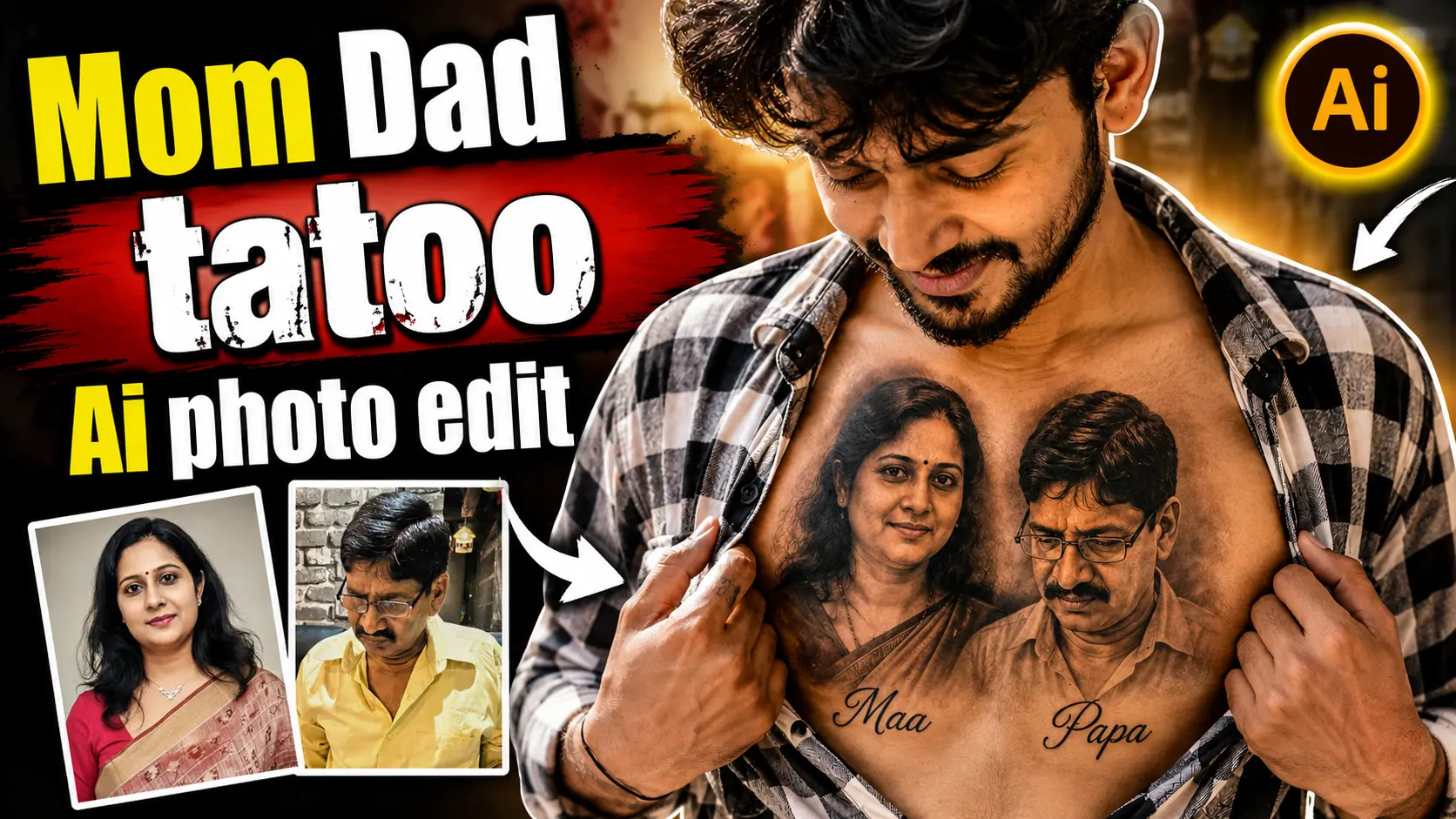
A meaningful way to create a personalized AI photo is to turn a family memory into a tattoo-style design. One interesting concept is an AI-generated photo showing a portrait of your mother, father, or both as a tattoo on the chest.
The important thing to understand is that this is an AI-created visual concept, not a real permanent tattoo. You can experiment with the idea before deciding whether you actually want a tattoo in real life.
You don’t need professional Photoshop skills for this type of edit. An image-generation tool such as ChatGPT can combine your reference photos with a detailed text prompt to create a new image based on your instructions.
The final result depends on the quality of the reference photos, the AI model you use, and how clearly the prompt describes the desired composition.
Why Create a Mom & Dad Tattoo AI Photo?
Family photographs often carry a lot of personal meaning. Turning a photograph of your parents into a tattoo-inspired design can be a creative way to visualize that memory.
There are several ways you can use the resulting AI image:
- As a personal photo concept
- As a social media post
- As inspiration for a future tattoo design
- As a family memory project
- As a creative AI photography experiment
Because the image is generated digitally, you can try different tattoo placements, styles, compositions, and lettering without making any permanent changes to your body.
What You Need
Before starting, keep these things ready:
- A clear photo of your mother, father, or both.
- An AI image-generation tool that supports image uploads.
- A detailed prompt.
- A little patience for adjusting the prompt if the first result isn’t what you expected.
For the best results, use photographs where the faces are clearly visible and reasonably well lit.
Mom & Dad Tattoo AI Photo Prompts
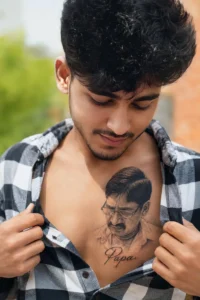
The boy is wearing a black-and-white checkered shirt, slightly unbuttoned to reveal a highly detailed realistic chest tattoo featuring a handsome portrait of his father with the name 'Papa' written in elegant cursive below it. He is smiling softly while looking down at the tattoo with love and respect. The tattoo blends naturally into his skin with realistic shading, fine ink details, and lifelike texture. Natural daylight, cinematic lighting, DSLR quality, ultra-realistic skin texture, shallow depth of field, and 8K photo realism.
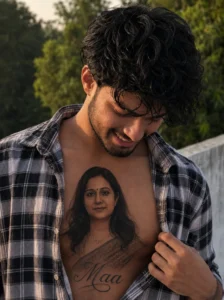
The boy is wearing a black-and-white checkered shirt, slightly unbuttoned to reveal a highly detailed realistic chest tattoo featuring a beautiful portrait of the girl with the name 'amma written in elegant cursive below it. He is smiling softly while looking down at the tattoo
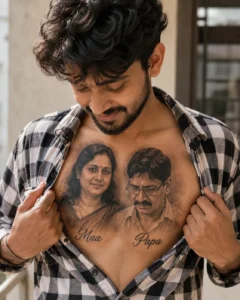
The boy is wearing a black-and-white checkered shirt, slightly unbuttoned to reveal a highly detailed realistic chest tattoo featuring beautiful portraits of both his mother and father. The mother's portrait has the name 'Maa' written in elegant cursive below it, while the father's portrait has the name 'Papa' written in elegant cursive below it. He is smiling softly while looking down at the tattoo with love and pride. The tattoo blends naturally into his skin with realistic shading, fine ink details, and lifelike texture. Natural daylight, cinematic lighting, DSLR quality, ultra-realistic skin texture, shallow depth of field, and 8K photo realism.
How to Create a Realistic Mom & Dad Tattoo AI Photo
Getting your Mom Dad’s Tattoo on your Chest is very easy with the help of AI The process of making it is very simple, just follow the given steps and make your photo easily.
- First of all, you have to download the Chatgpt app from Playstore and login with it.
- After that you have to take a photo of your mother and father.
- Then you have to come to the website and copy the prompt given below the photo.
- Now scroll down a bit and click on the create your image button.
- You have to select your and your parents’ photo by clicking on the plus icon of Chatgpt.
- Then paste the copied prompt and click on send.
- Now Chatgpt will make your tattoo photo for you in a short while.
Create Your Image
Tips for Better Results
Use Clear Reference Photos
Avoid extremely blurry, dark, or heavily edited photographs. A clear reference gives the AI more information to work with.
Keep the Tattoo Proportional
A tattoo can look unnatural if it is too large or placed incorrectly. Mention the approximate size and position in your prompt if necessary.
Try Different Tattoo Styles
You don’t have to use the same realistic style every time. You can experiment with:
- Black-and-grey portrait tattoo
- Fine-line tattoo
- Minimalist portrait
- Traditional tattoo style
- Soft shading
- Detailed realistic ink
Check the Text
AI-generated text can sometimes contain spelling mistakes. If you want names such as “Maa,” “Amma,” or “Papa,” check the final image carefully.
If the lettering isn’t correct, regenerate the image or create the tattoo design without text and add the lettering later using an image editor.
Don’t Expect Identical Results Every Time
AI image generation is not perfectly predictable. Even with the same prompt and reference image, different generations can produce different results.
Instead of expecting an exact result on the first attempt, treat the first generation as a starting point and refine the instructions.
Is This a Real Tattoo?
No. The image created using this method is a digitally generated AI concept.
It can be useful if you want to see what a particular tattoo idea might look like before discussing the design with a professional tattoo artist.
If you are considering getting the design permanently tattooed, it’s better to show the concept to a qualified tattoo artist. They can create a suitable stencil and adjust the design according to your body shape and tattoo placement.
Can I Use My Parents’ Photos?
Yes, using your own family photographs is the most appropriate approach for this type of personal project.
If the photographs belong to someone else, make sure you have permission to use them. Avoid using private photographs for purposes that the person has not agreed to.
Frequently Asked Questions
1. Can I create a Mom & Dad tattoo image for free?
Some AI image-generation services provide free access or limited free generations, while others require a subscription or credits. Availability and limits can change over time.
2. Do I need Photoshop?
No. An AI image-generation tool can handle much of the image creation process. However, traditional editing software can be useful if you want to make additional adjustments after generating the image.
3. Will the AI preserve my parents’ faces?
The result depends on the AI model and the quality of the reference images. AI may alter some facial details, so check the generated image carefully.
4. Can I create a tattoo for both parents?
Yes. You can provide reference photographs of both parents and describe how you want their portraits positioned in the tattoo design.
5. Can I change the tattoo style?
Yes. You can ask the AI to create different styles such as fine-line, black-and-grey, traditional, minimalist, or detailed portrait tattoo designs.
6. Can I use the AI image as a real tattoo reference?
Yes, it can be used as a starting concept. However, a professional tattoo artist should adapt the design before it is permanently tattooed.
Important Note About AI-Generated Images
AI-generated images are creative visual concepts and may not perfectly reproduce the original photographs. Faces, lettering, body proportions, clothing, and other details can change during generation.
For personal family images, use photographs that you have permission to use. Also remember that an AI-generated tattoo image should not be presented as proof of a real tattoo if it is digitally created.
Conclusion
Creating a Mom & Dad Tattoo AI photo is a simple way to visualize a meaningful family-inspired design without getting a permanent tattoo. With clear reference photographs and a detailed prompt, you can experiment with different portrait styles, tattoo placements, lettering, and lighting.
The first generation may not always look exactly as expected, so don’t hesitate to make small changes to the prompt and try again. The most important part is to treat the result as an AI-generated creative concept and use photographs responsibly.
If you eventually want to turn the idea into a real tattoo, use the AI image as inspiration and work with a professional tattoo artist to create the final design.