Introduction
Have you ever stopped scrolling because a single photo caught your attention? Maybe it was someone sitting quietly beside a rainy window, walking alone on an empty road, or looking at the sky with a broken heart. These photos feel different because they don’t just show a person—they tell a story. This is exactly why emotional AI photos have become one of the biggest trends on Instagram, WhatsApp, Facebook, and Pinterest. They look like scenes from a movie, but most of them are created with AI in just a few minutes.
The best part is that you don’t need to be a professional photo editor. You don’t need Photoshop or expensive software either. If you have a clear photo of yourself and a good AI prompt, you can create amazing emotional portraits that look realistic and natural.
In this guide, I’ll explain everything in simple English. Whether you’re a beginner or someone who has never used AI before, you can easily follow these steps and create your own cinematic AI photo.
Why Are Emotional AI Photos So Popular?
People love photos that make them feel something. A normal selfie might get a few likes, but a photo that tells a story often gets much more attention. Imagine two different pictures. One is a simple selfie. The other shows the same person sitting alone in the rain with soft street lights, a cloudy sky, and a thoughtful expression. Which one would you stop to look at? Most people choose the second one because it creates emotion.
That is the reason these AI photos are becoming viral. They look realistic, they tell a story, and they connect with people without using many words. Many creators also use these images for Instagram posts, WhatsApp Status, YouTube thumbnails, Facebook covers, and Pinterest pins because they stand out from regular photos.
Photo Prompt ⬇️
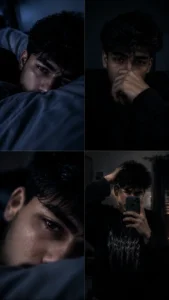
“Moody low-light pics of a young person from reference image , tired expression, emo/alt aesthetic. Generate Four-images , n = 4 , images ratio 9:16

1. lying on a pillow, face partially hidden, dim blue lighting, soft shadows

2. sitting in darkness, hand covering mouth, contemplative mood, grainy texture

3. extreme close-up of face resting sideways, blurry, dreamy, cinematic noise

4.mirror selfie, black oversized outfit with graphic tee, one hand in hair, dim room lighting Overall dark, desaturated tones, soft blur, film grain, melancholic atmosphere, night-time bedroom setting, indie aesthetic, slightly hazy focus.”
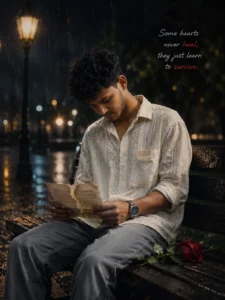
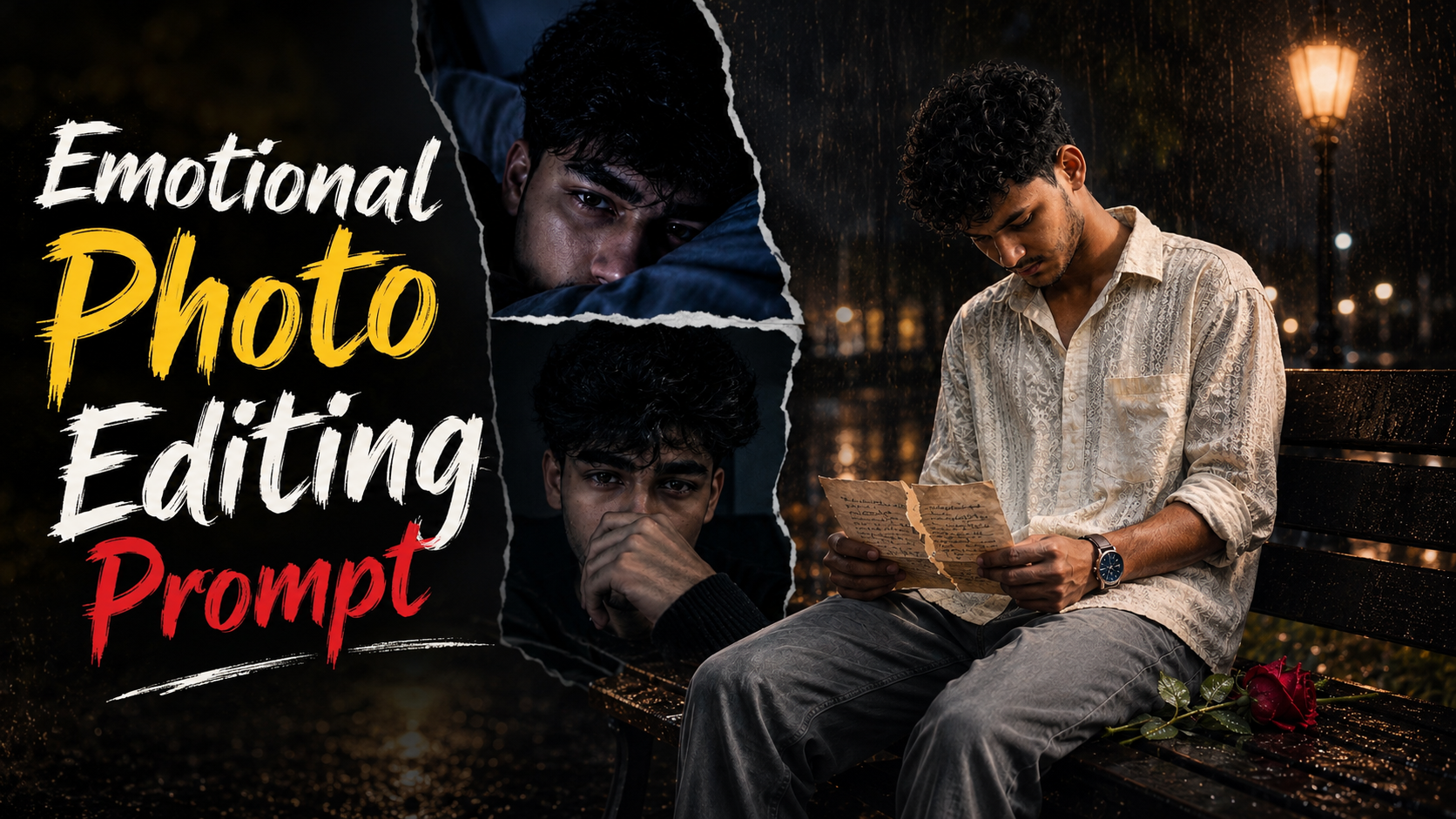
Create an ultra-realistic cinematic heartbreak portrait using the uploaded person's photo as the exact face and identity reference. Keep the person's face, hairstyle, beard, eyebrows, eyes, nose, lips, jawline, skin tone, body shape, pose, clothes, watch, and overall identity 100% identical to the uploaded photo. Do not change the person's facial features or identity. Transform the scene into a rainy night in an empty city park. The person is sitting alone on a wet wooden bench with his head lowered, looking emotionally broken and lost in deep thoughts. He is silently holding a torn handwritten love letter with both hands. A single fresh red rose lies beside him on the bench, with a few fallen petals scattered on the wet wood. The park is empty with old street lamps casting warm golden light. Heavy rain is falling, the ground is wet with realistic reflections, soft fog fills the background, and distant city lights create beautiful cinematic bokeh. Add realistic raindrops on the clothes, hair, hands, and bench. The overall mood should feel lonely, emotional, and heartbreaking, like a dramatic movie scene after a painful goodbye. Add a subtle handwritten quote in the top-right corner:

"Some hearts never heal,

they just learn to survive."

Use dramatic cinematic lighting, volumetric fog, HDR, 85mm lens, f/1.4 aperture, shallow depth of field, ultra-realistic skin texture, natural color grading, realistic rain physics, soft shadows, professional Photoshop composite, 8K quality, emotional storytelling, award-winning cinematic photography.

Negative Prompt:

cartoon, anime, painting, CGI, 3D render, illustration, low quality, blurry, extra people, duplicate face, wrong face, different hairstyle, smiling, daylight, oversaturated colors, watermark, logo, text artifacts, bad anatomy, unrealistic hands, deformed fingers, low resolution.
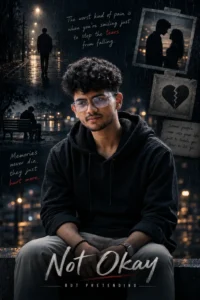
Create an ultra-realistic dark emotional cinematic portrait using the uploaded person's photo as the exact face and identity reference. Keep the face, hairstyle, eyebrows, eyes, nose, lips, beard, jawline, skin tone, body shape, pose, and facial proportions 100% identical to the uploaded photo. Do not change the person's identity. The person is wearing a black hoodie and sitting alone at night with a sad, heartbroken expression, looking slightly downward. The background is dark, moody, and cinematic with soft rain, cold blue tones, blurred city lights, and dramatic lighting. Behind the person, create a realistic emotional memories collage including:

• A lonely man walking on an empty road at night.

• A silhouette of a couple standing together.

• A broken heart photo pinned with tape.

• A lonely person sitting on a park bench.

• Handwritten emotional quotes blended naturally into the background.

Text on image:

"The worst kind of pain is when you're smiling just to stop the tears from falling."

"Memories never die, they just hurt more."

"Some people come into your life just to teach you how to let go."

Large cinematic title at the bottom:

"Not Okay"

Small subtitle:

"But Pretending"

Use volumetric lighting, realistic shadows, shallow depth of field, soft bokeh, HDR, 85mm lens, f/1.4, cinematic color grading, ultra-detailed skin texture, 8K quality, realistic photo manipulation, professional Photoshop composite, highly emotional, dramatic atmosphere.

Negative Prompt: cartoon, anime, painting, illustration, CGI, 3D, low quality, blurry, oversaturated, extra people, duplicate face, deformed face, different hairstyle, different skin tone, unrealistic lighting, watermark, logo, text errors, bad anatomy, low resolution.
How To Create Photo
How do you make such an emotional photo and which tool is required for it, I am telling you the entire process step by step and in detail. By reading and following these steps, you can easily create your own photo.
- First of all you have to download Chatgpt app from Google Play Store if you do not have it.
- After downloading, you have to login with your Gmail.
- Now you have to come back to the website and copy the prompt given below the photo from this post.
- Scroll down a bit and click on the create your image button.
- Now you have to select a photo of yourself by clicking on the plus icon of the chat.
- Then paste the copied prompt and click on the send button.
- Now Chatgpt will start creating your photo and your photo will be ready in a short while.
What Do You Need Before You Start?
Creating an emotional AI photo is much easier than most people think. You only need a few simple things before you begin. The first thing is a clear photo of yourself. Your face should be easy to see because AI creates better results when the image is sharp and well-lit. A photo taken with your phone is completely fine if the quality is good.
Next, you need an AI image generator. Today, many AI tools can create realistic portraits from prompts. Choose the one you are comfortable using.
The most important part is your prompt. Think of the prompt as a set of instructions for the AI. If your instructions are short, the result may look average. But when you describe every small detail, the AI understands your idea much better and creates a more realistic image. Finally, make sure you have a stable internet connection because AI tools work online.
Common Mistakes to Avoid
Many people don’t get good results because they make a few simple mistakes.
- The first mistake is using a low-quality photo. AI cannot create a realistic portrait if your original image is blurry.
- The second mistake is writing a very short prompt. A detailed prompt almost always produces better results.
- Another common mistake is adding too many different ideas in one prompt. If you ask the AI to create rain, snow, sunshine, mountains, beaches, and city lights all at the same time, the image may look confusing.
- It is always better to keep your idea simple and focus on one strong emotion.
Pro Tips for Better Results
If you want your AI photo to look as realistic as possible, follow these simple tips.
- Use a high-quality portrait with natural lighting.
- Write a detailed prompt instead of one short sentence.
- Keep your face and identity unchanged.
- Choose one clear mood, such as loneliness, memories, hope, or heartbreak.
- Use cinematic lighting instead of bright daylight.
- Generate more than one version and compare the results before choosing your favorite.
- The more you practice writing prompts, the better your images will become.
Conclusion
Creating emotional AI photos is easier than most people think. You don’t need professional editing skills or expensive software to make beautiful cinematic images. A clear photo, a detailed prompt, and a good AI tool are enough to get started. The most important thing is to describe your idea clearly so the AI understands the mood and story you want to create. Don’t worry if your first result isn’t perfect. Keep trying different prompts, change small details, and learn from each image you create. With a little practice, you will be able to create realistic emotional AI photos that look natural and catch people’s attention. So, start experimenting today, be creative, and turn your simple photos into stunning emotional artwork that tells a powerful story.