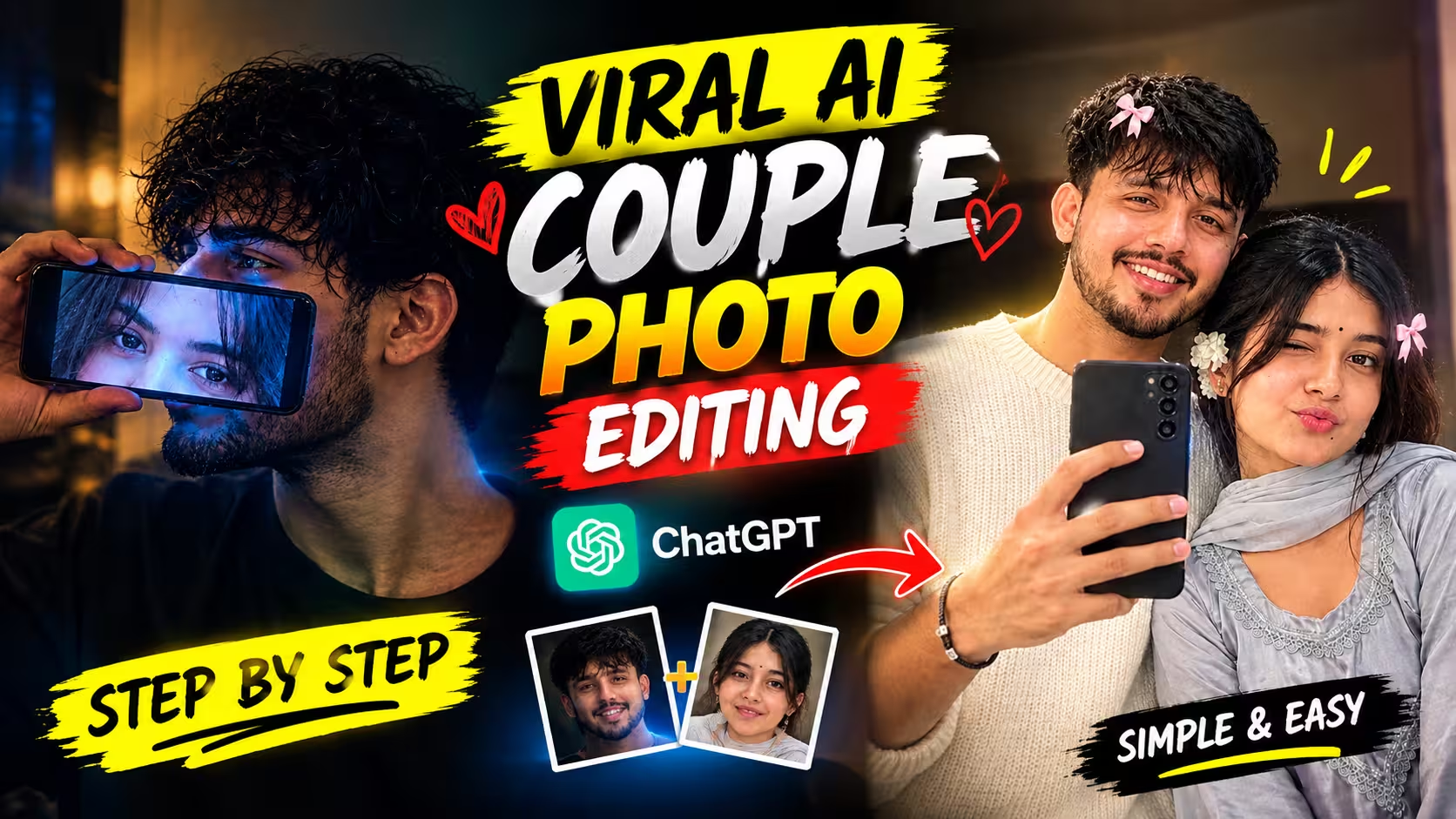
AI photo editing has made it much easier to turn a simple portrait into a creative and cinematic picture. One of the interesting styles going around on Instagram Reels is the girlfriend phone screen photo, where a boy holds a smartphone in front of his face and the girl’s eyes appear on the phone screen.
The final image gives the impression that the person is looking at his girlfriend through the phone. With the right prompt, lighting and reference photos, you can create a similar romantic and cinematic look while keeping both people recognizable.
In this guide, I will share the complete AI Couple Photo Editing Prompt and explain how you can use your own photo and your girlfriend’s photo to create this effect.
What Is This AI Couple Photo Editing Trend?
This editing style combines a normal portrait with a smartphone-screen effect.
In the final image, the boy is usually shown in a side or three-quarter profile while holding a phone horizontally in front of his face. Instead of showing a normal phone screen, the screen contains a close-up of the girlfriend’s eyes.
The phone screen can have a subtle blue glow, while the rest of the image has warm and darker cinematic lighting. This contrast makes the picture look more like a frame from a romantic movie rather than a regular selfie.
The good thing about this concept is that you don’t need an actual photoshoot together. You can use two separate photos and ask an AI image editor to combine the concept into one realistic scene.
Why Are These Types of Photos Popular on Social Media?
These types of AI couple photos are popular on social media because they look different from ordinary selfies and create a strong cinematic feeling. Dark lighting, a soft phone-screen glow, natural poses and creative compositions can make a simple photo look like a scene from a romantic movie. Since users can create these images with their own photos, the final result also feels more personal and unique.
Another reason is that these edits are perfect for Instagram Reels, Stories and other vertical content. An unusual concept, such as showing a girlfriend’s eyes on a phone screen, can quickly catch someone’s attention while scrolling. AI editing also allows people to experiment with different outfits, backgrounds, lighting and moods without arranging an actual photoshoot, making these trends easy and fun to recreate.
Viral AI Couple Photo Editing Prompt
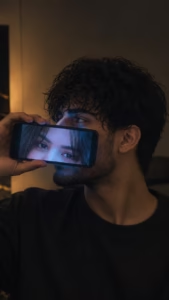
Use this uploaded image as the main cinematic reference. Recreate the same overall composition, pose, camera angle, framing and mood. Keep the subject in a dark black oversized T-shirt with a natural three-quarter side profile. He is holding a smartphone horizontally across the lower part of his face, with the phone screen clearly visible.
The phone screen should show only a close-up of the girl's eyes and eyebrows, inspired by the second reference photo that I will provide. Keep the eyes realistic and naturally integrated into the phone screen.

Maintain the dark, romantic indoor atmosphere with warm ambient background lighting and a subtle cool blue glow coming from the phone screen. Preserve realistic skin texture, natural hair, accurate hands and fingers, realistic shadows, shallow depth of field and cinematic color grading.

Make the final image look like a real professional photograph, not an AI-generated image. No extra people, distorted facial features, extra fingers, text, watermark or logos.
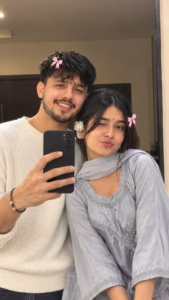
Create an ultra-realistic romantic mirror selfie using my uploaded photos as the STRICT MAIN IDENTITY REFERENCES for both the boy and girl. Preserve their exact facial features, face shape, eyes, nose, lips, hairstyle, skin tone, age and natural skin texture. Recreate the same composition as the reference: the couple standing very close together in front of a large mirror, the boy slightly behind/left of the girl with his head gently touching hers, and the girl holding a smartphone in front of the mirror. Give the girl a playful wink and cute pout, while the boy has a soft natural smile. Keep a cozy indoor bedroom/dressing-room setting, warm soft lighting, realistic reflections and natural skin details. Add cute small pink bows in their hair, matching the reference style. Keep the image candid, youthful, romantic and photorealistic, with realistic proportions, clothing texture and DSLR-quality detail.
How to Create This Viral AI Couple Photo
Creating this cinematic AI couple photo is very easy. You can create a similar image in just a few minutes using ChatGPT. Follow the simple steps below to create your own realistic couple photo with a cinematic phone-screen effect.
- First, choose two clear photos—one of yourself and one of your girlfriend. Try to use photos where the face is clearly visible and the lighting is good.
- After that, download the ChatGPT app from the Play Store and log in to your account.
- Now come back to this article and copy the Viral AI Couple Photo Editing Prompt given below the example image.
- Scroll down and click on the Create Your Image button.
- Next, tap the + icon in the ChatGPT chat and select both photos from your phone. Use your own photo as the main reference and your girlfriend’s photo as the second reference.
- Paste the copied prompt into the ChatGPT chat along with both photos and tap the Send button.
- ChatGPT will process the uploaded photos and create the cinematic couple image according to the prompt. Wait for the image generation to finish.
- Once the image is ready, carefully check the face, hairstyle, outfit, phone position, eyes shown on the phone screen, lighting and overall composition. If anything does not look right, you can ask ChatGPT to create another version with the required changes.
- Finally, save your generated photo to your phone and share it on Instagram, Facebook, WhatsApp or other social media platforms.
Common Mistakes to Avoid
Avoid using blurry, low-quality or heavily edited reference photos because they can make the final AI image look unnatural. Make sure both faces are clearly visible and not covered by sunglasses, masks or hair. Another common mistake is giving too many confusing instructions in one prompt. Keep your instructions simple and specific about the pose, outfit, lighting, background and phone position. Do not forget to mention identity preservation when you want the generated faces to closely match the uploaded photos. After the image is generated, carefully check the face, hands, eyes, phone screen and body proportions. If something looks wrong, ask ChatGPT to correct that specific detail instead of generating an entirely different image from scratch carefully.
Tips for Better Results
For better results, always use clear, high-quality photos with good lighting and visible facial details. Try to choose reference images with a similar camera angle and natural expressions. In your prompt, clearly mention that the facial structure, hairstyle, skin tone and other natural features should be preserved. If you want a cinematic appearance, describe soft lighting, realistic shadows, natural skin texture and a shallow depth of field. Avoid adding too many unnecessary details that may confuse the AI. If the first result is not perfect, ask ChatGPT to fix the exact issue, such as the face, hands, eyes or phone position. Finally, zoom in and check the small details before saving or sharing the finished image on social media online.
Frequently Asked Questions (FAQ)
Q1. Can I create this AI couple photo using ChatGPT?
Yes. You can use ChatGPT with your own photos and the prompt provided in this article to create a similar cinematic couple image.
Q2. What type of photos should I use?
Use clear, high-quality photos where the faces are visible and have good lighting. This usually helps AI produce a more accurate result.
Q3. Can I change the outfit or background?
Yes. You can modify the prompt and ask ChatGPT to change the outfit, background, lighting or overall mood according to your preference.
Q4. What if the generated face does not look correct?
You can ask ChatGPT to regenerate the image and specifically mention which facial details need to be corrected.
Q5. Can I share the generated photo on social media?
Yes, you can share your generated image on platforms such as Instagram, Facebook and WhatsApp. Always make sure you have permission to use another person’s photo.
Conclusion
Creating a cinematic AI couple photo is now much easier with tools like ChatGPT. With two clear reference photos and the right prompt, you can create a realistic-looking image with a creative phone-screen effect without needing advanced photo editing skills. The final result mainly depends on the quality of your reference photos and how clearly you describe the scene. If the first image is not perfect, you can make small changes to the prompt and generate another version. Try the prompt shared in this article, experiment with different poses and styles, and create your own unique AI couple photo to share on social media.