Introduction
AI photo editing has changed the way we create and share photos. You no longer need an expensive camera, a professional photographer, or a perfect outdoor location to create a beautiful portrait. With the right AI editing tool and a good reference photo, you can transform a simple picture into something that looks like it was captured during a professional outdoor photoshoot.
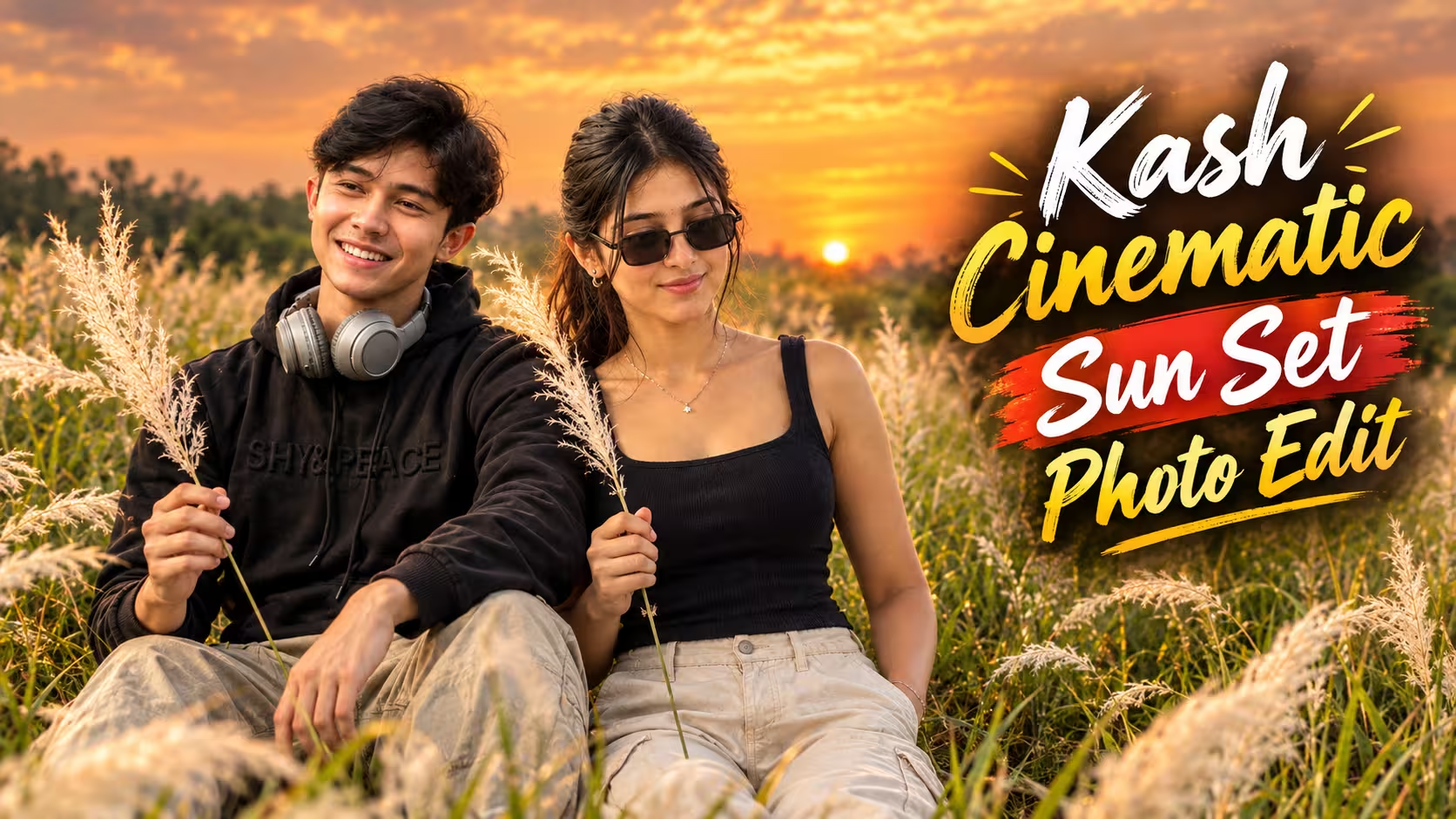
One of the photo styles that looks particularly beautiful is the Kash grass field portrait. Tall white Kash or Kaash grass, green fields, soft sunlight, and a colorful sunset can give a simple portrait a peaceful and cinematic appearance.
The best thing about this editing idea is that you can use your own photo. Instead of creating a completely different person, the goal is to maintain your original appearance while changing the environment, pose, lighting, and overall mood of the photograph.
In this article, we will look at how this style works, what type of photo you should use, how to get better results, and some useful ideas for creating your own Kash grass AI portrait.
What Is Kash Grass?
Kash grass, commonly written as Kaash grass as well, is a tall grass that produces beautiful white, feathery flowers. It is often seen growing naturally in open fields and countryside areas.
When photographed during sunset, the white grass catches the warm light and creates a soft glow around the subject. The combination of white grass, green vegetation, and a colorful sky makes it a great setting for portrait photography.
You may have seen similar photographs on Instagram, Pinterest, or other social media platforms. Many of these images have a peaceful countryside feeling, with the person standing or sitting among tall grass while the background remains softly blurred.
AI editing makes it possible to recreate a similar visual style using your own photograph.
Why Kash Grass Photos Are Trending
There is something naturally attractive about outdoor portraits. Unlike heavily edited studio photographs, a field portrait usually feels more relaxed and personal.
Kash grass adds another layer to the image because its soft white flowers create a beautiful foreground and background. When combined with golden-hour lighting, the photograph can have a cinematic appearance without looking overly complicated.
Another reason this style works well is its simplicity. You don’t need a lot of objects in the background. A field, grass, sky, sunlight, and the person are enough to create an interesting composition.
This makes the concept useful for social media profile pictures, Instagram posts, reels covers, wallpapers, and personal photography projects.
Kash Grass AI Photo Editing Prompt
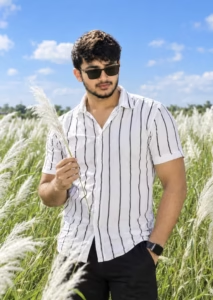
Use my uploaded photo as the STRICT MAIN IDENTITY REFERENCE. Preserve the exact face, facial features, hairstyle, skin tone, natural skin texture, body proportions, and clothing visible in my uploaded photo. Do not change, redesign, or replace the outfit.
Transform the scene into a natural seated portrait in a vast green field filled with tall white Kash/Kaash grass. Keep the subject sitting comfortably with one knee slightly raised, gently holding a white Kash grass flower in one hand and looking slightly downward to the side. Completely replace the original background with a beautiful golden-hour sunset featuring soft peach, pink, orange, and golden tones, subtle clouds, distant greenery, and warm sunlight.

Maintain authentic anatomy, realistic hands, natural fabric details, soft shadows, cinematic depth of field, and DSLR-quality sharpness. Keep the person’s identity completely unchanged and make the final photograph look genuinely captured in real life.
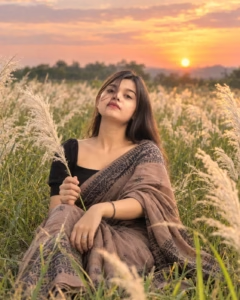
Take my uploaded photo as the primary reference for the person’s identity and appearance. Preserve the exact facial identity, hairstyle, complexion, natural skin details, physique, proportions, and every detail of the original outfit. The clothing must remain unchanged.
Create a photorealistic outdoor scene with the subject seated naturally among tall white Kash/Kaash grass in a lush green field. The pose should feel relaxed and candid, with one knee raised, one hand naturally holding a white grass plume, and the subject looking slightly downward toward the side. Replace the entire background with a warm, dreamy sunset landscape containing peach and pink skies, golden sunlight, soft clouds, and distant greenery.

Use realistic lighting, shadows, skin texture, hands, grass movement, fabric texture, and subtle background bokeh. Preserve the original identity perfectly and create a genuine DSLR-style photograph with no artificial or AI-generated appearance.
How to Create This Kash Grass AI Portrait
I am explaining the complete process of creating this stunning Kash Grass portrait in a very easy way. Just follow the instructions carefully, and you will be able to create your own beautiful portrait within a few minutes.
- First, scroll down and copy the Kash Grass AI photo editing prompt given below. Make sure you copy the complete prompt without missing any important instructions.
- Now open the ChatGPT app on your phone. If you haven’t installed it yet, download the ChatGPT app from the Play Store and log in with your Google account. If you already have the app and are logged in, you can simply continue.
- Open a new chat and tap on the + icon next to the chat box. Now select a clear and good-quality photo of yourself from your gallery. Try to choose a photo where your face is clearly visible and the lighting is good.
- After uploading your photo, paste the copied Kash Grass photo editing prompt into the chat box and tap the Send button.
- ChatGPT will now start creating your portrait according to the instructions in the prompt. The image generation may take a little time, so wait patiently until the process is complete.
- Once your photo is ready, check the final result. If you are happy with the image, tap the Download button to save it to your phone.
- And that’s it! Your beautiful Kash Grass cinematic portrait is ready. You can share it on Instagram, Facebook, or WhatsApp Status. Add suitable background music, an attractive caption, and relevant hashtags to give your post an even better look.
Create Your Image
Best Photo Size for Social Media
If your main goal is social media, consider the final aspect ratio before generating the image.
A vertical portrait is usually a good choice for Instagram posts, reels covers, and mobile wallpapers. A wider format may be more suitable for thumbnails or website banners.
Keeping the subject properly framed is also important.
Don’t place the person too close to the edge of the image. Leave enough space around the body and head so that the photograph doesn’t feel cramped.
For a portrait-oriented image, the subject can remain the main focus while the Kash grass fills the surrounding area.
Common Mistakes to Avoid
There are a few mistakes that can reduce the quality of an AI-edited portrait.
The first is using a low-quality reference image. If the face is blurry or heavily covered, maintaining identity becomes more difficult.
The second is giving contradictory instructions. If you ask the AI to completely redesign the clothes while also asking it to preserve them, the result may become inconsistent.
Another mistake is adding too many details. A simple and clearly written instruction often works better than a long list of unrelated effects.
Finally, don’t expect every generation to be perfect. AI image generation can produce different results from the same instructions. Creating a few variations can help you find the most natural one.
How to Improve Your Final Result
If the first result doesn’t look right, don’t completely change the concept.
Instead, identify the specific problem.
If the face looks different, strengthen the identity-preservation instructions.
If the hands look unnatural, ask for realistic anatomy and natural hand positioning.
If the clothing changes, clearly mention that the original outfit must remain unchanged.
If the background looks artificial, simplify the environment and reduce unnecessary effects.
Making small adjustments is usually more effective than rewriting everything from scratch.
Why This Editing Idea Is Useful for Beginners
You don’t need advanced Photoshop skills to try this style.
Traditional photo editing can require knowledge of masking, background replacement, color grading, lighting adjustments, and compositing. AI tools can simplify many of these tasks.
For beginners, the main challenge is writing clear instructions and choosing a suitable reference image.
Once you understand how identity, clothing, pose, lighting, and background instructions work together, you can create many different portrait concepts.
This makes Kash grass editing a good starting point for anyone who is learning AI-based photo editing.
Frequently Asked Questions
1. What is a Kash Grass AI photo editing prompt?
A Kash Grass AI photo editing prompt is used to create realistic photos featuring tall white Kash grass, natural greenery, and a beautiful cinematic background. You can use your own photo as a reference to create a personalized portrait.
2. Can I use my own face in a Kash Grass AI photo?
Yes. You can upload your own clear photo and use it as the main identity reference. For the best result, use a photo where your face is clearly visible and not heavily edited.
3. Will AI change my original face?
AI can sometimes change facial details, especially when the reference image is unclear. Using a high-quality photo and clearly asking the AI to preserve your facial identity can help maintain a more natural and recognizable result.
4. Can both males and females use this Kash Grass photo editing idea?
Yes. The editing concept can work for both male and female photos. The AI can keep the person’s original identity, appearance, and clothing while changing the environment and overall scene.
5. Can I keep my original clothes?
Yes. If you want the final image to look more natural, you can ask the AI to preserve your original outfit, colors, hairstyle, and overall appearance instead of replacing them.
Conclusion
The Kash Grass AI Photo Editing concept is a simple way to turn an ordinary personal photograph into a beautiful outdoor portrait. The combination of tall white grass, a green field, warm sunset colors, and natural posing can create a professional-looking result without making the photograph feel overly edited.
The most important part is to keep the original person at the center of the image. Your face, hairstyle, clothing, and natural appearance should remain consistent while the AI handles the new environment and atmosphere.
For the best results, start with a clear reference photo, use realistic lighting, keep the background simple, and avoid excessive effects. Try a few different poses and sunset colors until you find a version that feels natural.
Whether you want a new Instagram portrait, a profile picture, a creative post, or simply want to experiment with AI photography, this Kash grass concept is worth trying.
With a good reference image and carefully written instructions, you can create a portrait that feels less like an artificial creation and more like a real photograph captured during a peaceful evening in a beautiful field.