Introduction
AI photo editing has become a simple way to give ordinary photographs a completely different look. What once required hours of work in Photoshop can now be achieved with a well-written prompt and a good reference photo.
One of the most interesting things about AI editing is that you can change the entire mood of a photograph without losing the original character of the person. You can turn a simple portrait into a dark cinematic scene, a music-inspired composition, or a soft and dreamy photograph with warm lighting.
In this article, we are focusing on two different cinematic styles. The first has a dark music-listening aesthetic, while the second has a soft, dreamy and nostalgic appearance. Although the styles are different, both are designed to maintain a natural and realistic appearance.
Why Cinematic AI Photo Editing Looks So Good
A cinematic photograph is not just about adding a dark filter or making the image brighter. The overall mood comes from several elements working together.
Lighting is one of the most important parts. Soft highlights, deep shadows and controlled contrast can give an image much more depth. Backgrounds also matter because they help establish the atmosphere around the subject.
AI tools can combine these elements in a single edit. Instead of manually adjusting dozens of settings, you can describe the desired atmosphere in natural language.
This makes cinematic editing especially useful for people who want professional-looking results without having advanced photo-editing experience.
Why Dark Backgrounds Work So Well
Dark backgrounds are widely used in cinematic photography because they naturally direct attention toward the subject.
When most of the environment is dark, even a small amount of warm light becomes visually important. This creates contrast and gives the photograph a more dramatic appearance.
However, a completely black background can sometimes make the image look flat. Adding very subtle shadows, reflections, or details in the distance can provide depth without taking attention away from the main subject.
This is where AI editing can be useful. You can describe how much of the environment should remain visible and how the lighting should interact with the room.
Where These AI Portraits Can Be Used
Cinematic AI portraits can be useful for many creative purposes. They can work well as social media posts, profile images, YouTube thumbnails, wallpapers, creative projects, or visual content for an AI photo-editing website.
The dark music aesthetic is particularly suitable for music-related visuals and modern social media content, while the dreamy style can work well for personal portraits and aesthetic posts.
If you plan to publish the finished images commercially, always make sure that any third-party artwork, logos, music-related assets, or other copyrighted material you include are appropriate for your intended use.
Prompt ⬇️
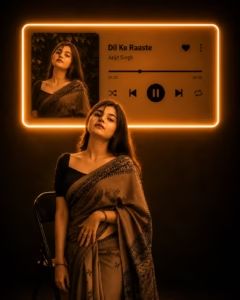
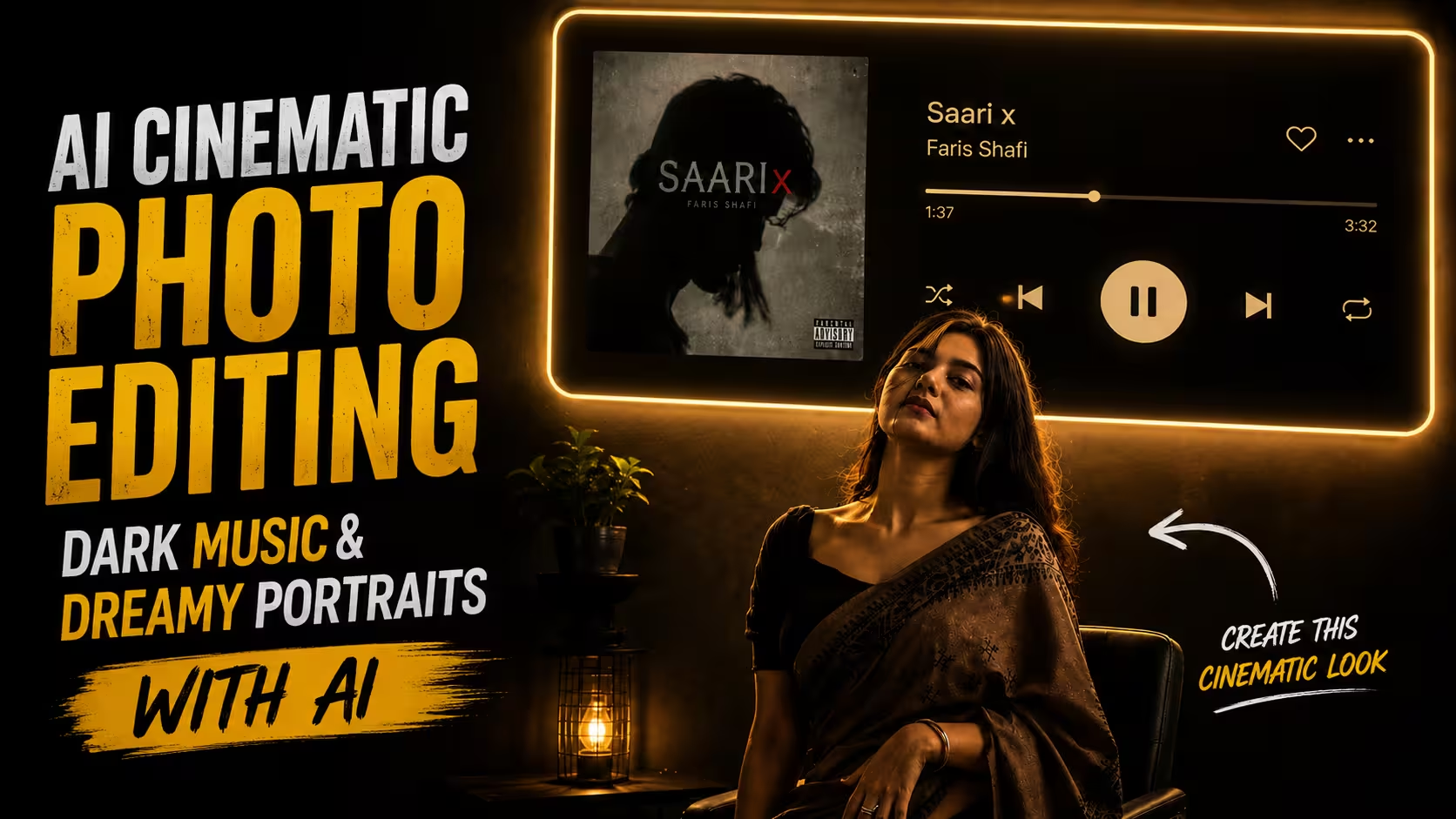
Transform my uploaded photo into a cinematic 9:16 vertical portrait inspired by a dark aesthetic music-listening scene.

Keep the exact same person from my uploaded photo — preserve their identity, face, facial features, hairstyle, skin tone, body proportions and clothing. Do not replace or redesign the person.

Place the person sitting naturally on a simple chair in a dark, minimal room, shown mostly as a dramatic silhouette from a side/three-quarter angle. Keep the pose realistic and elegant, with subtle rim lighting outlining the body and hair.

On the wall behind the person, create a large futuristic music-player panel with a soft warm white/golden neon glow around its edges. Inside the panel, show the uploaded/selected album artwork on the left and a realistic modern music-player interface on the right with:

Song: [SONG NAME]

Artist: [ARTIST NAME]

A progress bar, heart icon, menu icon, shuffle, previous, large pause/play button, next and repeat icons.

Make the music-player panel look physically mounted on the wall with realistic glow and light spill onto the room. Keep the background almost completely dark, with subtle shadows and reflections on the floor.

Use realistic photography, cinematic low-key lighting, warm ambient glow, deep blacks, soft shadows, realistic skin texture, natural proportions, subtle film grain, premium editorial aesthetic, high detail, photorealistic, dramatic composition. Aspect ratio: 4:5 vertical.
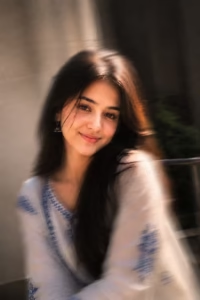
Use my uploaded photo as the main reference and preserve the person’s exact identity, facial features, natural skin tone, hairstyle, body proportions, clothing, and overall appearance. Transform the image into a dreamy cinematic portrait with a warm, nostalgic dark-aesthetic mood. Keep the person’s gentle smile and natural expression while adding soft golden sunlight from one side, creating beautiful rim light around the hair and shoulders. Place the subject near a minimalist doorway or window with subtle greenery in the background. Use a shallow depth of field, creamy background blur, realistic skin texture, soft shadows, warm highlights, and delicate atmospheric haze. Add subtle vintage film grain, light leaks, soft motion blur around the edges, and a premium editorial photography feel. Keep the composition elegant, natural, photorealistic, highly detailed, and emotionally cinematic. Aspect ratio 4:5 vertical.
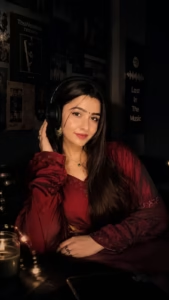
Transform my uploaded photo into a cinematic 9:16 vertical portrait inspired by a dark asethetic music listening scene
How to Create This Cinematic AI Photo
Making a cinematic AI photo like the one shown above is very easy. You can create it and get it ready in just a few minutes. Below I am describing each and every process of making it step by step, by reading and following which you can create a similar cinematic photo.
- First of all, you have to take a clear photo of yourself to create such a cinematic portrait. Try to use a good-quality photo where your face, hairstyle, clothing, and overall appearance are clearly visible.
- After that, you have to download the ChatGPT app from the Play Store and log in to it.
- After coming to this post, you have to copy the AI photo editing prompt given below the sample photo.
- Scroll down a bit and click on the Create Your Image button.
- Now click on the Plus (+) icon in the ChatGPT chat and select your photo from your phone’s gallery.
- Paste the copied prompt along with your uploaded photo and click on the Send button.
- ChatGPT will start processing your photo according to the prompt. It will transform your original portrait into a dark cinematic music-listening scene, with dramatic lighting, a glowing music-player panel, and a premium cinematic atmosphere.
- After a short while, your AI cinematic portrait will be created and ready. You can then save the generated image and share it with your friends, use it as a social media post, or upload it to your story.
Create Your Image
Common Mistakes to Avoid in AI Cinematic Photo Editing
Getting a good AI-generated portrait is not only about using a long prompt. Some small mistakes can make the final image look unnatural or completely different from the original photo.
One common mistake is giving the AI too many instructions at once. When a prompt contains unnecessary effects, colors, objects, and complicated camera details, the result may become messy. It is better to describe the main subject, environment, lighting, and mood clearly.
Another mistake is not telling the AI to preserve the original person’s appearance. If identity, hairstyle, clothing, and facial features are important, mention them clearly in the prompt.
Lighting is another area where AI images can go wrong. Extremely bright neon lights or unrealistic shadows can make a cinematic scene look artificial. The lighting should match the environment and have a believable source.
It is also better to avoid excessive skin smoothing. Real photographs have natural skin texture, and keeping some natural details can make the final AI portrait feel much more realistic.
Finally, don’t judge the result only by the first generation. Small changes to the prompt can often improve the composition considerably.
Tips for Getting Better AI Photo Editing Results
For the best results, start with a clear and reasonably high-quality reference photograph. The AI needs enough visual information to understand the person’s face, hair, clothing, and proportions.
Try to keep your prompt focused on the final visual idea. If you’re creating a dark music-inspired portrait, concentrate on the dark room, warm glow, music-player interface, shadows, and cinematic composition. For a dreamy portrait, focus more on warm natural light, soft background blur, subtle film grain, and a nostalgic atmosphere.
Another useful approach is to describe the lighting carefully. Instead of simply writing “cinematic lighting,” explain where the light is coming from and how it should fall on the subject.
Keep the effects subtle. A small amount of film grain, haze, or motion blur can add character, while too much can reduce the realistic appearance.
Most importantly, experiment with different versions. AI editing is a creative process, and sometimes a small change in the prompt can produce a much better result.
FAQ
Can I create these cinematic portraits using my own photo?
Yes. You can upload your own suitable portrait as a reference and provide a detailed prompt describing the desired style. For better identity preservation, use a clear image where the face and important features are visible.
Will AI keep my original face?
AI tools can often preserve the main appearance of a reference subject, but the result is not always identical. Clearly asking the tool to preserve facial features, hairstyle, skin tone, clothing, and proportions can help produce a closer result.
Do I need Photoshop to create these images?
No. These styles can be created using AI image-editing tools without requiring advanced Photoshop knowledge. However, traditional editing software can still be useful if you want to make small corrections after generating the image.
Which photo works best for cinematic AI editing?
A sharp, well-lit and reasonably high-resolution photograph usually works best. Images with a clearly visible face and natural pose give the AI more useful information for creating a realistic result.
Can I change the song shown in the music-player design?
Yes. You can customize the song title and artist name in your prompt. You can also describe the type of music interface, album artwork placement, and playback controls you want.
Why does my AI-generated image sometimes look unrealistic?
This can happen because of inconsistent lighting, excessive effects, distorted proportions, or unclear instructions. Simplifying the prompt and emphasizing realistic lighting, natural proportions, and photographic details can often improve the result.
Can I create both dark and dreamy styles from the same photo?
Yes. The same reference photograph can be used to create completely different visual styles. Changing the environment, lighting, colors, background, and mood can turn the same portrait into a dark cinematic scene or a soft dreamy photograph.
Conclusion
AI cinematic photo editing has made it much easier to experiment with creative photography. A simple portrait can be transformed into a dramatic music-inspired scene or a soft, nostalgic photograph with only a carefully written prompt and a suitable reference image.
The two styles covered in this guide show how different lighting and environments can completely change the feeling of the same type of portrait. Dark shadows and warm neon lighting can create a modern cinematic atmosphere, while soft sunlight, shallow depth of field, and subtle film effects can produce a dreamy and emotional look.
The key is to focus on realistic lighting, natural proportions, clear instructions, and a strong visual concept rather than adding too many effects.
If the first result isn’t exactly what you imagined, don’t worry. AI photo editing usually becomes much easier once you start experimenting with prompts and understand which details have the biggest impact on the final image.
With the right approach, you can turn an ordinary photograph into a creative cinematic portrait that feels personal, polished, and visually engaging.