Introduction
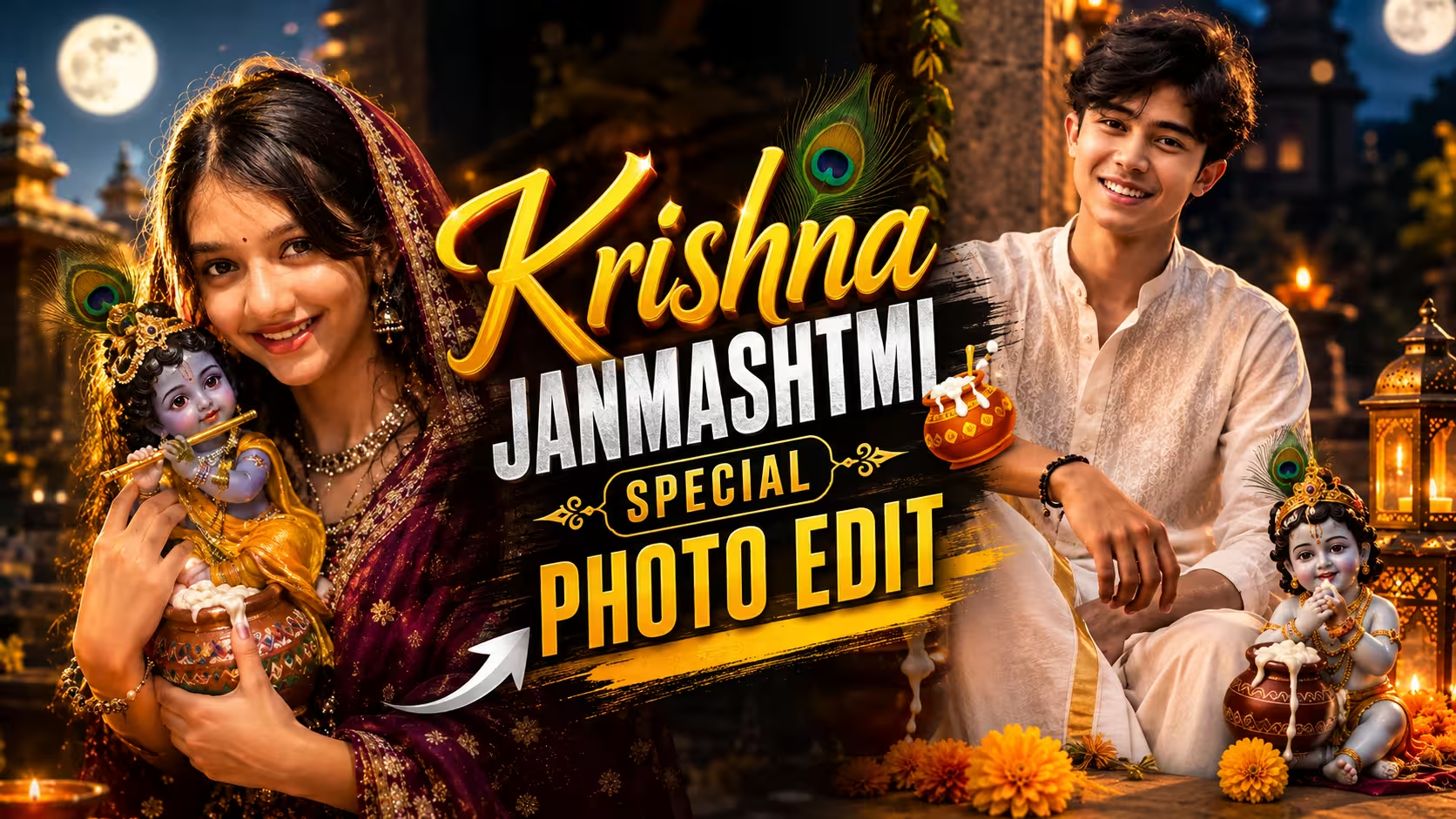
Krishna Janmashtami is one of the most beautiful festivals celebrated with devotion, happiness, and colorful decorations. From decorated temples and glowing diyas to peacock feathers and traditional outfits, there are many ways to capture the festive spirit of Janmashtami.
If you enjoy creating creative photos for Instagram, WhatsApp Status, or other social media platforms, you can now give your normal picture a beautiful Krishna Janmashtami AI photo editing look with the help of AI.
You don’t need professional photo editing skills for this. With a good photo and the right prompt, an AI image editor can create a cinematic festive scene while keeping your original appearance recognizable.
In this guide, I’ll show you how to create a cinematic Krishna Janmashtami photo using AI, what type of photo works best, how to write the prompt, and some common mistakes you should avoid.
What Is Krishna Janmashtami AI Photo Editing?
Krishna Janmashtami AI photo editing is a simple way to transform an ordinary portrait into a festive Krishna-themed image using an AI photo editor.
Instead of manually adding every element in Photoshop or another editing application, you can describe the scene you want in a text prompt. The AI then uses your uploaded photo as a reference and creates a new version based on your instructions.
For example, you can turn a regular portrait into a scene featuring a decorated temple, glowing diyas, marigold flowers, peacock feathers, a butter-filled matki, a flute, and a Bal Krishna idol.
The final result can have a cinematic look with warm golden lighting, soft background blur, realistic shadows, and a festive atmosphere.
Why Is Krishna Janmashtami Celebrated and What Is Its Significance?
Krishna Janmashtami is an important Hindu festival celebrated as the birth anniversary of Lord Shri Krishna. According to Hindu traditions, Lord Krishna was born in Mathura to Devaki and Vasudeva at midnight on the Ashtami Tithi of the Krishna Paksha in the month of Bhadrapada. His birth took place during the reign of the cruel king Kansa, whose growing oppression had troubled the people of Mathura.
Lord Krishna is worshipped as an avatar of Lord Vishnu. His life and teachings represent dharma, truth, love, compassion, and duty. Janmashtami is not only a celebration of Krishna’s birth but also a reminder of the victory of good over evil.
On this day, devotees observe fasts, offer prayers, sing bhajans, decorate temples, and celebrate Krishna’s birth at midnight. In many places, Dahi Handi and Krishna Jhanki events are also organized.
The festival inspires people to follow the path of truth, perform their duties, and remain positive even during difficult times.
Prompt ⬇️
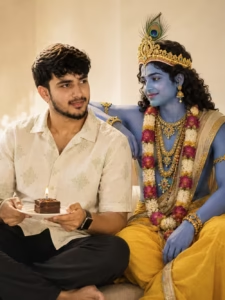
Create a photorealistic 4:5 Indian cultural fashion portrait. Show the uploaded man full-body, standing barefoot beside a weathered heritage doorway, wearing an elegant off-white linen kurta and relaxed white pajama trousers with black rectangular sunglasses. Preserve his natural facial features, hairstyle, skin tone and realistic appearance. He holds a simple bamboo flute diagonally while one hand rests casually near his pocket, with one ankle crossed. Behind him, create a monumental traditional hand-painted Lord Krishna mural covering the center-right wall. Krishna has deep blue skin, peaceful eyes, an antique-gold jeweled crown with peacock feathers and plays a wooden flute. Use aged ivory walls, stone flooring, dark wooden doors, foliage and warm sunlight. Keep the mural clearly painted, not a real person or statue. No text, logos, extra people or distortions.
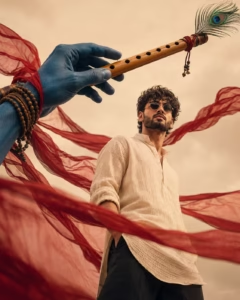
Create a cinematic 4:5 ultra-realistic low-angle portrait. Show a stylish young South Indian man from mid-thigh upward, wearing an off-white handwoven linen kurta, black trousers and small round dark sunglasses. Keep his face natural, with messy wavy black hair, beard and calm powerful expression. From the upper-left, show only an enormous blue-skinned divine hand and forearm of Lord Krishna holding a large polished wooden bansuri diagonally toward the upper-right. Add Rudraksha beads, traditional bracelets, sacred threads and a natural peacock feather on the flute. Surround the scene with flowing translucent deep-crimson fabric moving dramatically in the wind. Use a warm cream sky, soft golden lighting, cinematic Indian editorial grading, realistic textures, subtle film grain and 8K detail. No Krishna face or body.
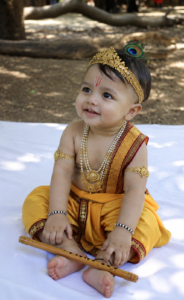
Use the uploaded baby photo as a STRICT IDENTITY REFERENCE. Preserve the exact same baby face, eyes, nose, lips, cheeks, skin tone, hair, age and natural proportions. Create an ultra-realistic Baby Krishna portrait of the same baby sitting naturally on a soft white cloth outdoors. Dress the baby in a luxurious golden-yellow silk dhoti with red and gold embroidered borders, traditional pearl and gold necklaces, armlets, bangles and a delicate golden crown with a realistic peacock feather. Add a subtle Vaishnav tilak on the forehead and place a beautiful wooden bansuri naturally near the baby’s feet. Keep the baby’s chubby hands, feet and innocent expression completely realistic. Background with large trees, soft sunlight, dreamy natural bokeh and devotional atmosphere. Photorealistic DSLR photography, cinematic lighting, realistic skin and fabric texture, 8K detail, vertical 4:5 composition.
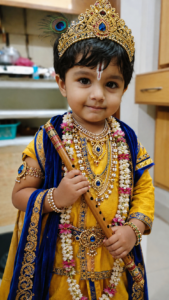
Use the uploaded baby photo as a strict identity reference. Preserve the exact same face, eyes, nose, lips, cheeks, skin tone, hair, age, and natural baby proportions. Create an ultra-realistic Bal Krishna portrait of the same baby wearing a royal yellow and deep peacock-blue silk outfit with intricate golden embroidery. Add an ornate golden Krishna mukut decorated with realistic peacock feathers, pearls and gemstones, along with traditional necklaces, bangles, armlets, floral garlands and a small Vaishnav tilak. The baby holds a beautifully decorated wooden bansuri naturally with both hands. Set the scene in a dreamy Janmashtami devotional environment with warm golden lamps, flowers, greenery and soft bokeh. Cinematic DSLR photography, realistic baby skin, natural expression, detailed fabric and jewelry, soft rim lighting, shallow depth of field, 8K, vertical 4:5.
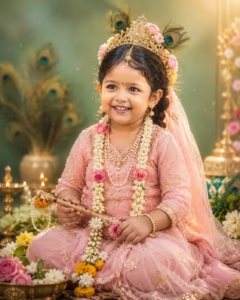
Use the uploaded baby photo as a strict identity reference. Preserve the exact face, eyes, nose, lips, cheeks, skin tone, age and natural baby proportions. Create an ultra-realistic cinematic Bal Krishna-inspired portrait of the same baby, seated naturally and smiling joyfully. Dress the baby in a luxurious golden-yellow dhoti with intricate embroidery, ornate golden crown with colorful gemstones and a realistic peacock feather. Add pearl necklaces, tiny earrings, bracelets, anklets and a small Vaishnav tilak. Baby holds a flower-decorated wooden flute. Surround with jasmine, roses, marigolds and subtle peacock feathers. Warm golden lighting, mint-green dreamy bokeh background, DSLR photography, realistic skin, 8K detail, vertical 4:5.
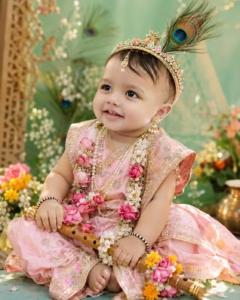
Use the uploaded baby photo as a STRICT IDENTITY REFERENCE. Preserve the baby’s exact facial identity, face shape, eyes, nose, lips, cheeks, skin tone, natural baby features and age. Do not change, beautify, age-up, morph or replace the baby’s face.

Create an ultra-realistic cinematic portrait of the same baby dressed as a cute little Radha/Krishna-inspired divine child, seated naturally and looking slightly upward with a sweet innocent expression. Dress the baby in a soft pastel pink traditional Indian outfit with intricate golden embroidery, a delicate golden crown decorated with realistic peacock feathers, small pearl-and-floral jewelry, tiny maang tikka and cute traditional earrings.

Place a small traditional wooden flute beside/in the baby’s hands, decorated with fresh pink roses, white jasmine and yellow marigold flowers. Add beautiful floral garlands around the baby. Keep the baby’s natural body proportions, chubby cheeks and realistic hands.

Background: soft pastel mint-green devotional setting with subtle peacock-feather elements and dreamy bokeh. Warm soft golden lighting, gentle highlights on the face, realistic shadows, shallow depth of field, cinematic color grading, soft glow, detailed skin texture, natural hair, realistic fabric and jewelry.

Photorealistic DSLR photography, 8K detail, highly realistic baby skin, natural expression, premium devotional portrait, dreamy and divine atmosphere, vertical 4:5 composition.
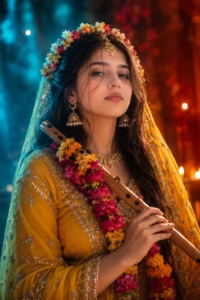
A cinematic, high resolution portrait of a beautiful Indian woman dressed as Radha, wearing a vibrant yellow lehenga with intricate gold embroidery.

She is holding a traditional wooden flute adorned with colorful marigold and rose garlands. Her hair is styled in loose waves, decorated with a delicate floral crown and traditional gold jewelry, including a maang tikka and jhumkas. The scene features dramatic teal and orange split lighting, with soft cyan light on one side and a warm red-orange glow on the other. Soft bokeh background, ethereal atmosphere, hyper realistic details, 8k resolution."
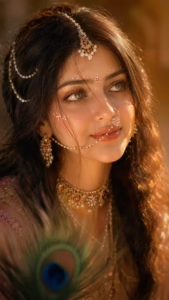
Divine Radha-inspired Indian woman, ultra-realistic cinematic close-up, vertical 9:16, warm golden sunset light, dreamy ethereal mood. Luminous fair skin, hazel-green expressive eyes gazing slightly upward sideways, curled lashes, defined brows, glossy peach-nude lips, soft romantic expression. Long dark brown-black wavy hair with natural wisps across the face.

Ornate pearl-gold maang tikka, pearl chains, delicate pearl-detailed nath, layered pearl earrings and luxurious gold pearl-gemstone choker. Soft-glam champagne eyeshadow, subtle blush and radiant highlighter. Symmetrical tiny white-pink devotional face dots across forehead, brows and cheeks. Softly blurred peacock feather in foreground. Golden highlights from the right, soft shadows, glowing jewelry, warm amber-brown bokeh background, shallow DOF, volumetric light, regal, mystical, romantic, divine, hyper-realistic editorial photography.
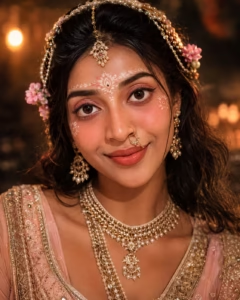
Create an ultra-realistic cinematic close-up portrait of a beautiful young Indian woman inspired by Radha Rani aesthetics. She has expressive brown eyes, natural glowing skin, soft peach makeup, delicate floral devotional designs on her forehead and cheeks, and a graceful nose ring. Style her with long dark wavy hair adorned with pearl chains, maang tikka, and elegant traditional jewelry. Add a luxurious layered pearl-and-gold necklace and traditional earrings. Warm golden temple-like lighting illuminates her face, creating soft highlights and realistic shadows. Background should be dark, dreamy, and softly blurred with warm bokeh. Photorealistic DSLR quality, detailed skin texture, shallow depth of field, cinematic glow, 4:5 portrait.
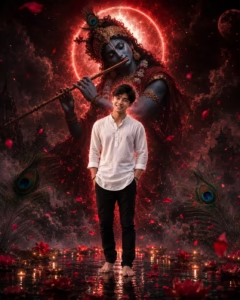
Use my uploaded photo as the main subject and preserve my exact facial identity, natural skin tone, hairstyle, and overall appearance. Create an ultra-realistic cinematic devotional portrait of me standing barefoot in the center, wearing a clean white traditional shirt and dark pants, with a confident yet peaceful expression. Behind me, create a gigantic divine Lord Krishna playing the flute, surrounded by dramatic red cosmic energy, glowing particles, smoke, and mystical clouds. Add a bright circular divine halo behind Krishna and a subtle glowing red aura around me. Include large realistic peacock feathers and scattered red flower petals in the foreground. The ground should look wet and reflective, creating cinematic reflections. Use dramatic low-key lighting, deep shadows, red and black tones, volumetric light, atmospheric fog, extremely detailed textures, realistic skin, sharp focus, epic devotional fantasy style, 9:16 portrait composition.
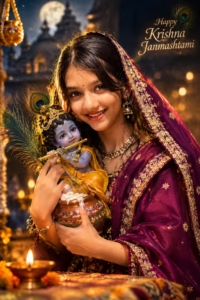
Transform my uploaded photo into a highly realistic cinematic Krishna Janmashtami portrait. Preserve my exact facial identity, face shape, eyes, nose, lips, hairstyle, natural skin texture and recognizable features without changing my face. Dress me in an elegant traditional Indian outfit with rich purple and golden embroidery and a beautifully draped dupatta. Show me gently holding a cute Bal Krishna idol decorated with a peacock feather crown, yellow dhoti, jewelry and flute. Add a traditional butter-filled matki, peacock feathers, marigold flowers and glowing diyas around me. Create a magical moonlit temple background with warm golden lights, soft bokeh, dramatic rim lighting and cinematic depth of field. Use premium color grading, realistic shadows and a devotional festive atmosphere. Add elegant golden text: “Happy Shri Krishna Janmashtami.”
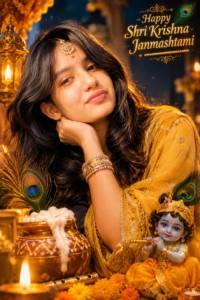
Edit my uploaded photo into a unique, luxurious and cinematic Shri Krishna Janmashtami portrait. Keep my face 100% recognizable and preserve my original facial structure, skin texture, eyes, nose, lips and natural expression. Change the outfit into a beautiful golden-yellow traditional Indian dress with delicate embroidery, elegant jewelry, bangles, a small bindi and a graceful dupatta. Place me in a beautifully decorated Krishna temple surrounded by glowing diyas, marigold flowers, peacock feathers, golden ornaments and a traditional butter matki. Include a charming Bal Krishna idol sitting beside me with a flute and peacock feather crown. Use deep blue nighttime tones mixed with warm golden illumination, soft atmospheric haze, realistic shadows, cinematic lighting and shallow depth of field. Add stylish glowing text: “Happy Shri Krishna Janmashtami” with a peacock feather design.
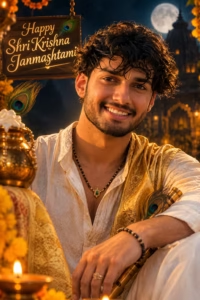
Turn my uploaded photo into a highly realistic cinematic Shri Krishna Janmashtami celebration poster. Preserve my exact facial identity, hairstyle, facial structure, skin tone, eyes, nose, lips and natural smile without altering my appearance. Dress me in an elegant ivory or cream traditional kurta with a luxurious golden stole and subtle Krishna-inspired detailing. Give me a graceful traditional tilak while keeping my face natural. Place me in a beautiful temple courtyard at night with a glowing full moon, illuminated temple architecture, hanging bells, marigold garlands, diyas, peacock feathers, a decorated butter-filled matki and a traditional flute. Create dramatic golden rim lighting with deep blue shadows, cinematic bokeh, realistic textures and premium color grading. Add elegant golden typography reading “Happy Shri Krishna Janmashtami” and a small peacock feather beside the text.
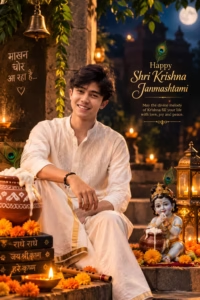
Transform my uploaded photo into a completely different, premium cinematic Krishna Janmashtami scene. Preserve my exact face and identity, including facial proportions, eyes, nose, lips, hairstyle, skin texture and natural expression. Show me sitting casually on beautifully decorated temple steps wearing a sophisticated white or ivory kurta-dhoti with a golden border and a saffron stole featuring subtle “Jai Shri Krishna” motifs. Surround the scene with glowing diyas, brass lamps, temple bells, marigold flowers, green leaves, peacock feathers, a butter-filled traditional matki and a small Bal Krishna idol holding a flute. Set the background during blue-hour evening with a softly glowing moon and an illuminated temple. Use cinematic depth of field, warm golden highlights, realistic shadows, atmospheric bokeh and professional film-style color grading. Add elegant text: “Happy Shri Krishna Janmashtami” with a devotional blessing underneath.
How To Create Ai Photo
I am telling you step by step the entire process of making your own special photo for Krishna Janmashtami. Read and follow the steps given by me and you can easily make your photo.
- First of all you have to download the Chatgpt app and login to it.
- After that, you have to come back to this post and copy the prompt given below whichever photo you like.
- Scroll down a bit and click on the create your image button.
- Click on the plus icon of Chatgpt and upload a good photo of yours.
- Now paste the prompt along with the photo and click on the send button.
- Now your photo will start getting created and in a short while a beautiful photo of Krishna Janmashtami will be ready.
Create Your Image
How to Get a More Realistic Result
Sometimes AI-generated photos can look too artificial. A few simple changes to your prompt can make the result feel more like a real photograph.
First, mention natural skin texture and realistic lighting. This can help avoid an overly smooth or plastic-looking face.
You can also ask for realistic shadows, natural fabric details, and cinematic depth of field.
Try not to add too many objects. A few well-placed Janmashtami elements can look much better than filling the entire background with decorations.
For example, a decorated matki, a few diyas, marigold flowers, peacock feathers, and a Bal Krishna idol are enough to establish the theme.
Common Mistakes to Avoid
One of the most common mistakes is using a low-quality or blurry reference photo. If the original image doesn’t contain enough detail, the AI may struggle to maintain the person’s appearance.
Another mistake is writing an extremely short prompt. The more clearly you describe the desired scene, the easier it is for the AI to understand your idea.
Adding too many decorative elements can also make the composition messy. Keep the main subject clear and use decorations to support the scene rather than distract from it.
Finally, always check the generated image carefully. AI can sometimes create unusual details in hands, jewelry, text, clothing, or other objects. If something looks incorrect, generate another version with a slightly improved prompt.
FAQ
Can I use any photo for Krishna Janmashtami AI editing?
You can try most clear photos, but a sharp portrait with a clearly visible face usually gives better results.
Can AI change my clothes?
Yes. You can ask the AI to give you a traditional Indian outfit, such as a kurta, saree, lehenga, or other festive clothing, while instructing it to preserve your facial identity.
How can I keep my face unchanged?
Clearly mention that your exact facial identity, facial structure, eyes, nose, lips, hairstyle, and natural skin texture should be preserved. However, results can vary between different AI editors.
What is the best ratio for a Janmashtami photo?
If you want to use the image for WhatsApp Status, Instagram Stories, or a phone wallpaper, 9:16 is usually the most suitable option.
Can I create a Janmashtami photo without a Bal Krishna idol?
Yes. You can create a more subtle design using only elements such as peacock feathers, flute, diyas, temple decorations, flowers, and a decorated matki.
Conclusion
Creating a Krishna Janmashtami AI photo is a simple and creative way to give your ordinary portrait a festive makeover. You don’t need advanced editing knowledge or complicated software. With a clear photo and a detailed prompt, you can create a beautiful cinematic image in just a few steps.
The key is to keep the prompt specific while maintaining a natural look. Focus on realistic lighting, suitable decorations, traditional clothing, and a clean composition. Most importantly, use a good-quality reference photo if you want the final image to closely resemble you.
You can also experiment with different backgrounds, outfits, lighting styles, and Krishna-themed elements to create your own unique Janmashtami photo. So, upload your favorite photo, try the prompt above, and create a beautiful cinematic Krishna Janmashtami photo to share with your friends and family.