Introduction
Creating beautiful photos does not always require professional photography or advanced editing skills. With the help of AI photo editing tools, you can now turn a simple portrait into a stylish fashion collage within a few minutes.
One of the popular styles is the AI photo collage, where several portraits of the same person are combined into one creative image. A traditional Indian fashion theme can make this style even more attractive, especially when you use a saree, soft lighting, warm colors and an elegant background.
In this article, you will find a ready-to-use AI photo collage prompt that can help you create a similar Indian fashion collage using your own photo.
What Is an AI Photo Collage?
An AI photo collage is a creative image made by combining multiple portraits or scenes into one design. Instead of showing only one photo, the collage can contain different poses of the same person.
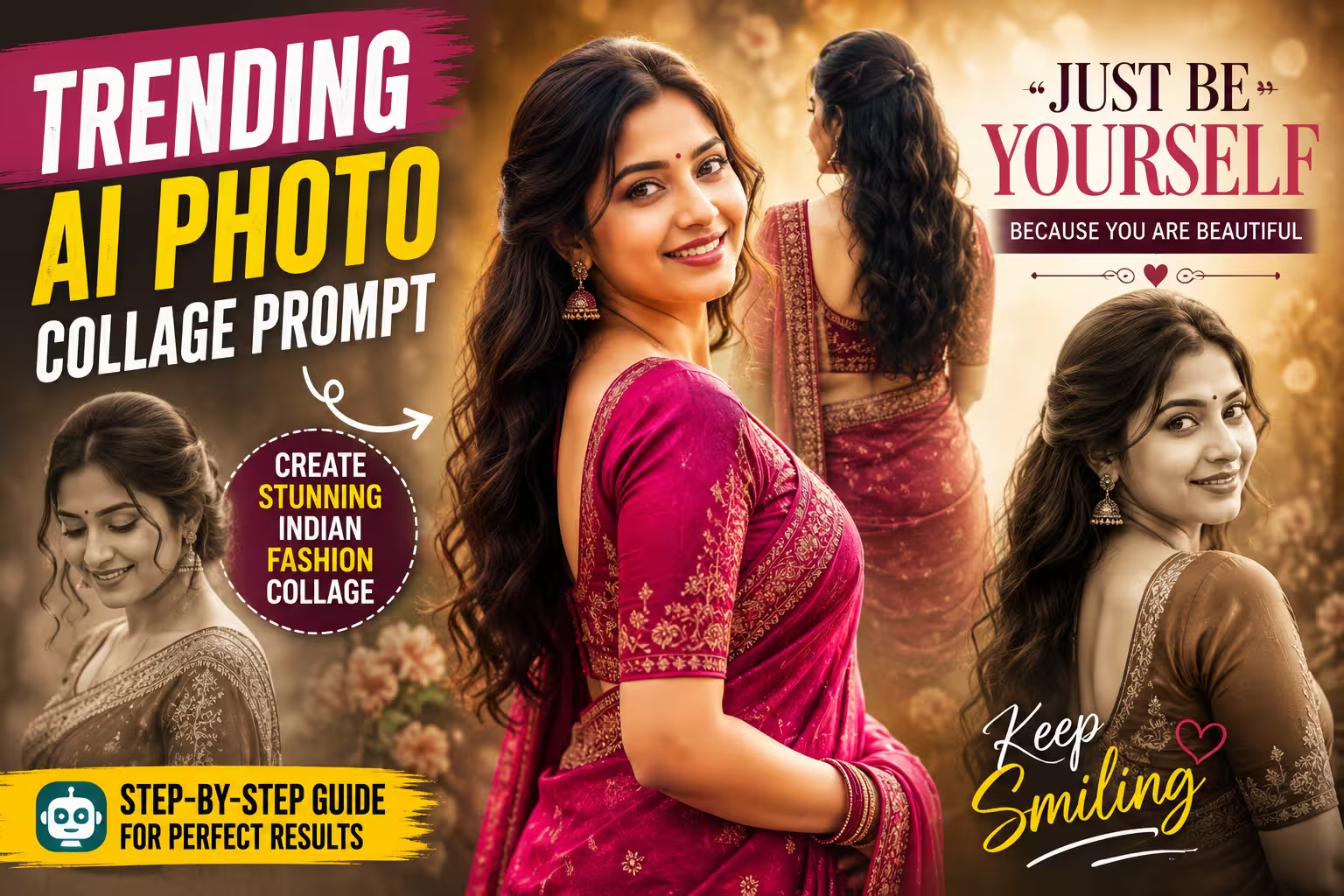
For example, one design can include a main color portrait in the center, a faded portrait on the left, another portrait on the right and a back-view image in the background.
The AI creates these elements and blends them together to give the final image a professional editorial look.
Why Is This Photo Going Viral?
This AI photo collage is getting popular because it brings together traditional Indian fashion and a modern cinematic editing style. Instead of showing a single portrait, the design combines several poses of the same person into one creative composition. The rich saree, warm colors, soft golden bokeh and faded portraits give the image a premium fashion-magazine feel. The elegant quotes also make the design more emotional and relatable.
Another reason for its popularity is that people can create a similar look using their own photos. They can experiment with different saree colors, poses, backgrounds and accessories without needing advanced editing skills. This makes the trend easy to recreate and share on social media. The combination of AI photo editing, traditional fashion and a stylish collage layout makes this photo visually attractive and highly shareable.
Prompt ⬇️
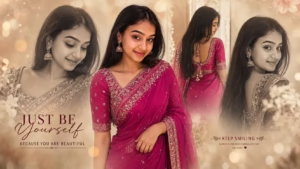
Create a photorealistic 16:9 Indian fashion photo collage using my uploaded image as the exact identity reference. Keep the same face, facial features, skin tone, hairstyle and natural proportions unchanged.
Show the same woman in an elegant magenta saree in four different natural poses. Use one large color portrait in the center, two softly faded monochrome portraits on the sides, and one back-view portrait behind the main subject.
Use a warm beige studio background, subtle golden bokeh, soft shadows, natural skin texture, realistic saree fabric, cinematic lighting and gentle vintage film grain.
Create a sophisticated Indian fashion magazine aesthetic with clean composition, soft atmospheric blending and balanced spacing. Add minimal elegant typography reading “JUST BE YOURSELF” and “KEEP SMILING”.
Highly realistic DSLR photography, natural expression, premium editorial style, 16:9 landscape composition, no distorted hands, no duplicate faces and no cropped faces.
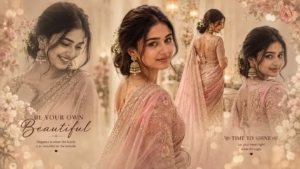
Create an ultra-realistic cinematic editorial collage of a beautiful young South Asian woman in an elegant pastel pink saree with intricate golden embroidery. Use a completely different facial identity, with natural glowing skin, expressive brown eyes, soft makeup, and a graceful smile. Show multiple poses: a dreamy close-up, confident front portrait, elegant side profile, and a back view highlighting the saree drape and detailed blouse. Add traditional jhumka earrings, delicate floral hair accessories, and soft romantic styling. Use a luxurious beige-golden studio background with flowers, warm bokeh, soft sunlight, and dreamy haze. Add elegant typography: “BE YOUR OWN BEAUTIFUL” and “TIME TO SHINE”.
How To Create Collage Photo
Creating this Indian fashion photo collage is very easy. You can create a similar image in just a few minutes using ChatGPT. Below, I have explained the complete process step by step, so you can follow it easily even if you have never used an AI photo editing tool before.
- First, choose a clear photo of yourself that you want to use for the edit. A well-lit photo with a clearly visible face will usually give better results.
- After that, download the ChatGPT app from the Play Store and log in to your account.
- Now come back to this article and copy the AI Photo Collage Prompt given below the example image.
- Scroll down and click on the Create Your Image button.
- Next, tap the + icon in the ChatGPT chat and select the photo you want to edit from your phone.
- Paste the copied prompt into the chat along with your photo and tap the Send button.
- ChatGPT will then process your photo and create the AI fashion collage based on the instructions in the prompt. Wait for the image generation to finish.
- Once your image is ready, check the face, saree, poses and overall collage carefully. If you want a different look, you can ask ChatGPT to make another version with a different saree color, background or pose.
- Finally, save the generated image and share it on Instagram, Facebook, WhatsApp, or wherever you want.
Which Is Best for Photo Editing: Gemini or ChatGPT?
Both Gemini and ChatGPT are useful for AI photo editing, but the better choice depends on the type of edit you want. Gemini is a good option for simple image transformations and creative edits. ChatGPT is particularly useful when you want to create detailed edits using a specific prompt. It can help with cinematic portraits, traditional fashion looks, photo collages, background changes and different lighting styles. For the Indian fashion collage shown in this article, ChatGPT can be a good choice because you can describe the clothing, poses, composition, colors and overall style in detail. However, the final result can vary depending on the reference photo and the tool version you use. It is worth trying both and choosing the result that looks most natural to you.
How to Get Better Results
For a better AI photo collage, always start with a clear and high-quality reference photo. A well-lit image with a visible face usually gives more consistent results. Avoid using heavily filtered or blurry pictures.
Keep your prompt detailed but easy to understand. Clearly mention the person’s appearance, clothing, poses, background, lighting and image ratio. If you want the same person in every portrait, specifically ask the AI to maintain the facial identity and natural features.
You can also experiment with different saree colors, poses and backgrounds. If the first result is not perfect, try generating another version instead of changing everything at once. Small prompt changes can often improve the final image.
Common Mistakes to Avoid
One common mistake is using a low-quality reference photo. This can make the face look different or unnatural. Another mistake is adding too many instructions, which may confuse the AI and produce a messy composition.
Avoid asking for excessive skin smoothing or unrealistic beauty changes, as this can make the image look artificial. Too many background elements can also distract from the main portrait.
Finally, always check the generated image for face consistency, hands, clothing details, text and cropped areas before publishing or sharing it
FAQ
Can I create this AI photo collage with my own photo?
Yes. You can use a clear photo of yourself as a reference and paste the prompt into an AI image editing tool that supports reference images.
Which photo is best for AI editing?
A clear, well-lit photo with a visible face usually gives better results. Avoid blurry images and photos with heavy filters.
Can I change the saree color?
Yes. You can change the saree to red, green, blue, black, cream or any other color you like.
Can I create the collage in another size?
Yes. You can change the aspect ratio according to your needs. For this design, 16:9 works well for a wide landscape collage.
Why does AI sometimes change the face?
AI may sometimes change facial details while creating multiple portraits. Using a clear reference image and specific identity instructions can help improve consistency.
Can I add my own text to the collage?
Yes. You can ask the AI to add text, or create the image without text and add your preferred quotes later using a photo editor.
Conclusion
AI photo collage editing is an easy way to turn a simple portrait into a stylish and creative fashion image. With a clear reference photo and the right prompt, you can create a beautiful Indian traditional collage with multiple poses, elegant clothing, cinematic lighting and a premium background.
You can also personalize the result by changing the saree color, poses, accessories, background and text. If the first result is not perfect, try making small changes to the prompt and generate another version.
For the best results, keep the design natural, avoid excessive effects and always check the final image before sharing it.