Introduction
Sawan is one of the most special months for Lord Shiva devotees. During this time, people visit Shiva temples, offer water and Bel Patra to Shivling, and share beautiful devotional photos on Instagram, Facebook, and WhatsApp.
These days, you don’t always need to visit a temple or hire a photographer to create a beautiful Sawan-themed photo. With AI photo editing tools, you can create a realistic Sawan Somwar Mahadev photo using your own face.
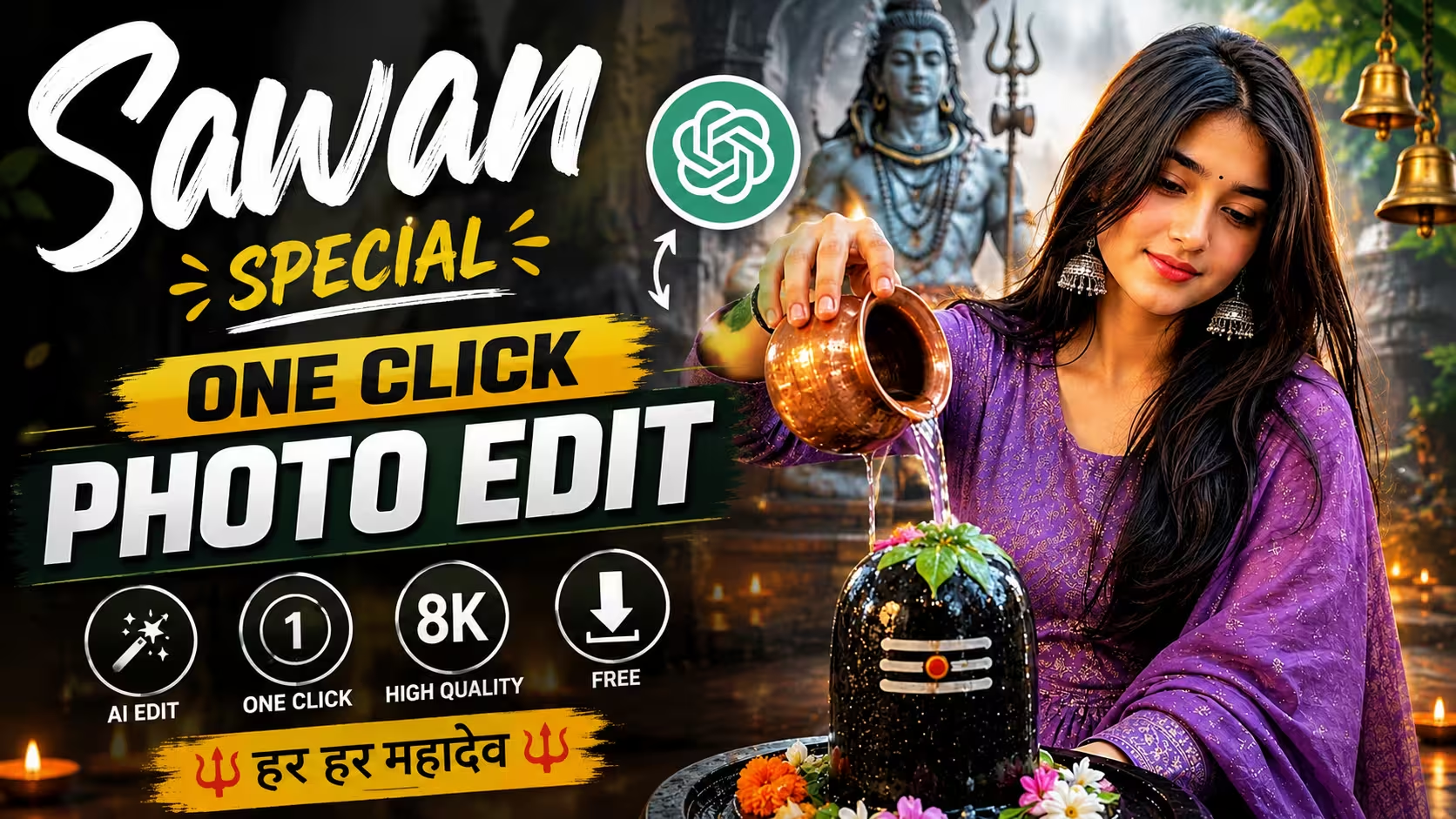
In this guide, I will show you how to create a devotional AI photo where you are sitting beside a decorated Shivling, praying with folded hands, with Lord Shiva, diyas, flowers, and a beautiful temple atmosphere in the background.
The best part is that you can do it with a simple face reference photo and an AI image generator.
What Is a Sawan Somwar AI Photo?
A Sawan Somwar AI photo is a creative devotional image made with the help of AI, especially for the holy month of Sawan and Mondays dedicated to Lord Shiva. With an AI image generator, you can use your own photo as a face reference and create a completely new Sawan-themed scene. For example, you can show yourself praying beside a Shivling, offering water, holding a diya, or standing inside a beautiful Shiva temple.
AI can also add traditional clothes, flowers, Bilva leaves, temple bells, diyas, rain, mountains, and a peaceful devotional background. With the right prompt, the final image can look realistic and cinematic. These photos are also perfect for sharing on Instagram, Facebook, WhatsApp Status, or other social media platforms.
Features of This Sawan Somwar AI Photo
This Sawan Somwar AI photo has a beautiful Mahadev and Shivling devotional theme with a realistic and cinematic look. You can use your own face as a reference and create a natural-looking photo wearing a traditional purple outfit. The scene includes a decorated Shivling, Lord Shiva statue, flowers, glowing diyas, and a peaceful temple atmosphere. The folded-hands prayer pose gives the photo a spiritual and devotional feel.
The photo also focuses on realistic details and cinematic quality, including natural skin texture, detailed clothing, warm temple lighting, realistic flowers and beautiful background elements. The 4:5 vertical format makes it perfect for Instagram, Facebook, and other social media platforms. You can also change the outfit, temple background, lighting, or pose to create different Sawan Somwar AI photos.
Prompt ⬇️
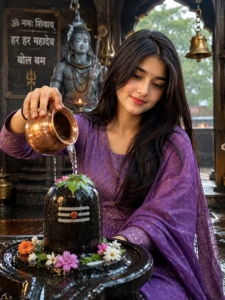
Use my face reference and keep my face exactly same. Keep the exact same clothes from my reference photo, including color, design, style and all details. Do not change or replace my outfit. Me pouring water from a copper lota on a decorated Shivling inside a beautiful Shiva temple, flowers, Bilva leaves, glowing diyas, Lord Shiva statue in background, peaceful devotional atmosphere, cinematic realistic photography, natural skin, 8K, 4:5.
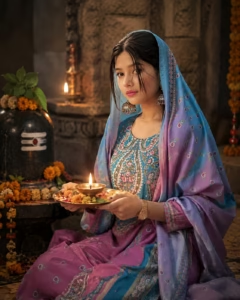
Use my face reference and keep my face exactly same. Keep the exact same clothes from my reference photo, including color, design, style and all details. Do not change or replace my outfit. Me sitting beside a decorated Shivling and holding a glowing brass diya, flowers, Bilva leaves, warm temple lights, peaceful devotional expression, cinematic realistic photography, natural skin, 8K, 4:5.
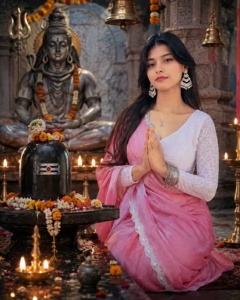
Use my face reference and keep my face exactly same. Keep the exact same clothes from my reference photo, including color, design, style and all details. Do not change or replace my outfit. Me sitting with folded hands and praying beside a decorated Shivling, Lord Shiva statue behind, glowing diyas, flowers, temple bells, peaceful devotional atmosphere, cinematic realistic photography, natural skin, 8K, 4:5.
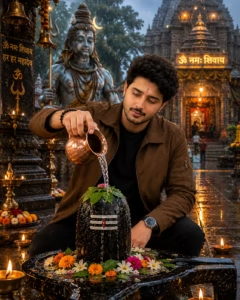
Use my face reference and keep my face exactly same. Keep the exact same clothes from my reference photo, including color, design, style and all details. Do not change or replace my outfit. Me sitting with full devotion and pouring water from a copper lota over a beautifully decorated Shivling, peaceful prayerful expression, Lord Shiva statue behind, trishul, temple bells, flowers, Bilva leaves, glowing diyas, Sawan rain atmosphere, cinematic realistic photography, natural skin, 8K, 4:5.
How To Create Somwar Sawan Ai Photo
It is very easy to make this Somwar Sawan photo, you can make it and get it ready in just a few minutes. Below I am telling you step by step steps of making it, you follow those steps and your dough will be ready in minutes.
- First of all, you have to copy the prompt given below the photo as per the photo you want to make.
- Scroll down a bit and click on the create your image button.
- If you already have Chatgpt then it is good, if not then download it from Play Store and login to it.
- Now you have to click on the plus icon and upload your photo.
- Then paste the copied prompt along with the photo and click on send.
- Now Chatgpt will start taking your photo, it may take some time, 1-2 minutes.
- Once your photo is ready, you just save it and you can upload it to your story or social media.
Create Your Image
Common Mistakes to Avoid
While creating a Sawan Somwar AI photo, one of the most common mistakes is using a blurry or unclear reference photo. If your face is not clearly visible, the AI may not recreate your facial features properly. So, always use a clear, good-quality photo and avoid sunglasses, heavy filters, or anything covering your face.
After generating the image, make sure to check the final result carefully. Sometimes AI can create small mistakes in hands, fingers, clothes, facial expressions, or background elements. Hindi text can also appear incorrect. If you notice any issue, generate the image again or make the necessary edits before sharing it.
Why Is This AI Photo Going Viral Right Now?
AI photos are becoming popular because they allow people to create unique and attractive images using their own faces without needing an expensive camera or professional photoshoot. Sawan Somwar is also a popular devotional occasion, so people are naturally interested in creating and sharing Mahadev-themed photos on Instagram, Facebook, and WhatsApp.
Another reason is that these photos are easy to personalize. Users can change their outfit, temple background, pose, lighting, rain effect, or devotional elements with a simple AI prompt. When the final image looks realistic and different from a normal photo, people are more likely to share it with friends and post it on social media. This combination of Sawan trend + Mahadev theme + personal face + AI creativity makes this type of photo especially attractive right now.
FAQ
1. Can I create a Sawan Somwar AI photo with my own face?
Yes, you can create a Sawan Somwar AI photo using your own face as a reference image. Upload a clear photo and use the Sawan Somwar AI photo prompt to generate the image.
2. Do I need professional photo editing skills?
No, you don’t need Photoshop or advanced editing skills. An AI image generator can create the photo using your reference image and prompt.
3. Can I change the outfit and background?
Yes, you can change the traditional outfit, temple, flowers, diyas, rain, mountains, lighting, and other elements according to your preference.
4. Which image size is best for Instagram?
A 4:5 vertical format is a good choice for Instagram posts. You can also use 9:16 for Instagram Stories or Reels.
5. Why does AI sometimes change my face?
AI may sometimes slightly change facial features while generating a new image. Using a clear reference photo and generating the image again can help you get a closer result.
6. Can I use the same prompt to create different Sawan photos?
Yes, you can use the same basic prompt and change the scene, pose, outfit, temple, or background to create different Sawan-themed AI photos.
Conclusion
Creating a Sawan Somwar AI photo with your own face is a simple and creative way to celebrate the holy month of Sawan. You don’t need professional photography skills or complicated editing software to make an attractive Mahadev-themed photo. With a clear face reference and the right AI prompt, you can create a realistic devotional image with a Shivling, temple, flowers, diyas, and traditional surroundings.
You can also try different outfits, poses, backgrounds, and lighting styles to make your photo unique. Once your image is ready, you can share it with friends and family on Instagram, Facebook, or WhatsApp. So, try the prompt and create your own beautiful Sawan Somwar AI photo and make this Sawan special with a creative Mahadev-themed picture.