Introduction
Ganesh Chaturthi is a festival filled with devotion, happiness, beautiful decorations, traditional clothes, flowers, music, and unforgettable family moments. Along with celebrating the festival in real life, many people now enjoy creating creative festive photographs with the help of AI photo editing tools.
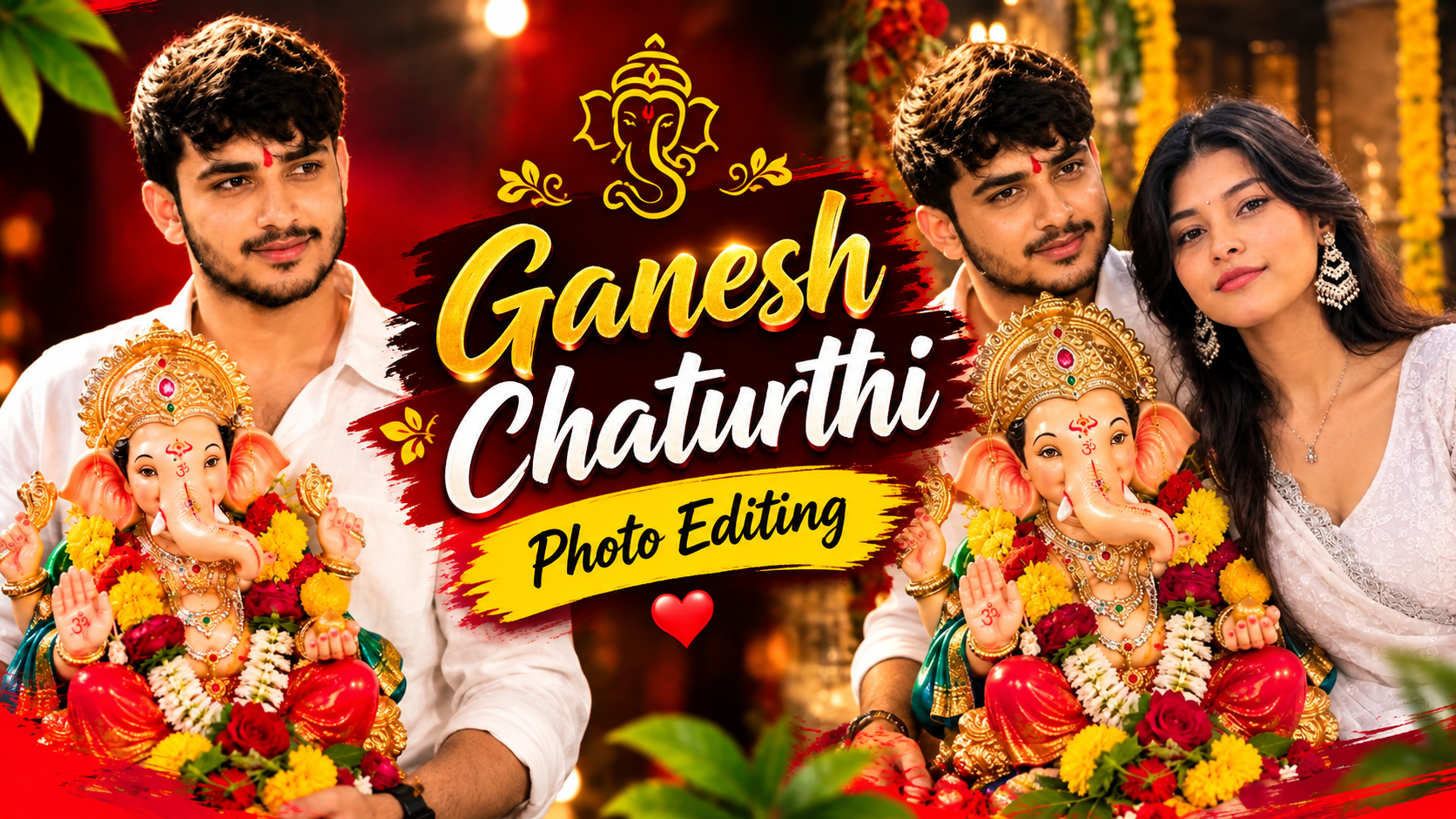
A Ganesh Chaturthi AI photo edit can turn a simple portrait into a beautiful traditional celebration scene. A normal photograph can be transformed into a festive portrait featuring Lord Ganesha, traditional Maharashtrian clothing, jewellery, flowers, diyas, a decorated Kalash, and warm cinematic lighting.
The goal of a good AI edit should not be to make the image look overly artificial. Instead, it should feel like a real photograph captured during a beautiful Ganesh Chaturthi celebration. Natural expressions, realistic skin texture, detailed clothing, balanced lighting, and a meaningful festive background can make the final image much more attractive.
The Beauty of a Traditional Ganesh Chaturthi Portrait
There is something special about traditional Indian festival photography. The combination of vibrant colours, ethnic clothing, flowers, jewellery, and warm lights creates a look that is both elegant and emotional.
A Ganesh Chaturthi portrait becomes even more meaningful when Lord Ganesha is included as the central part of the composition. Rather than simply placing an idol in the background, the image can show a personal and peaceful connection between the person and the idol.
For example, a woman dressed in a traditional Maharashtrian saree can be shown sitting or standing beside a beautifully decorated Ganesha idol. Her peaceful expression, traditional jewellery, and festive surroundings can create a warm devotional atmosphere.
The addition of small details such as marigold flowers, rose garlands, brass diyas, green leaves, and a copper Kalash can make the scene feel much more authentic.
Why Ganesh Chaturthi AI Photos Are Popular
AI photo editing has become popular because it allows people to experiment with creative ideas without needing a professional photoshoot.
A person may have a simple outdoor portrait but want a traditional festival photograph. Instead of arranging an entire photoshoot with costumes, decorations, lighting, and a Ganesha idol, an AI editing tool can create a similar visual concept from a reference photograph.
This is particularly useful for social media users who want unique festive content for Instagram, Facebook, WhatsApp, or other platforms.
The popularity of these edits also comes from their personal nature. People can choose their preferred saree colour, jewellery style, pose, background, lighting, and festive decorations. This makes every image slightly different.
However, the best results usually come from keeping the edit believable rather than adding too many visual effects.
Ganesh Chaturthi AI Photo Editing Prompt
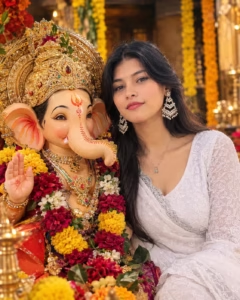
Create a highly realistic 8K devotional portrait of a young South Asian woman standing affectionately cheek-to-cheek with a beautifully adorned Lord Ganesha idol. Preserve her natural facial identity, realistic skin texture, long flowing black hair, small bindi, expressive brown eyes, gentle smile, elegant silver jhumka earrings, and delicate white embroidered traditional outfit. The Ganesha idol should feature an intricately crafted golden crown, traditional jewelry, a red-orange tilak design, and lifelike painted eyes with fine details. Set the scene in a warm temple-inspired environment decorated with colorful flowers and subtle festive elements. Use soft golden illumination, cinematic background blur, natural skin tones, realistic textures, professional DSLR photography, shallow depth of field, crisp details, and an authentic devotional atmosphere. Ratio 4:5.
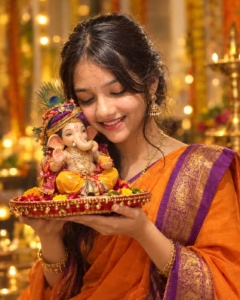
Create a photorealistic vertical 4:5 portrait of a young Indian woman celebrating Ganesh Chaturthi with a beautifully decorated Lord Ganesha idol. She has long, naturally wavy dark hair, a calm expression with gently closed eyes, and a soft devotional smile. Give her an elegant traditional appearance with a crescent-shaped Chandrabindi, a Maharashtrian nath, and classic ethnic earrings. Dress her in a luxurious maroon saree featuring intricate golden brocade patterns, with the pallu gracefully placed over one shoulder. She should lean naturally and affectionately toward the Ganesha idol.

Show Lord Ganesha beside her with an intricate golden Mukut, detailed ornaments, and beautiful garlands made from bright yellow marigolds and red roses. Add traditional golden bangles to the idol. Place a polished copper Kalash in the foreground, filled with fresh betel leaves and a coconut decorated with flowers. Surround the scene with subtle festive home decorations, warm ambient illumination, soft golden highlights, and an artistic blurred background. Maintain realistic skin texture, natural proportions, detailed fabrics, authentic jewellery, cinematic depth of field, vibrant yet balanced colours, professional photography, and ultra-high-definition 8K detail. Preserve the exact facial identity and natural features of the reference photo without altering the face.
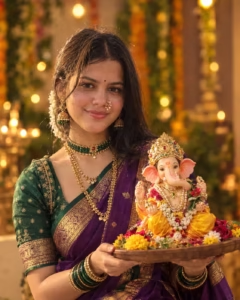
Create an ultra-detailed, natural-looking vertical 4:5 photograph of a young Indian woman sharing a peaceful Ganesh Chaturthi moment with a beautifully ornamented Lord Ganesha idol. Her appearance should remain graceful and realistic, with long dark waves, softly closed eyes, and a gentle smile that expresses happiness and devotion. Include a traditional crescent Chandrabindi, elegant Maharashtrian nose ring, and ethnic earrings.

She should wear a sophisticated maroon silk saree decorated with intricate golden brocade work, with the pallu resting naturally over her shoulder. Her pose should feel comfortable and intimate as she gently brings her head closer to the Ganesha idol.

Make the idol highly detailed, with a grand golden crown, traditional ornaments, and vibrant garlands combining yellow marigolds with red roses. Add delicate golden bangles to its wrist. Place a copper Kalash prominently toward the lower foreground, decorated with green betel leaves, a coconut, and fresh flowers.

Create a cozy festive home environment with tasteful Ganesh Chaturthi decorations, warm golden illumination, soft glowing lights, and a beautifully blurred background. Use realistic skin pores, natural facial proportions, detailed textile textures, authentic jewellery, realistic shadows, cinematic portrait lighting, shallow depth of field, and rich but natural colours. The final image should resemble a professional camera photograph with exceptional 8K-level detail. Preserve the subject's exact facial identity from the reference image and avoid changing her facial structure.
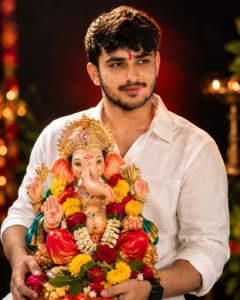
Create a high-quality cinematic studio portrait of a young Indian man, keeping the same person and facial identity as the uploaded reference image. He is wearing a clean white shirt and holding a beautifully decorated, colorful Lord Ganesha idol during Ganesh Chaturthi. Give him a natural gentle smile, a small red tilak, and a joyful devotional expression. Place him against a deep, dramatic dark background with a soft red glow surrounding the subject. The Ganesha idol should have vibrant traditional decorations, detailed ornaments, flowers, and realistic craftsmanship. Use warm cinematic lighting, subtle background bokeh, sharp facial and fabric details, realistic skin texture, professional DSLR photography, natural colors, shallow depth of field, photorealistic 8K quality. Ratio 4:5.
How To Create Ganesh Chaturthi AI Photo
Creating this Ganesh Chaturthi photo is very easy. You can create a similar image using ChatGPT in just a few minutes.
- Choose a clear photo of yourself.
- Open the ChatGPT app and log in.
- Copy the Ganesh Chaturthi Photo Editing Prompt given below.
- Tap the + icon and upload your photo.
- Paste the prompt and tap Send.
- ChatGPT will create your Ganesh Chaturthi photo.
- If you want any changes, ask ChatGPT to modify the photo.
- Finally, save the image and share it on social media.
Create Your Image
The Importance of Lord Ganesha in the Composition
Lord Ganesha should remain one of the main visual elements of the photograph.
A beautifully decorated idol can include an ornate mukut, traditional clothing, jewellery, and colourful flower garlands. The colours of the idol can be coordinated with the woman’s saree so that the complete image looks visually connected.
For example, a pink or yellow outfit on the Ganesha idol can complement a maroon, purple, or green saree. Gold decorations can then connect both subjects together.
The idol should also have realistic proportions and detailed facial features. AI-generated images sometimes produce unusual hands, jewellery, or facial details, so checking the final image is important.
A respectful and natural presentation also makes the photograph feel more appropriate for a religious festival.
Why This Style Works Well for Social Media
Festive AI portraits can work particularly well on social media because they combine a personal photograph with a culturally relevant theme.
A traditional Ganesh Chaturthi image can be used as a festival post, profile update, story, reel cover, or creative social media artwork.
The 4:5 portrait format is also useful for social media because it provides enough vertical space for the person’s face, outfit, Ganesha idol, and decorations.
A clean composition can make the image easier to view on a mobile screen.
However, the image should still feel personal. Adding too many artificial effects or exaggerated elements can make the photograph look less authentic.
Common Mistakes to Avoid in Ganesh Chaturthi AI Photo Editing
Creating a festive AI portrait is easy, but a few common mistakes can reduce the quality of the final image. Keeping these points in mind can help you get a more natural result.
1. Using a Low-Quality Reference Photo
A blurry or poorly lit reference image can make it difficult for the AI tool to understand facial features. Always use a clear photograph with the face visible.
2. Adding Too Many Details
Putting too many decorations, jewellery pieces, flowers, lights, and background objects into one image can make the composition look crowded. A clean and balanced scene usually looks better.
3. Changing the Face Too Much
If you are editing your own photograph, avoid excessive changes to facial features. The final image should maintain a natural resemblance to the original reference.
4. Ignoring Hands and Fingers
AI-generated images can sometimes produce incorrect fingers, unusual hand positions, or distorted jewellery. Always check these details before using the final image.
5. Using Unrealistic Lighting
The light on the person, Ganesha idol, and background should look consistent. Extremely bright highlights or unnatural shadows can make the image look artificial.
6. Making the Background Too Busy
A festive background should support the main subject rather than distract from it. Soft flowers, diyas, and bokeh lights are often enough to create a beautiful atmosphere.
7. Forgetting the Aspect Ratio
The wrong aspect ratio can crop important parts of the saree, idol, or decorations. For this portrait concept, a 4:5 ratio works well, especially for social media posts.
Frequently Asked Questions
What is a Ganesh Chaturthi AI photo edit?
A Ganesh Chaturthi AI photo edit is a digitally created or enhanced portrait that gives a photograph a festive Ganesh Chaturthi appearance using AI. It can include traditional clothing, Lord Ganesha, flowers, jewellery, diyas, and festive decorations.
Can I use my own photo for this AI edit?
Yes. You can use a clear personal portrait as a reference with an AI image editing tool that supports reference images. Using a good-quality photo generally gives better results.
How can I keep my face similar to the original photo?
Use a clear reference image and include instructions asking the AI to preserve the person’s facial identity and natural facial features. However, results can vary between different AI tools.
Which saree colours work best for this type of image?
Traditional colours such as maroon, red, green, purple, navy blue, and gold can work particularly well for a Ganesh Chaturthi portrait. You can choose the colour according to your preferred style.
Why are flowers used in the Ganesh Chaturthi AI photo?
Flowers such as marigolds and roses help create a traditional festive atmosphere. They also add colour and visual detail to the portrait.
What aspect ratio is best for this portrait?
A 4:5 vertical ratio is a good option for this type of portrait. It provides enough space for the person, Ganesha idol, and festive decorations.
Can I change the background?
Yes. The background can be customized according to your preference. You can choose a simple home puja setting, a decorated festive room, or a more colourful celebration environment.
Conclusion
A Ganesh Chaturthi AI photo edit is a creative way to give a regular portrait a beautiful traditional festival look. With elements such as a Maharashtrian saree, traditional jewellery, Lord Ganesha, marigold flowers, diyas, and warm lighting, you can create a portrait that feels festive and personal.
The key to a good result is not adding as many effects as possible. Instead, focus on realistic details, natural facial features, balanced colours, proper lighting, and a clean composition. A high-quality reference photo can also make a noticeable difference.
The prompt shared above can be used as a starting point, and you can adjust the clothing, colours, decorations, pose, and background according to your preference.
Whether you are creating a Ganesh Chaturthi post for Instagram, a WhatsApp status, or simply experimenting with AI photography, this traditional portrait style can help you create something beautiful while keeping the festive spirit of Lord Ganesha at the centre.