Retro photography has a different kind of charm. Unlike modern photos that often focus on sharp details and heavy editing, old photographs have a warm, slightly faded look that feels personal and nostalgic. This is one of the reasons why 90s-inspired photos are becoming popular again on social media.
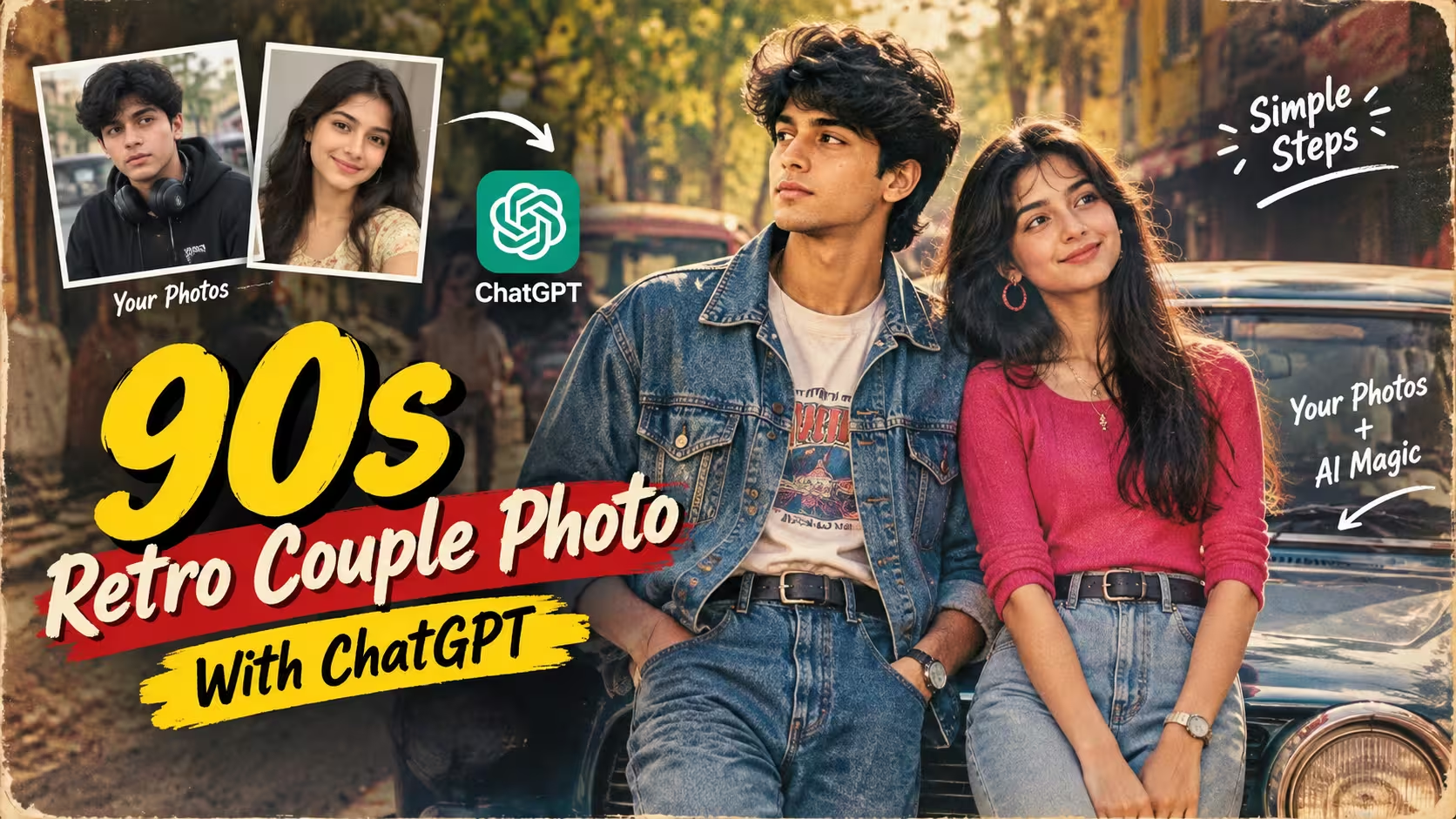
The photo style featured in this tutorial combines that nostalgic look with a modern couple portrait. The vintage car, denim outfits, warm sunlight, soft background and old-film texture give the image a classic Indian retro feel.
The best part is that you can create a similar concept using your own photos with the help of ChatGPT. You do not need advanced Photoshop skills or professional photography equipment. You simply need suitable reference photos and clear instructions for the type of image you want to create.
Why This 90s Retro Couple Photo Is Trending
The popularity of retro-style images is not only about making a photo look old. It is about recreating the mood and visual character of a particular era.
The 90s had a very recognizable photography style. Pictures often had warm colors, natural lighting, simple outfits and a slightly soft appearance because they were captured using film cameras. Vintage cars, denim fashion and outdoor locations also played an important role in the visual culture of that period.
When these elements are combined with an AI-generated scene, an ordinary portrait can be transformed into something that feels like a still from an old romantic movie.
Another reason this style works well for social media is its nostalgic appearance. It looks different from the highly polished and heavily filtered images that are common today. The subtle imperfections make the final picture feel more like a real photograph.
What Makes This Photo Look Authentic?
Creating a retro image is not simply a matter of adding a brown or yellow filter. A convincing result depends on several small details working together.
Lighting is one of the most important elements. Warm natural sunlight helps create the soft appearance associated with vintage photography. Harsh artificial lighting can make the image look more like a modern digital edit.
Color grading also matters. Slightly faded colors and gentle contrast can give the photograph an older appearance without making the image look dull.
Film texture adds another layer of realism. Fine grain, very light scratches and small imperfections can recreate the character of an analog photograph. These effects should be subtle because excessive grain or scratches can make the image look artificial.
The background is equally important. A vintage car, old-style buildings, trees and an outdoor Indian setting help establish the period without making the scene feel overly staged.
90s Retro Photo Prompt
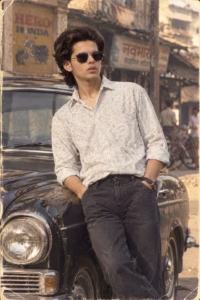
Transform my uploaded photograph into a believable 1980s-inspired portrait while keeping my original identity completely recognizable. Preserve my facial structure, eyes, eyebrows, nose, lips, jawline, complexion, hairstyle, natural skin details, age and body proportions without beautifying or reshaping my face. Style me with authentic 1980s fashion, a voluminous vintage hairstyle, classic accessories and aviator sunglasses. Place me in a realistic period setting containing details such as a vintage automobile, old storefronts, retro posters and a cassette player. Use warm golden illumination, soft contrast, faded vintage colors, realistic depth of field and natural shadows. Add delicate analog film grain, subtle photographic wear, dust and lightly aged edges. Make everything appear naturally photographed on an old film camera, with realistic textures and no digital-looking effects, text or watermark.
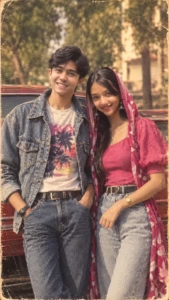
Create a highly realistic vertical 9:16 photograph featuring the two people from my uploaded reference images. Preserve both identities exactly, including their facial structure, skin tone, hairstyle, age, natural features and body proportions. Place the man on the left and woman on the right in a relaxed romantic pose beside a classic vintage car. Give them authentic 1990s-inspired Indian fashion with realistic clothing, accessories and natural styling. Set the scene on an old Indian street with greenery, vintage surroundings and soft golden sunlight. Use shallow depth of field, cinematic framing, faded warm colors, subtle analog grain, gentle film scratches and natural shadows. The final picture should resemble a genuine 1990s film photograph, with realistic skin, anatomy, hands, clothing texture and no text, watermark or artificial beauty filter.
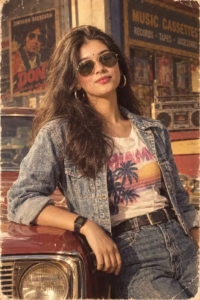
Turn my uploaded photo into a photorealistic Indian fashion collage while using my image as the primary identity reference. Keep my facial identity, face shape, eyes, nose, lips, skin tone, hairstyle, natural texture, age and body proportions unchanged. Create a stylish multi-frame composition featuring me in an elegant traditional Indian saree with graceful poses and realistic fabric details. Each section should feel like part of the same professional fashion photoshoot while showing slightly different poses and framing. Use rich but natural colors, soft studio lighting, realistic shadows, detailed skin texture and a premium editorial photography look. Maintain accurate anatomy, natural hands and believable clothing folds. Make the final collage polished, realistic and visually attractive, without artificial beauty effects, distorted features, text or watermark.
How To Create 90s Retro Couple Photo
Creating this 90s retro couple photo is very easy. You can create a similar image in just a few minutes using ChatGPT. Below, I have explained the complete process in simple steps, so you can follow it easily even if you have never used an AI photo editing tool before.
- First, choose two clear photos—one of the boy and one of the girl. Photos with clearly visible faces and good lighting usually give better results.
- After that, download the ChatGPT app from the Play Store and log in to your account.
- Now come back to this article and copy the 90s Retro Couple Photo Prompt given below the example image.
- Scroll down and click on the Create Your Image button.
- Next, tap the + icon in the ChatGPT chat and select both photos from your phone.
- Paste the copied prompt into the chat along with the photos and tap the Send button.
- ChatGPT will process the photos and create the retro couple image according to the prompt. Wait for the image generation to finish.
- Once the image is ready, check the faces, outfits, pose, vintage car and overall look. If you want any changes, you can ask ChatGPT to create another version.
- Finally, save your generated photo and share it on Instagram, Facebook, WhatsApp, or anywhere you like.
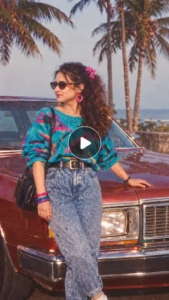
How to Use the Trending CapCut Template
First of all, take a clear photo of yourself and upload it to ChatGPT. Copy the prompt given above, paste it into ChatGPT, and click on Send.
- Once your AI-generated photo is ready, download and save it to your phone.
- Now, if the CapCut template is not available in your region, download a VPN from the Play Store and connect to it.
- After that, click on the Use Template in CapCut button given above.
- Once the template opens in CapCut, add your original photo to the first clip and the AI-generated photo to the second clip. Then add your original photo to the third clip and the AI-generated photo to the fourth clip.
- Continue using the same pattern throughout the template. Repeat this process until you reach the last clip. For the final remaining clip, add your original photo.
- Now check the complete video in the preview. If everything looks correct, click on Export and save the finished video to your phone.
Use Template in Cap Cut
Choosing the Right Photos
The quality of the reference photos can have a noticeable effect on the final result.
For a couple image, it is better to use clear photographs in which both faces are easily visible. Photos with extreme filters, very low resolution or faces covered by objects may produce less consistent results.
You do not have to find photos with matching backgrounds. In fact, the original backgrounds can be completely different. What matters most is that the important facial features are clearly visible.
Natural photographs are generally a better choice than heavily edited selfies because they provide more authentic facial and skin details for reference.
Keeping the Couple’s Natural Appearance
One of the biggest concerns with AI photo editing is that the final image may not look enough like the original people.
For a personal photo, the purpose of an AI edit should be to change the creative setting, not unnecessarily change someone’s appearance.
A good result should retain natural facial characteristics, skin tone, hairstyle and general body proportions. Avoid instructions that ask the AI to make the person unrealistically perfect, as excessive beautification can make the final image look less natural.
The same principle applies to clothing and accessories. If you want a particular retro outfit, it should look naturally fitted to the person rather than changing their body shape to fit the clothing.
Why Vintage Cars Work So Well
A classic car is one of the strongest visual elements in this type of photograph. Its shape, chrome details and older paint finish immediately communicate a different period.
When the couple is positioned naturally beside the vehicle, the car becomes part of the photograph instead of looking like a separate background element.
Lighting is especially important here. Reflections on the car should follow the same light direction as the people and surrounding environment. Consistent lighting helps the entire scene feel like one photograph.
Common Mistakes to Avoid
One common mistake is using a very low-quality reference image. If the original face is unclear, maintaining recognizable features can become more difficult.
Another mistake is adding too many instructions that conflict with each other. A clear description of the people, clothing, pose, environment and visual style is usually more useful than repeating the same requirement several times.
It is also better to avoid excessive beauty effects. Extremely smooth skin, unrealistic facial proportions or overly sharp details can make the image lose its natural appearance.
Finally, don’t rely only on a vintage color filter. The retro feeling should come from the complete combination of lighting, styling, environment, composition and film texture.
Frequently Asked Questions
Can I create this 90s retro couple photo using ChatGPT?
Yes. You can create a similar retro couple photo in ChatGPT by uploading suitable reference photos and providing clear instructions about the desired style, clothing, pose, background and overall appearance.
Do I need professional photo editing skills?
No. You do not need advanced editing knowledge. The process is simple enough for beginners, although you may need a few attempts to get the composition and details exactly as you want.
What type of photos should I upload?
Use clear, good-quality photos where the faces are visible. Natural photos with good lighting usually work better than heavily filtered or blurry images.
Can I use photos of both people separately?
Yes. You can upload separate photos of the male and female and explain which image should be used as the reference for each person.
Can I change the clothes and background?
Yes. You can describe the outfit, location, vehicle, lighting and other visual elements you want. This allows you to create different versions while keeping the same overall retro concept.
Can I create the image in 9:16 ratio?
Yes. You can request a 9:16 vertical format, which is suitable for Instagram Reels, Stories, Shorts and other mobile platforms.
Final Thoughts
The appeal of a 90s retro couple photograph comes from its simplicity. Warm sunlight, natural expressions, classic fashion, an old vehicle and the character of analog photography can create a memorable image without requiring complicated editing.
ChatGPT makes it easier to experiment with this style because you can describe the scene you have in mind and refine the result until the composition feels right. However, the quality of the final image still depends heavily on the reference photos and the clarity of your instructions.
For the most realistic result, focus on natural faces, believable poses, consistent lighting and subtle vintage effects. Instead of adding too many filters or effects, let the overall composition create the retro feeling.
With the right approach, you can turn your ordinary couple photos into a cinematic 90s-inspired portrait that feels nostalgic, personal and suitable for sharing on social media.