Introduction
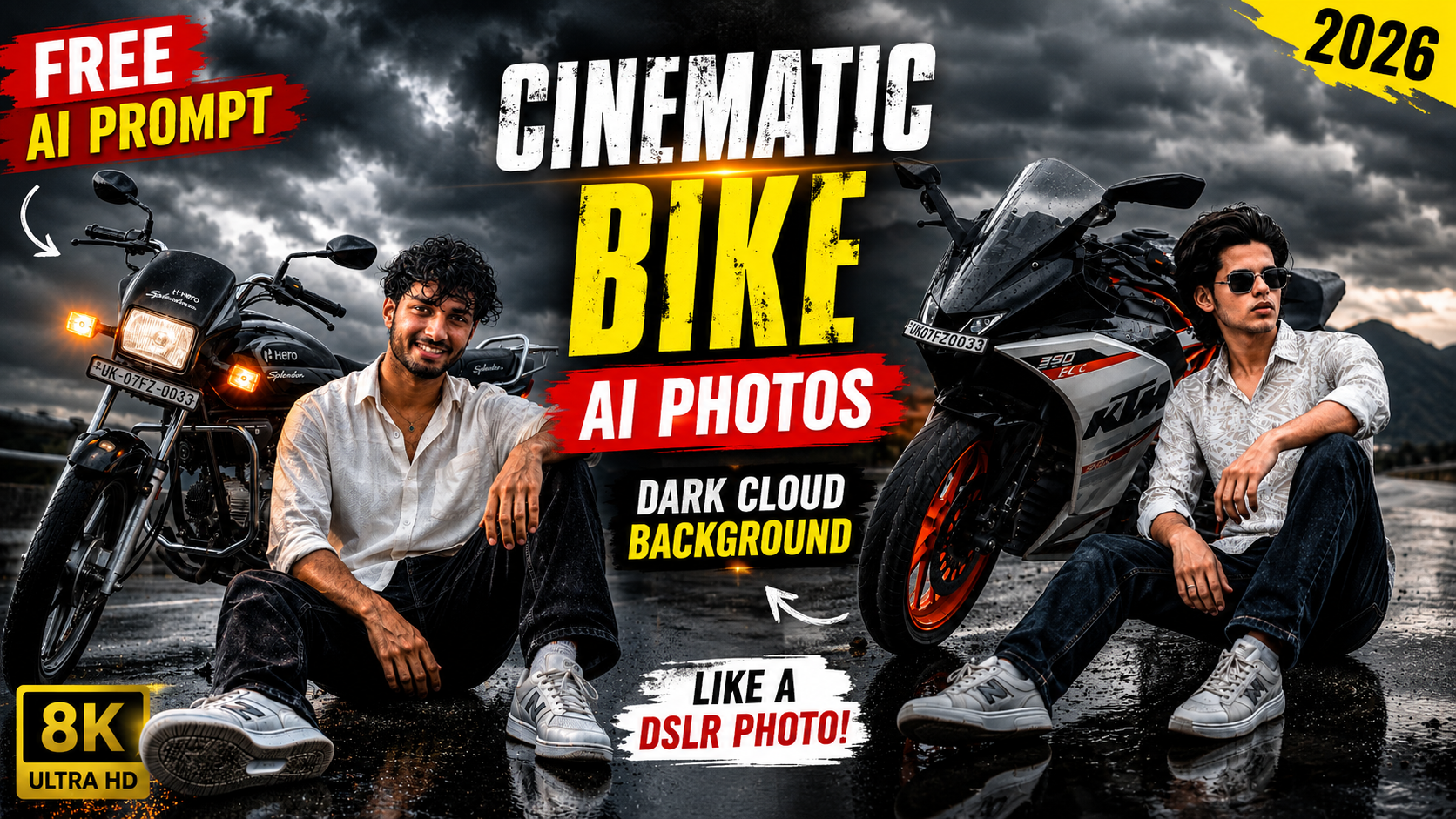
Have you ever seen a bike photo on Instagram that made you stop scrolling for a second? A stylish bike, dark storm clouds, cinematic lighting, and a realistic portrait can instantly grab anyone’s attention. The best part is that you no longer need expensive cameras or professional editing skills to create this kind of image. With ChatGPT, creating ultra-realistic bike AI photos has become easier than ever. All you need is a clear photo of yourself and a well-written prompt. Within a few moments, AI can transform your normal image into a premium cinematic portrait that looks like it was captured during a professional photoshoot.
Why Are Cinematic Bike AI Photos Trending?
Cinematic AI photos are one of the biggest trends on Instagram, Facebook, and WhatsApp. Unlike normal edits, these images create a powerful visual impact with realistic lighting, dramatic skies, and premium color grading. People love sharing these photos because they look stylish, unique, and professional. Whether you’re creating a new profile picture or posting on social media, a cinematic bike photo helps your profile stand out. Dark storm clouds, wet roads, glowing bike lights, and natural facial details make the final image look much more realistic than a simple background edit.
In this guide, you’ll learn how to create stunning bike AI photos with a dramatic dark cloud background using ChatGPT. Even if you’re using AI image generation for the first time, you can easily follow this tutorial.
Why People Love Dark Cloud Backgrounds
Dark storm clouds instantly add emotion and depth to an image. They create a dramatic atmosphere that makes the subject stand out without looking over-edited. When combined with a stylish motorcycle, cinematic lighting, and realistic reflections, the photo looks like a scene from a high-budget movie. This is one of the main reasons why dark cloud AI photos continue to trend on social media.
Prompt ⬇️
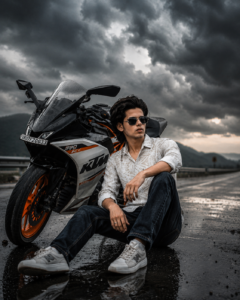
Use the uploaded image as the exact face reference. Preserve the face and identity exactly without changing facial structure, hairstyle, skin tone, beard, or expression. Generate a hyper-realistic cinematic portrait where the person is sitting naturally beside a KTM RC 390 on a wet highway. Massive dark storm clouds fill the entire sky, creating an epic monsoon atmosphere. The road is wet with realistic reflections, subtle rain droplets, dramatic volumetric lighting, moody blue-gray cinematic color grading, realistic wind effect in the hair, detailed motorcycle textures, premium automotive photography, shallow depth of field, HDR lighting, ultra realistic skin texture, DSLR quality, 85mm lens, 8K Ultra HD, photorealistic, magazine cover quality, no AI artifacts, natural pose, perfectly blended subject.
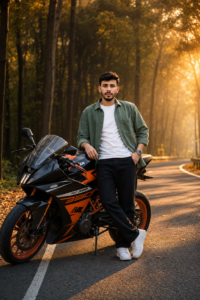
Use the uploaded photo as the exact face reference. Keep the person's face, hairstyle, skin tone, expression, body proportions, and identity 100% unchanged. Create an ultra-realistic DSLR-quality portrait of the same person standing beside a black-and-orange KTM RC 390 on a smooth forest highway during golden hour. The person is casually leaning on the bike with one hand on the fuel tank and the other in the pocket. Both legs are fully visible in a natural standing pose. Warm sunset rays pass through tall trees, creating cinematic rim lighting, soft volumetric light, and realistic shadows. Add beautiful road reflections, shallow depth of field, orange color grading, premium automotive photography style, HDR, 85mm lens, f/1.8, extremely sharp focus, realistic skin texture, detailed hair strands, premium fashion photography, luxury aesthetic, 8K, Ultra HD, hyper realistic, no face distortion, no AI artifacts.
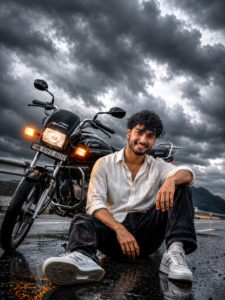
Use the uploaded photo as the exact face reference and keep the person's identity 100% unchanged. Create an ultra-realistic portrait of the same person sitting comfortably beside a glossy black Hero Splendor Plus motorcycle on a rain-soaked road. The motorcycle's amber indicators are ON and glowing brightly. Huge black thunder clouds cover the entire sky, creating an intense cinematic atmosphere. The wet road reflects the motorcycle lights and stormy sky. Add soft fog, distant mountains, dramatic lighting, realistic reflections, premium automotive photography, ultra detailed motorcycle, realistic facial details, sharp eyes, natural smile, HDR, DSLR quality, 85mm lens, shallow depth of field, volumetric light, luxury cinematic color grading, hyper realistic, 8K Ultra HD, extremely detailed, no face distortion, no AI look, perfectly natural composition.
How to Create This AI Photo with ChatGPT
If you want to make this photo with the help of Chatgpt then I will tell you how you can make this photo.How to make it, I am telling you its process step by step.
- First of all, you have to download the Chatgpt app from Google Play Store and login to it.
- Now you have to come to the website and copy the prompt below for whatever photo you want to create.
- Then click on create your image and then upload the photo in the plus icon of the chat and paste the prompt with it and click on send.
- ChatGPT will start creating your photo and will create a beautiful cinematic photo in no time.
- You have to download it and now if you want to make more such photos then you can make it by quickly copying it from the website.
Create Your Image
Why Use ChatGPT for AI Photo Editing?
ChatGPT is not only useful for writing text. It can also generate amazing AI images when you upload your photo and use a detailed prompt. Instead of spending hours learning Photoshop, you can simply describe the type of image you want. ChatGPT understands your instructions and creates a realistic result within minutes.
The best part is that your original facial identity can remain unchanged while the background, lighting, and overall environment become completely cinematic.
Tips to Get the Best AI Results
- The quality of your uploaded photo directly affects the final output.
- Always upload a bright and high-resolution image.
- Keep your face fully visible without heavy shadows.
- Avoid blurry or heavily filtered photos.
- Natural expressions usually produce the best results.
- If possible, wear simple clothes because AI can blend them more naturally with the cinematic environment.
- You can also ask ChatGPT to keep your face exactly the same while improving only the background, lighting, and overall quality.
FAQ
1. Can I create this cinematic bike AI photo for free?
Yes. If you have access to ChatGPT’s image generation feature or another AI image generator, you can create these photos using a clear image and a detailed AI prompt.
2. Do I need Photoshop or any editing skills?
No. You don’t need Photoshop or any professional editing experience. Simply upload your photo, paste the prompt, and let the AI generate the image.
3. Which type of photo gives the best results?
A high-quality photo with good lighting and a clearly visible face usually produces the most realistic AI images. Avoid blurry or low-resolution pictures.
4. Can I use any bike in the AI prompt?
Yes. You can replace the bike name with any model you like, such as KTM RC 390, Hero Splendor, Yamaha R15, Royal Enfield, TVS Apache, Bajaj Pulsar, or any other motorcycle.
5. Why doesn’t my AI image look realistic?
This usually happens if the uploaded photo is blurry or the prompt is too short. Using a detailed prompt and a high-quality photo will give much better and more realistic results.
6. Can I change the background?
Absolutely. You can ask ChatGPT to generate different backgrounds like dark storm clouds, mountains, forests, highways, sunsets, city streets, or rainy weather.
Conclusion
Creating cinematic bike AI photos has never been easier. With ChatGPT and the right AI prompt, anyone can transform a simple selfie into a stunning professional-looking portrait. Whether you prefer a KTM, a Hero Splendor, or any other motorcycle, you can easily generate realistic images with dark storm clouds, dramatic lighting, and premium cinematic effects.
Experiment with different poses, lighting styles, and weather conditions to create a photo that truly reflects your personality. With a good-quality photo and a detailed prompt, your AI-generated image can easily look like a professional DSLR photoshoot.