Hello friends, right now surreal manipulation photo is trending a lot on social media and this photo is being liked a lot on the entire social media. Now you can also create such a photo and after creating it, you can post it on your story. It is very easy to make this photo. Anyone can make it in just a little time. It will take you only 1 to 2 minutes. And the best part is that to create this surreal emotional photo, you do not need any kind of editing; you can create this photo without any editing knowledge. If you really want to make this kind of photo of yourself and that too with your own photo then you are at the right place. Today VS Editor will tell you everything about how to make this photo and how to make it. Every process will be explained in detail, just read the article carefully.
What is Surreal Photo Manipulation
In today’s modern times, pictures are not just pictures; people spend a lot of time and cherish many things through pictures these days. If we talk about surreal manipulation photos, then in this people are expressing their emotions through their eyes in which modern art is used.
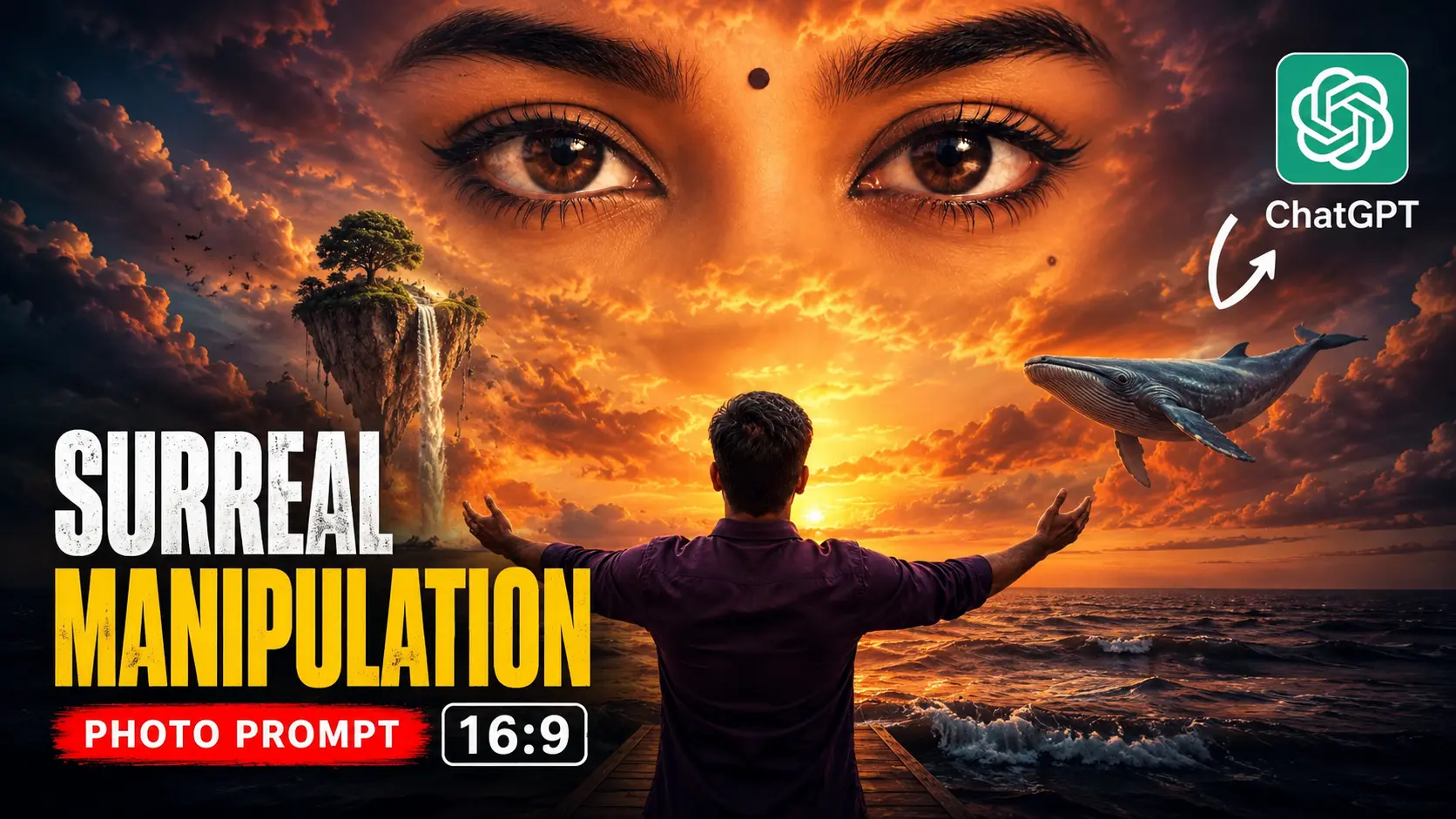
In simple terms, Surreal Photo Manipulation is an art form in which real photographs are combined with imaginative and creative elements to create a unique visual scene. It often features objects, situations, or environments that do not exist in the real world, yet they appear so natural and realistic that they seem believable. For example, giant eyes emerging from the clouds, floating islands in the sky, or a mysterious figure appearing above the ocean. Such compositions blur the line between reality and imagination, creating visually captivating artwork that tells a story and evokes emotion.
The biggest thing about this photo is that it acts as a bridge between reality and imagination.Surreal photos are created with the help of AI by adding your photo to AI and pasting a special prompt.
Why is Surreal Photo Manipulation So Popular?
In today’s digital world, people scroll through hundreds of images every day. As a result, it has become increasingly difficult for ordinary photographs to capture attention. This is one of the main reasons why Surreal Photo Manipulation has gained so much popularity. It offers something different—something that instantly makes viewers stop, look, and think.
One of the biggest strengths of this art form is its ability to turn imagination into visual reality. Instead of simply showing what exists, surreal artworks present scenes that challenge the viewer’s perception and spark curiosity. Whether it is giant eyes appearing in the clouds, floating objects in the sky, or dreamlike landscapes, these unusual elements encourage people to interpret the image in their own way and discover a deeper meaning behind it.
Social media has also played a major role in the rise of surreal photo manipulation. Platforms such as Instagram, Pinterest, and Behance are filled with creative visual content, and unique artworks often receive more engagement than traditional photographs. People are naturally drawn to images that tell a story or evoke emotion.
With the growing accessibility of tools like Photoshop and AI-powered editing software, creating surreal artwork has become easier than ever. As a result, Surreal Photo Manipulation has evolved into one of the most admired and influential forms of modern digital art.
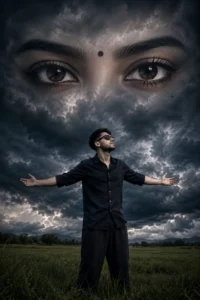
Use the uploaded reference image as the exact person. Preserve 100% facial identity, face shape, skin tone, hairstyle, and facial details. A cinematic dark fantasy portrait in an open green field under dramatic storm clouds. The person is standing in the center wearing a dark navy/black full-sleeve shirt with sleeves rolled up, loose black pants, black sunglasses, arms stretched wide open, looking slightly upward with a confident emotional pose. Above him in the sky, create a massive photorealistic female eyes composition blended into dark thunder clouds, occupying almost the entire upper half of the image. The eyes should be highly detailed, expressive, mysterious, with a small black bindi between the eyebrows. Clouds naturally merge into the face shape while keeping only the eyes and forehead visible. Ultra-dramatic atmosphere, dark blue-gray color grading, stormy clouds, cinematic depth, realistic lighting, moody shadows, epic love-story vibe, surreal fantasy artwork, high contrast, sharp focus, professional photo manipulation style, realistic grass field, volumetric clouds, ultra detailed, HDR, masterpiece, Instagram viral edit quality. Negative Prompt: blurry face, low resolution, extra limbs, distorted eyes, bad anatomy, duplicate person, cartoon, painting, watermark, text, logo, oversaturated colors.
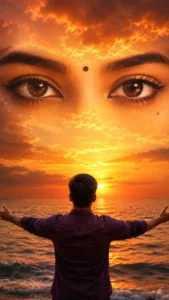
KEEP THE BOY EXACTLY AS IN THE ORIGINAL PHOTO. BACK VIEW ONLY. DO NOT SHOW HIS FACE OR SIDE PROFILE. Maintain the same pose, same body position, same clothing, same hairstyle, and both arms fully open facing the sea. Preserve the original composition and camera angle.Transform the sky into a divine cinematic sunset filled with gigantic ultra-realistic female eyes using the reference eye image. Use the reference eyes EXACTLY — preserve the same brown iris color, eyeliner, eyelashes, eyebrow shape, black bindi, and beauty mole. Do not redesign, beautify, or alter the eyes in any way.
The eyes must dominate 70–80% of the sky, stretching from left to right edge, appearing naturally formed within glowing golden-orange sunset clouds. Eyes must be crystal clear, razor sharp, ultra detailed, photorealistic, highly realistic cloud blending, with visible eyelashes and eyebrow texture.
Create a dreamy spiritual atmosphere with dramatic sunset clouds, divine heavenly glow, warm golden light reflecting on the ocean, cinematic color grading, volumetric sunlight, HDR lighting, realistic cloud textures, emotional mood, masterpiece quality, ultra-realistic photography, 8K resolution, DSLR quality, sharp focus, high contrast, realistic shadows, 9:16 vertical composition.
Negative Prompt: front face, side face, visible facial features of the boy, character replacement, different pose, different clothes, blurry eyes, small eyes, distorted eyes, extra eyes, cartoon, anime, painting, low quality, oversaturated colors, unrealistic clouds, deformed body, cropped subject, duplicate person, text, watermark, logo, noise, pixelation.
How To Create Surreal Manipulation Photo :-
- First of all, to make a rain photo, you have to copy the prompt given below any photo.
- Now you have to come down and click on create your image.
- You have to download the Chatgpt app from Play Store and login it with your Gmail and if you have already done this then you do not need to do this.
- Now click on the plus icon of the chat and take a nice photo of yourself and paste the copied prompt and click on the send button.
- Now Chatgpt will start creating your photo, it may take some time, you have to wait a little.
- As soon as your photo is ready, you can download it by clicking on the download button.
- Now your stunning portrait photo is ready, you can add it to your story with a nice background music, the right title and hashtag.
Tips For Creating Surreal Manipulation Photo :-
- Always use a high-quality HD photograph for better results.
- Make sure your face is clearly visible and properly focused in the image.
- Avoid using photos taken from a long distance, as facial details may not be visible.
- Choose a photo with a simple and clean background.
- Avoid backgrounds with too many objects or distractions.
- A clean background makes the editing process much easier and more effective.
- For AI-based photo manipulation, ChatGPT is a great option for generating high-quality and realistic images.
- Using a good source photo can significantly improve the final output and overall visual quality.
Conclusion :-
So in today’s article I told you how you can use AI to create your own surreal manipulated photos, that too absolutely free without any editing knowledge. The specialty of this type of photo is that it is absolutely cinematic and HD and it does not take much time or hard work to make it, everyone can make it easily. Anyone who has read this article carefully will be able to create their own photo easily without any difficulty. If you still have any problems or don’t understand something, you can contact us through our social media links in the header above.Today’s article ends here, we will meet you with another new article.