
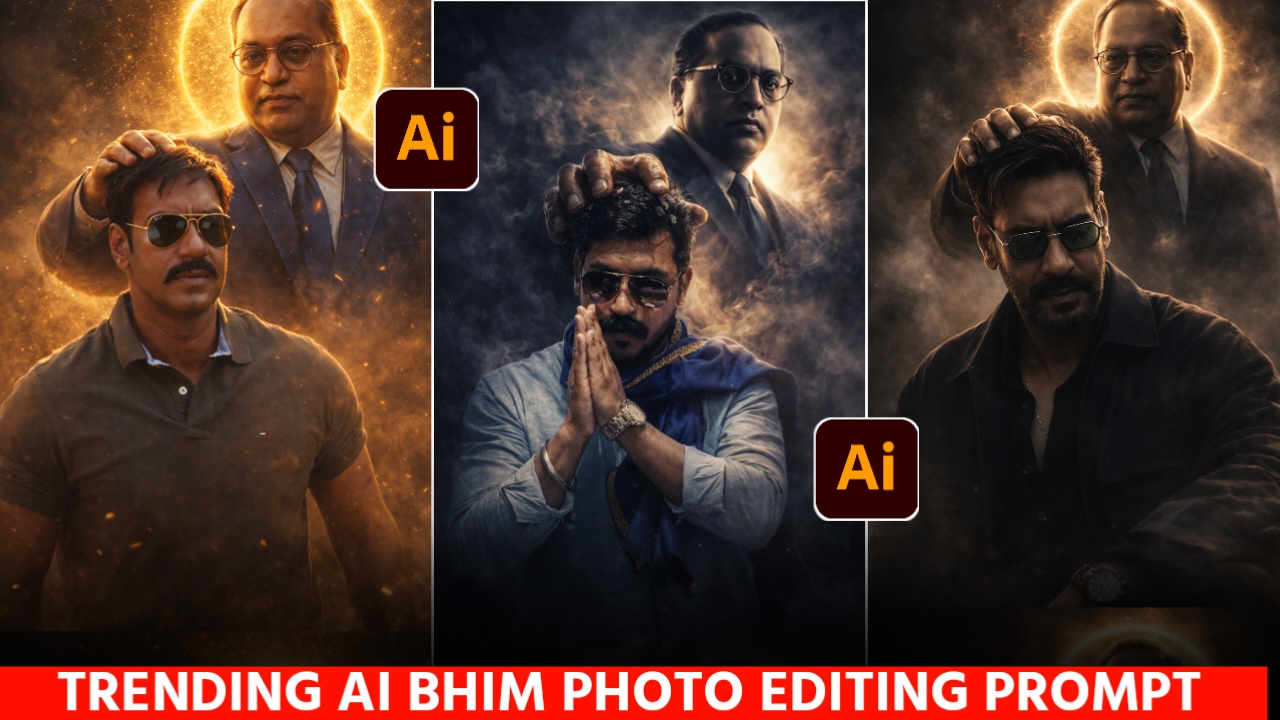
Creative AI photo editing has made it possible to experiment with many different portrait concepts using a personal photograph. One such concept is a respectful tribute-style image featuring Dr. B. R. Ambedkar alongside the person in the reference photo.
In this style, Dr. Ambedkar can be portrayed as a symbolic guiding or protective presence, while the main subject remains the focus of the composition. Blue tones, warm lighting, atmospheric effects, and cinematic framing can be used to create a meaningful visual.
If you want to create a similar image, you don’t need advanced photo-editing experience. A suitable reference photo and a detailed prompt can help you experiment with this concept using an AI image-generation tool.
Baba Saheb Ambedkar Blessing Photo Prompts
Here are three different creative prompts. You can choose one based on the type of composition you want to create.

Ultra-realistic cinematic digital art of B.r ambedkar (baba sahab) standing behind a me, B.r ambedkar blessing him by gently placing one hand on his head and make full photo. B.r ambedkar is wearnig a blue coat paint glowing golden aura and halo around his head, dramatic lighting. dust particles, smoky atmosphere, golden sparks floating in air. Hyper-detailed muscles, realistic skin texture, sharp focus. Cinematic composition, low angle shot, 8K ultra HD, high contrast, volumetric lighting, JAY

Create a highly dramatic and cinematic Person Behind him, generate a massive, divine, dr babasehb Ambedkar The divine figure should appear like a protective guardian emerging from smoke and shadows, placing a gentle, powerful hand over the man’s head as if giving him strength. Use dark, moody lighting with strong contrast, smoke effects, rim lights, and hyper-realistic textures. Make the entire image intense, powerful, and motivating. Ultra-realistic, 8K, high detail, dramatic atmosphere

Photograph me sitting low on a minimalist metal stool, legs spread forwardina relaxed, grounded pose, feet planted on uneven outdoor terrain. One hand loosely resting between the knees holding Indian constitution, shoulders slightly slouched, head tilted downward in a calm, introspective expression. The subject wears dark oversized layered clothing, wide-leg trousers, leather boots, and dark sunglasses. A strong black Dr. Babasaheb Ambedkar stands closely behind the seated figure, aligned protectively and partially overlapping the subject’s silhouette. Open natural landscape with rough ground and wild grass, bright overexposed sky creating strong negative space. High contrast lighting, deep blacks, soft highlights, matte texture.Timeless, cinematic mood.Medium-format film look, subtle grain, monochrome fine-art fashion editorial, avant-garde luxury photography. don’t harm the quality of the picture give me in 1080p quality.
How to Create the Photo
Once you have selected a prompt, you can create the image by following these steps:
- Open the ChatGPT app or access ChatGPT through its website.
- Sign in to your account if necessary.
- Select one of the prompts from this article and copy it.
- Start an image-generation request.
- Upload a clear photograph that you want to use as the reference image.
- Paste the selected prompt along with your reference photo.
- Submit the request and allow the image-generation process to finish.
- Review the result carefully. Check the facial appearance, composition, clothing, lighting, and positioning of both figures.
- If something doesn’t look right, modify the prompt and generate another version.
- Once you are happy with the result, save the image to your device.
Note: The ChatGPT interface and available image features may change over time. Depending on your device or account, the buttons and options may appear differently.
Create Your Image
Choosing a Good Reference Photo
A suitable reference photo can help produce a better result. You don’t necessarily need a professional photograph; a clear personal photo can work well.
Choose a Clear Image
Use a photo where your face is visible and reasonably sharp. Avoid extremely blurry or heavily compressed images.
Use Balanced Lighting
A photograph with natural or balanced lighting can provide clearer facial details than one that is extremely dark or overexposed.
Keep Facial Details Visible
Try to use a photograph where your face is not covered by a mask, hand, or other objects. This gives the image-generation tool more information about your appearance.
Try Different Photos
If the first result doesn’t resemble your reference closely enough, try another photograph with a clearer view of your face. You can also experiment with different prompts and compositions.
A Note About Facial Similarity
AI image-generation tools cannot guarantee that every generated image will reproduce a person’s face exactly. The result can vary depending on the reference image, prompt, model, and generation process.
For better consistency, use a clear reference photo and include instructions asking the tool to preserve the person’s recognizable facial characteristics. If necessary, generate a few variations and select the result that looks most natural.
Creating a Respectful Tribute
When creating an image featuring a historical figure such as Dr. B. R. Ambedkar, it is a good idea to keep the portrayal respectful. Avoid adding misleading statements or presenting the generated image as an authentic historical photograph.
The image should be understood as a creative AI-generated tribute or artistic composition, rather than a real photograph of an event that actually took place.
You can also personalize the design by changing the background, lighting, clothing style, camera angle, or overall color palette while keeping the central concept intact.
Conclusion
Creating a tribute-style photo featuring Dr. B. R. Ambedkar can be an interesting way to experiment with AI image-generation and creative portrait design. With a clear reference photograph and an appropriate prompt, you can create different compositions ranging from cinematic portraits to outdoor editorial-style images.
The three prompts above give you different approaches, so you can choose the one that best matches your preferred style. You can also make small changes to the lighting, background, clothing, and composition to create a more personalized result.
Keep in mind that AI-generated images can vary between attempts, so the first result may not always be perfect. Using a better reference photo and making small adjustments to the prompt can help you achieve a more natural-looking composition.
Ultra-realistic cinematic digital art of B.r ambedkar (baba sahab) standing behind a me, B.r ambedkar blessing him by gently placing one hand on his head and make full photo. B.r ambedkar is wearnig a blue coat paint glowing golden aura and halo around his head, dramatic lighting. dust particles, smoky atmosphere, golden sparks floating in air. Hyper-detailed muscles, realistic skin texture, sharp focus. Cinematic composition, low angle shot, 8K ultra HD, high contrast, volumetric lighting, JAY
Video
Jai bhim
Jay Bheem ke photo